Gemini on Janitor AI (2026): Free API Key Setup, Best Model, Settings and Every Error
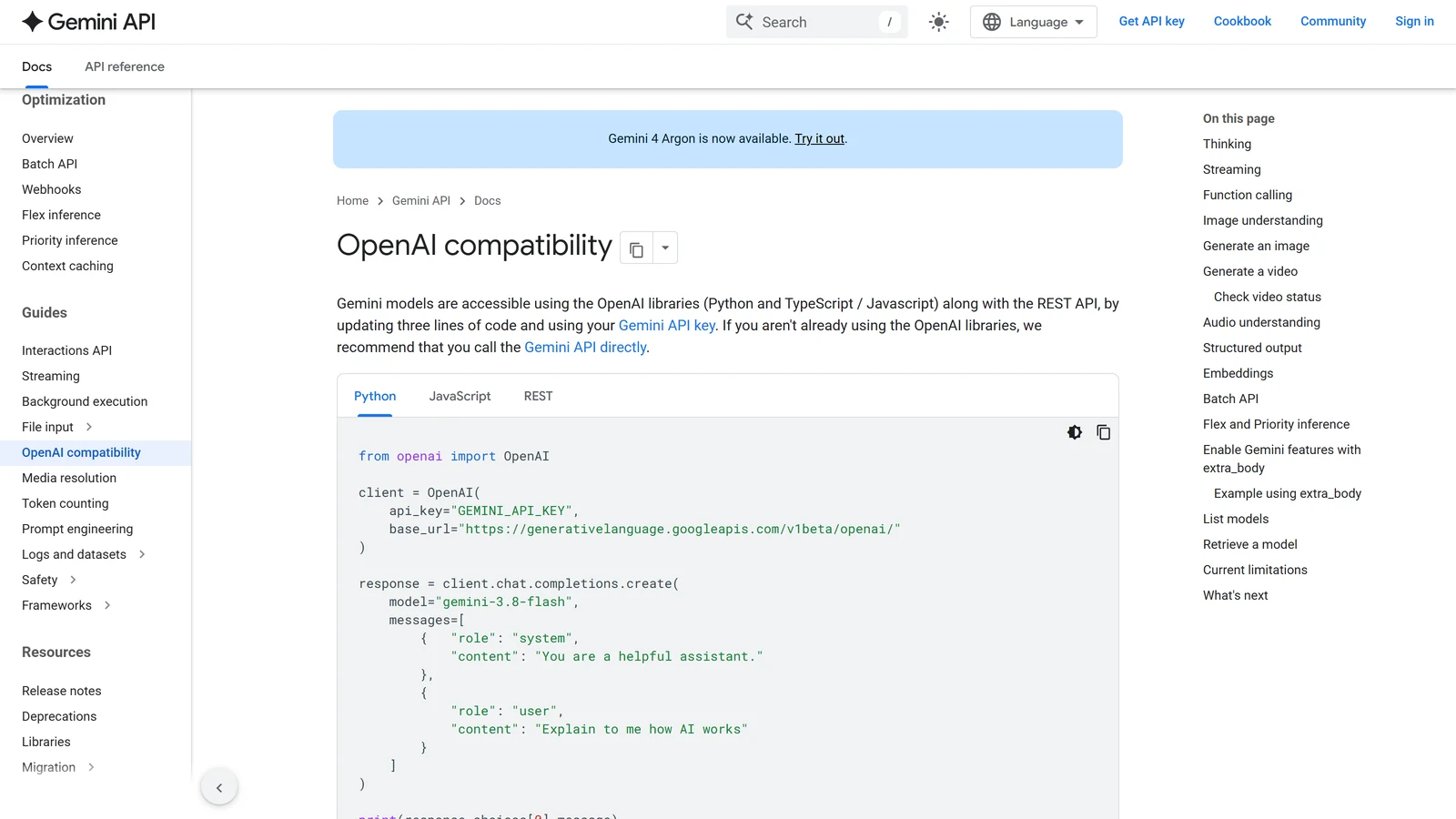
Gemini on Janitor AI means connecting Janitor’s proxy setting to Google’s Gemini API with your own API key, so a Gemini model writes the replies instead of Janitor’s own JLLM. It is popular for one reason: Google’s API has a free tier, so for many players it is the cheapest strong model they can plug into Janitor.
It is also a moving target. In the last few weeks Google retired Gemini 3.7 Flash, released Gemini 3.8 Flash and Gemini 4 Argon, and deprecated the temperature setting. Many guides you will find still name models or settings that no longer work. This page gives the current values, explains the two settings that cause most failures, and says plainly what the free tier costs you.
How we checked. Everything here comes from Google’s Gemini API documentation, Janitor’s help centre and change log, and OpenRouter’s public model list, read on 19 October 2026. We did not test a Gemini key on Janitor ourselves, so the setup steps combine Janitor’s documented proxy form with Google’s documented address; where that matters, we say so. Arcanum has no commercial relationship with Google or Janitor.
The Short Answer
| You want | Do this |
|---|---|
| To connect | Proxy, model gemini-3.8-flash, URL https://generativelanguage.googleapis.com/v1beta/openai/chat/completions, your AI Studio key |
| The best model for most chats | Gemini 3.8 Flash (free tier or paid) |
| The cheapest paid model | Gemini 3.5 Flash-Lite or 3.1 Flash-Lite |
| Google’s strongest model | Gemini 4 Argon, paid only |
| Replies cut off or empty | Set max tokens to 0 |
| Temperature | Leave it at 1 |
| Prefill | Off |
| ”Resource has been exhausted” | You hit a rate limit; wait, or check your daily quota |
Three Ways to Get Gemini on Janitor
| Route | What you need | Cost | Notes |
|---|---|---|---|
| Google’s API, direct | A Google AI Studio API key | Free tier, or Google’s per-token prices | The cheapest route; the one this page covers in detail |
| OpenRouter | An OpenRouter key and credit | OpenRouter’s prices | One key for many models; no free Gemini model on 19 October |
| janitor+ Router | A janitor+ subscription, on the web | Router’s per-token prices | Janitor’s own built-in model store; check inside which Gemini models it offers |
Janitor announced its Router on 30 July 2026 as a way to “access a wide range of third-party models directly through janitor, without copying API keys or configuring an external proxy.” It is for subscribers and, at launch, web only. Our Janitor AI pricing page covers what janitor+ costs.
How to Set Up Gemini on Janitor AI
1. Get a Gemini API key
Go to Google AI Studio (aistudio.google.com), sign in with a Google account and create an API key. Google’s free tier needs no payment method. Keep the key private: anyone with it can use your quota, or your money on a paid account.
2. Add a proxy configuration in Janitor
Janitor’s own quickstart describes the proxy form. In a chat, click the gear icon at the top right, then API Settings, choose the proxy option and Add Configuration. Fill in:
| Field | Value |
|---|---|
| Config name | Anything, for example “Gemini 3.8 Flash” |
| Model name | gemini-3.8-flash |
| Proxy URL | https://generativelanguage.googleapis.com/v1beta/openai/chat/completions |
| API key | Your AI Studio key, with no spaces |
Save, refresh the page, and send a test message. Janitor’s quickstart says the same for its own example: add, save, refresh, then test.
Where the URL comes from. Google offers an “OpenAI-compatible” address for Gemini, so that tools built for OpenAI’s format, as Janitor’s proxy is, can talk to it. Google’s own example sends requests to https://generativelanguage.googleapis.com/v1beta/openai/chat/completions. Janitor’s proxy guide uses the same full form, ending in /chat/completions, for its OpenRouter example. Copy the address exactly; a missing /openai/ or a trailing space is the most common setup mistake.
If it does not connect at all. We could not test this connection ourselves. If Janitor cannot reach Google directly from your account or browser, connect through OpenRouter instead: proxy URL https://openrouter.ai/api/v1/chat/completions, model google/gemini-3.8-flash, and an OpenRouter key. Our Janitor AI proxy guide explains the proxy form in general, and our Janitor AI API key page covers keys.
Which Gemini Model to Use
Google’s model line-up changed twice in October 2026. On 8 October it deprecated Gemini 3.7 Flash, which now “automatically routed to gemini-3.8-flash”, and Gemini 3.5 Flash, now routed to Gemini 3.6 Flash. On 13 October it released Gemini 4 Argon. If your Janitor config still says gemini-3.7-flash, it works, but you are already talking to 3.8 Flash.
| Model name for Janitor | Free tier? | Paid price per million tokens (input / output) | Notes |
|---|---|---|---|
gemini-3.8-flash | Yes | $0.75 / $3.75 until 31 December 2026, then $1.50 / $7.50 | Google’s “most intelligent Flash model”. Our pick. |
gemini-3.6-flash | Yes | $0.75 / $3.75, same schedule | The previous Flash generation |
gemini-3.5-flash-lite | Yes | $0.30 / $2.50 | Cheaper, lighter |
gemini-3.1-flash-lite | Yes | $0.25 / $1.50 | The cheapest current text model |
gemini-4-argon | No | $2 / $10 until 30 November 2026, then $4 / $20 | Google’s strongest; “not available on the Free tier” |
gemini-3.1-pro-preview | No | $2 / $12 (prompts up to 200,000 tokens) | A preview model |
Output prices include thinking tokens; Google’s pricing page says so in every row. Gemini 2.5 models are still served, but Google says it limited access to them to “users who have actively used them in the past,” so a new account may not be able to use them.
Our recommendation. Start with Gemini 3.8 Flash. If the free tier’s limits stop you mid-session and you do not want to pay, 3.5 Flash-Lite or 3.1 Flash-Lite on the free tier are the fallback. If you pay and want the strongest model, try Gemini 4 Argon, and note that its price doubles on 1 December. For how Gemini compares with DeepSeek, Claude and Janitor’s own JLLM, see the best model for Janitor AI and the best Gemini model for roleplay.
The Free Tier: What It Costs You
Google’s free tier costs no money, but it is not free of conditions.
- Your chats help train Google’s products. Google’s pricing page lists “Content used to improve our products” under Free and “Content not used to improve our products” under Paid. For roleplay, that means your story is not private from Google on the free tier.
- The limits are per project, not per key. Google’s rate-limits page says: “Rate limits are applied per project, not per API key.” Making a second key in the same project gives you nothing extra.
- The daily limit resets at midnight Pacific time. That is early morning in Europe and late afternoon in East Asia.
- Google does not publish one fixed number. It says limits “depend on a variety of factors” and shows your current ones in AI Studio. Check there rather than trusting a number from a forum post.
- Some models are not on it at all. Gemini 4 Argon and 3.1 Pro Preview are paid only.
Adding a billing account moves you to Google’s paid Tier 1, with higher limits, and your content is no longer used to improve Google’s products. Google’s pricing then applies per token.
The Settings That Matter
Most “Gemini doesn’t work on Janitor” problems are one of these four settings. Our Janitor AI generation settings guide explains every slider; here is what Gemini needs.
| Janitor setting | Set it to | Why |
|---|---|---|
| Max tokens | 0 | Thinking and the reply share the same limit |
| Temperature | 1 | Google has deprecated it on current models |
| Top P, Top K | 0 (off) | Deprecated with temperature |
| Prefill | Off | Google says to remove prefilled model turns |
| Context size | What your chat needs, up to Janitor’s 128,000 | Larger costs more on the paid tier |
Max tokens: the cause of cut-off and empty replies
Every current Gemini model thinks before it answers. Gemini 3.8 Flash thinks at a medium level by default. Google is explicit that thinking counts against the output limit: “max_output_tokens is a hard limit: the response stops once thinking and output together reach it.”
On Janitor, max tokens 0 lets the model choose the length. Any other number is a hard stop. Set it to 300 and Gemini may spend most of those 300 tokens thinking, then stop after one line of reply, or send nothing at all. That is the most likely cause behind searches like “Janitor AI Gemini cutting off” and “no content received”.
Temperature, Top P and Top K
Google’s migration guide for Gemini 3.8 Flash tells developers to “remove deprecated sampling parameters (temperature, top_p, top_k)”. Leave temperature at 1 and the other two at 0. If you want different writing, change the prompt or the character’s example dialogue, not the slider.
Prefill
Janitor’s prefill puts words at the start of the model’s reply. Google’s 3.8 Flash guide tells developers to “remove prefilled model turns.” If Gemini returns an error only when prefill is on, that is why. Turn it off and put the instruction in your custom prompt instead.
Thinking level, through a custom parameter
Since 3 May 2026 Janitor’s settings have had “custom parameters”. Google’s compatible address accepts OpenAI’s reasoning_effort and maps it to Gemini’s thinking level: low, medium or high. Lower means faster, cheaper replies. One trap: Google says minimal “is not supported for Gemini 3.8 Flash and will return an error.” Use low as the lowest setting on 3.8 Flash. We have not tested custom parameters on Janitor ourselves; if a custom parameter causes an error, remove it.
Content, Filters and Bans
Players search for “Janitor AI Gemini ban”, “content filtering” and “prohibited content” constantly. Here is what Google itself says, so you can decide for yourself.
Google’s filters
Google’s safety documentation says its adjustable safety filters are “Off by default” for Gemini 2.5 and later models. Separately, Google has “built-in protections against core harms, such as content that endangers child safety,” which “are always blocked and cannot be adjusted.”
When something is blocked, the request fails with an HTTP 400 error and nothing is returned. Google’s error codes say why: safety, or for a blocked input, jailbreak, prohibited_content or blocklist, with a message that starts “Input blocked:”. On Janitor that shows up as a failed reply.
Google’s account enforcement
Filters act on single requests. Google also watches accounts. Its abuse-monitoring page says:
- Automated systems “scan API usage for violations of our Prohibited Use Policy, such as hate speech, harassment, sexually explicit content, and dangerous content.”
- A project with consistent suspicious activity “may be flagged for manual review by authorized Google personnel.”
- Google keeps prompts and outputs for 55 days for this purpose, and says that data is not used to train models other than those used for policy enforcement.
- Its steps, in order: it may email you, impose temporary usage limits, temporarily suspend your access, or “as a last resort, and for serious violations,” close your access to the Gemini API and other Google services. It says it will “provide a link where you can appeal.”
The last point is the one to weigh. A Google API key is tied to your Google account, and Google says a serious violation can affect “other Google services” too. Some players use a separate Google account for their API key for that reason. Whether to use Gemini, and for what, is your call; this is simply what Google publishes.
Common Errors and What They Mean
Janitor often shows a short message, such as “Network error”. Janitor’s help article for that message suggests switching to JLLM for a moment: if JLLM works, the problem is with the outside model, not with Janitor. Google’s own codes, from its error reference:
| Error | Google’s code | What it means | What to do |
|---|---|---|---|
| 400 | invalid_request, parameter_unknown | Something in the request is not accepted | Turn prefill off, remove custom parameters, check minimal |
| 400 | safety, prohibited_content, jailbreak | The content was blocked | See the section above |
| 401 | authentication | The key is “missing, invalid, or expired” | Paste the key again, with no spaces |
| 402 | payment_required | A prepaid credit balance is used up | Add credit in Google’s billing |
| 403 | permission_denied | The key lacks permission | Check the project the key belongs to |
| 404 | model_not_found | The model name is wrong | Use exactly gemini-3.8-flash |
| 429 | rate_limit_exceeded, quota_exceeded | Too many requests per minute, or the daily quota | Wait; daily quotas reset at midnight Pacific |
| 429 | RESOURCE_EXHAUSTED | Google’s rate-limit page uses this name, including for spend limits on paid tiers | The “Resource has been exhausted” message; wait and retry |
| 500 | api_error | An error on Google’s side | Retry |
| 503 | service_unavailable | Google is “temporarily overloaded or down” | Wait and retry |
| 504 | deadline_exceeded | The request took too long | Retry; a lower thinking level helps |
A note on spend limits. Google’s paid tiers have a spend-based rate limit on a rolling 10-minute window: $10 on Tier 1, $50 on Tier 2, $200 on Tier 3. Hitting it returns a 429 even if you are under your per-minute request limit.
For errors that are about Janitor itself, such as login problems, see Janitor AI not working.
What a Session Costs on the Paid Tier
An example: 100 messages, a 20,000-token prompt each time (a detailed bot, a persona and a long history) and about 600 output tokens per reply including thinking.
| Model | Input (2 million tokens) | Output (60,000 tokens) | Session |
|---|---|---|---|
| Gemini 3.1 Flash-Lite | $0.50 | $0.09 | about $0.59 |
| Gemini 3.5 Flash-Lite | $0.60 | $0.15 | about $0.75 |
| Gemini 3.8 Flash (to 31 December) | $1.50 | $0.23 | about $1.73 |
| Gemini 4 Argon (to 30 November) | $4.00 | $0.60 | about $4.60 |
Google also lists lower prices for cached input, but we have not confirmed whether Janitor’s requests benefit from Google’s caching, so the table leaves it out. On the free tier, all of this costs nothing, within the limits.
Gemini on Janitor Compared With the Alternatives
| Gemini (direct) | DeepSeek (direct) | JLLM | |
|---|---|---|---|
| Free option | Yes, Google’s free tier | No | Yes, Janitor’s own model |
| Privacy on the free option | Content used to improve Google’s products | n/a | Janitor’s own terms |
| Setup | AI Studio key + proxy | DeepSeek key + proxy | None |
| Our guide | This page | DeepSeek on Janitor AI | How to use Janitor AI |
If you also use SillyTavern, the same Gemini key works there; see Gemini in SillyTavern.
Our Recommendation
- Use
gemini-3.8-flashwith Google’s OpenAI-compatible URL. Replace anygemini-3.7-flashconfig. - Set max tokens to 0. It fixes most cut-off and empty replies.
- Leave temperature at 1 and turn prefill off.
- Know the free tier’s price: your chats help train Google’s products.
- When you see “Resource has been exhausted”, wait. A new key in the same project does not help.
- Read Google’s abuse-monitoring rules before you tie a roleplay key to your main Google account.
Frequently Asked Questions
How do I use Gemini on Janitor AI?
Create a free API key in Google AI Studio. In a Janitor chat, open API Settings, choose the proxy option and add a configuration with the model name gemini-3.8-flash, the proxy URL https://generativelanguage.googleapis.com/v1beta/openai/chat/completions and your key. Save, refresh the page and send a test message. If it fails, check the model name and the URL first.
Is Gemini free on Janitor AI?
It can be. Google’s Gemini API has a free tier on several models, including Gemini 3.8 Flash, 3.6 Flash, 3.5 Flash-Lite and 3.1 Flash-Lite, with limits on requests per minute and per day. The trade-off is that Google says content sent on the free tier is used to improve its products. Gemini 4 Argon and 3.1 Pro Preview are not on the free tier.
What is the proxy URL for Gemini on Janitor AI?
Google’s OpenAI-compatible address: https://generativelanguage.googleapis.com/v1beta/openai/chat/completions. Google’s own example uses that exact address. The model name goes in Janitor’s separate model field, for example gemini-3.8-flash.
What is the best Gemini model for Janitor AI?
Gemini 3.8 Flash for most players: it is Google’s newest Flash model, it is on the free tier, and on the paid tier it costs 0.75 dollars input and 3.75 dollars output per million tokens until the end of 2026. Gemini 3.5 Flash-Lite is the cheaper paid option. Gemini 4 Argon is Google’s strongest model but is paid only.
Why does Gemini cut off or send no reply on Janitor AI?
Usually because of the max tokens setting. Gemini thinks before it answers, and Google counts thinking and the reply together against the output limit, so a low max tokens value can be used up by thinking and leave a short or empty reply. Set max tokens to 0 on Janitor so the model chooses the length.
What does Resource has been exhausted mean on Janitor AI?
It is Google’s 429 error. You hit a rate limit: too many requests per minute, your daily quota, or on paid accounts a spend limit. Google applies limits per project, not per API key, so a second key in the same project does not help. Daily quotas reset at midnight Pacific time.
Can Google ban me for using Gemini on Janitor AI?
Google’s abuse-monitoring page says automated systems scan Gemini API use for violations of its Prohibited Use Policy, and that it may email you, limit your usage, suspend access temporarily or, for serious violations, close your access to the Gemini API and other Google services. It says it provides a link to appeal. We have no figures on how often this happens to Janitor users.
Does temperature work for Gemini on Janitor AI?
Leave it at 1. Google’s migration guide for Gemini 3.8 Flash tells developers to remove the temperature, top_p and top_k settings, which Google has deprecated. Change the style of replies through your prompt or the character’s example dialogue instead.
Sources, read on 19 October 2026: Google’s Gemini API documentation (OpenAI compatibility, models, pricing, rate limits, API errors, safety settings, abuse monitoring, release notes, and the Gemini 3.8 Flash and Gemini 4 Argon guides); Janitor’s help-centre articles “TL;DR Quickstart Proxy Instructions” and “Error: Rate Limit/Network Error”; Janitor’s change log and announcements (Router, 30 July 2026; API settings redesign, 19 July 2026; generation parameters, 3 May 2026); and OpenRouter’s public model list. The session costs are our arithmetic from Google’s listed prices. We did not test a Gemini key on Janitor for this page.
Gemini and Google are trademarks of Google LLC. Arcanum is independent and not affiliated with Google or Janitor AI. Nominative use only.