Janitor AI API Key: How to Get One and Set It Up (2026)
If you’ve read that Janitor AI is much better once you “add an API key” but weren’t sure what that means or where to get one, this is the guide. An API key sounds technical, but it’s just a password-like string that lets Janitor AI use your AI model instead of its free built-in one — and getting one takes about ten minutes.
This is the dedicated key walkthrough from our complete Janitor AI setup guide. If you want the full picture of how BYOM fits together, start there; if you just need to get a key working, stay here.
What an API Key Actually Is (and Where It Comes From)
The key misunderstanding to clear up first: you don’t get the API key from Janitor AI. You get it from a model provider — the company that runs the AI — and then paste it into Janitor AI.
An API key is a secret string tied to your account with that provider. When you give it to Janitor AI, you’re authorising Janitor AI to send your messages to that provider’s model and bill your provider account for the usage. That’s the whole mechanism behind “bring your own model”:
- Janitor AI supplies the character library and the chat interface.
- Your API key supplies the model doing the actual writing.
Because the key bills your account, using your own model is pay-per-use rather than a flat subscription — often just cents per conversation.
Do You Even Need One?
No — and it’s worth being clear about this. Janitor AI works for free on its built-in Janitor LLM with no key. You only need an API key if the free model’s writing feels flat and you want to upgrade it, which most serious users eventually do. If you’re happy with the free model, you can skip this entirely.
But if your first impression of Janitor AI was “this is kind of mediocre,” an API key is almost always the fix — the same character card feels dramatically better with a stronger model behind it.
Which Provider (and Key) Should You Get?
For the choice of model itself, with usage figures and prices checked in October 2026, see the best model for Janitor AI.
There are three common choices, depending on what you care about:
- DeepSeek — best value. Capable writing at a tiny cost per message, which is why it’s the most popular budget key on Janitor AI. If you want a big quality jump for pennies, start here. Full walkthrough in our DeepSeek + Janitor AI guide.
- OpenAI or Anthropic — best quality. A frontier GPT or Claude key gives the strongest prose and instruction-following, at a higher (but still per-message) cost. Compared in best LLM for roleplay.
- OpenRouter — most flexible. One key that unlocks many models (including DeepSeek), so you can switch and compare without juggling separate accounts. It sometimes offers free low-volume access to certain models too.
If you’re unsure, DeepSeek via a direct key or OpenRouter is the sweet spot for most people: great writing, minimal cost.
Two other services that sell one key for many models come up often: NanoGPT and Chutes. OpenRouter vs NanoGPT vs Chutes compares all three.
How to Get an API Key (Step by Step)
The exact dashboards differ by provider, but the shape is identical everywhere:
- Create an account with your chosen provider (DeepSeek, OpenAI, OpenRouter, etc.).
- Add a small amount of credit. BYOM is pay-per-use; a few dollars goes a long way, especially with a budget model. (Some OpenRouter free models need no credit at low volume.)
- Open the API keys page in the provider’s dashboard — usually under “API keys,” “Keys,” or “Developer settings.”
- Generate a new secret key and copy it immediately. Most providers show the full key only once, so save it somewhere safe right away. Treat it like a password.
That’s it — you now have a key. The next step is telling Janitor AI to use it.
How to Add Your API Key to Janitor AI
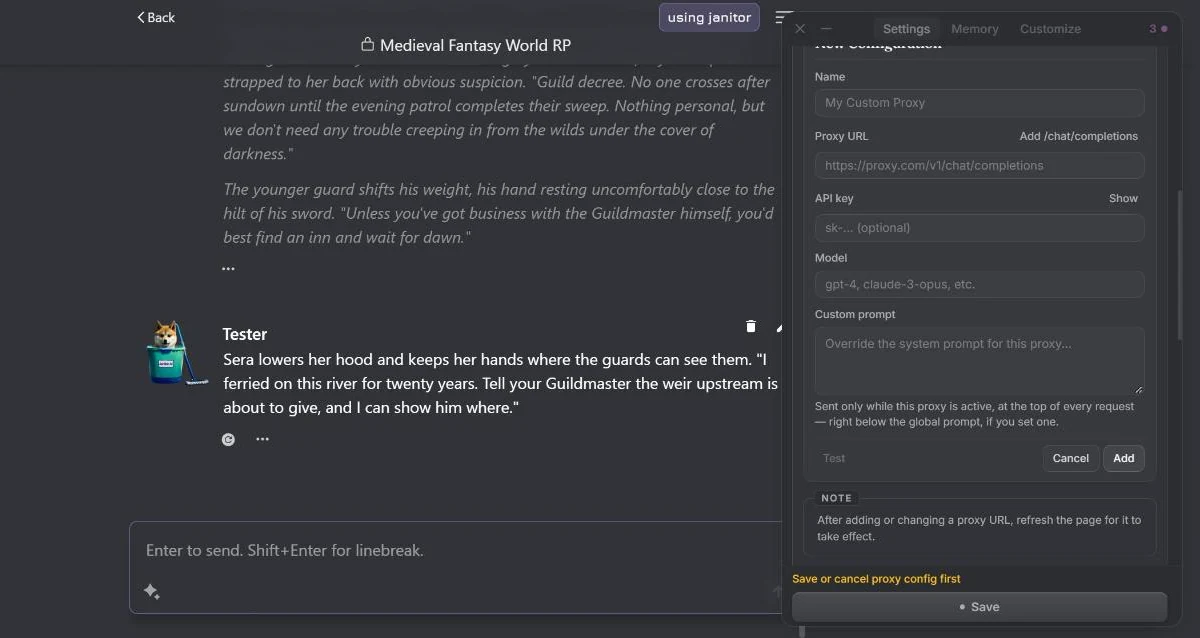
- Open the API / model settings in Janitor AI (inside a chat or in your account configuration).
- Choose the connection type — a direct provider option, or the custom / proxy / OpenAI-compatible option for providers like DeepSeek and OpenRouter.
- Enter your details: paste your API key, set the model name (the exact model ID from your provider), and — for the custom/proxy route — the base URL your provider gives you. That base-URL-and-model-name pairing is covered in full in the proxy setup guide.
- Save and send a test message. A reply means your key is working. An error means jump to troubleshooting below.
What It Costs
The key is free to create; usage is not — but it’s cheaper than most people expect:
- Budget model (DeepSeek): often pennies for a long session.
- Frontier model (GPT/Claude): a few cents for a normal conversation, more for long exchanges on top-tier models.
- Free routes: some OpenRouter free models cost nothing at low volume.
The practical tip: set a spending limit on your provider account. It caps any surprise and makes a leaked or misused key harmless.
Keeping Your Key Safe
Your API key is a credential, so a little care goes a long way:
- Only use keys from official providers — never paste your real key into a stranger’s shared “free proxy,” where the operator can potentially see and misuse it.
- Set a spending limit so a leaked key can’t run up a bill.
- Revoke and regenerate any key the moment you’re unsure about it — it’s instant and free.
- Don’t share it or paste it into random tools.
Our dedicated is Janitor AI safe guide covers the proxy risk, clone sites, and privacy in full — worth a read before you connect anything.
When Your Key Won’t Work
If Janitor AI rejects the key, it’s almost always one of these:
- Stray space when copying — re-copy it cleanly.
- Key doesn’t match the base URL’s provider — a DeepSeek key only works with the DeepSeek (or OpenRouter) URL, not an OpenAI one.
- Revoked key or empty balance — generate a fresh key and check your credit.
The full error-by-error breakdown is in Janitor AI not working.
The Bigger Picture
An API key is the gateway to the real Janitor AI — the version where good character cards finally get a model worthy of them. Get a cheap DeepSeek key, keep it funded and private, and you’ve unlocked the experience most people quit before ever seeing.
And if, once it’s all working, you find you want a game with memory and stakes rather than a stateless chat, that’s a different category entirely — which AI RPGs actually remember ranks the platforms built for it.
Frequently Asked Questions
Do I need an API key for Janitor AI? No — Janitor AI works for free on its built-in Janitor LLM with no key at all. An API key is only needed if you want to bring your own model, like connecting Claude, GPT, or DeepSeek for much better writing. It’s optional, but it’s the single biggest upgrade to the experience.
How do I get an API key for Janitor AI? You don’t get the key from Janitor AI — you get it from a model provider. Create an account with a provider like OpenAI, DeepSeek, or OpenRouter, add a small amount of credit, open their API keys page, and generate a new secret key. You then paste that key into Janitor AI’s bring-your-own-model settings. The key belongs to your provider account, not to Janitor AI.
Is the Janitor AI API key free? The key itself is free to create, but using it is pay-per-use — you pay your provider a small amount per message. A normal conversation is often just cents, and pennies with a budget model like DeepSeek. Some routes, like certain OpenRouter free models, can cost nothing at low volume. Janitor AI’s own platform is free; the only cost is your provider’s API usage.
Which API key is best for Janitor AI? For the best writing quality, a frontier model from OpenAI or Anthropic. For the best value, a DeepSeek key is the popular choice — capable and extremely cheap. For flexibility, an OpenRouter key gives you access to many models behind a single key. Most people who want great writing cheaply start with DeepSeek.
Is it safe to put my API key in Janitor AI? Using your own key from an official provider in Janitor AI’s built-in bring-your-own-model setting is fine — as safe as using that key anywhere else. The real risk is third-party reverse proxies shared in communities, where whoever runs the proxy can potentially see your traffic and misuse the key. Stick to official providers, set a spending limit on your API account, and revoke any key you’re unsure about.
Why is my Janitor AI API key not working? Usually one of three things: the key was copied with a stray space, the key doesn’t match the base URL’s provider (a DeepSeek key won’t work on an OpenAI URL), or the key was revoked or the account is out of credit. Re-copy the key cleanly, confirm it matches the provider of your base URL, and check your balance. Generating a fresh key fixes most cases.