Janitor AI Proxy: What It Is and How to Set One Up (2026)
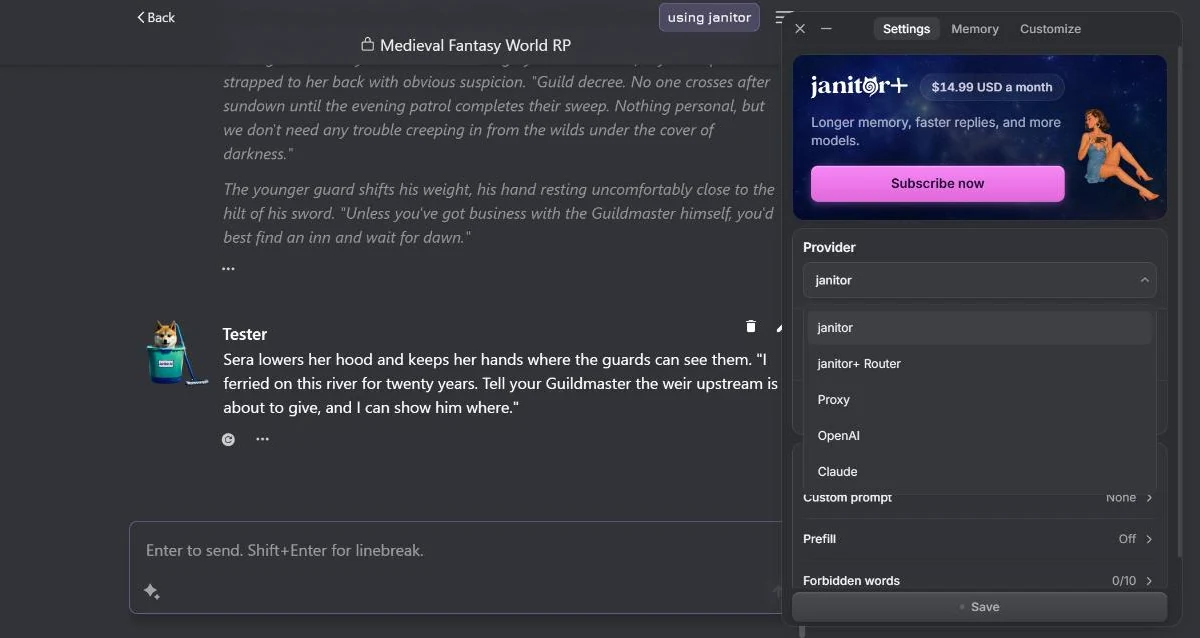
Few things about Janitor AI cause more confusion than the word “proxy.” It sounds like something technical and slightly shady — but on Janitor AI a proxy is nothing more than the custom connection route for using your own model. This guide demystifies it: what a proxy really is, how to set one up for any model, and the one genuine risk to steer around.
This is the dedicated proxy explainer from our complete Janitor AI setup guide. If DeepSeek specifically is what you’re after, the DeepSeek + Janitor AI guide has the exact values; this page is the general concept that applies to any model.
What “Proxy” Actually Means Here
Strip away the jargon and a Janitor AI proxy is just an endpoint you point Janitor AI at. Because most AI providers expose an OpenAI-compatible API, Janitor AI can talk to almost any of them through one generic “custom / proxy” option — you simply tell it three things:
- Base URL — where to send the request (the provider’s address).
- API key — your credential, proving the request is yours and billing your account.
- Model name — which specific model to use.
That’s the entire concept. When people say “set up a proxy on Janitor AI,” they mean “fill in those three fields so Janitor AI uses your model instead of the free Janitor LLM.” There’s nothing more mysterious to it.
Proxy vs. API Key: How They Fit Together
These two terms get tangled, so here’s the clean split:
- The API key is who — your credential, tied to your provider account.
- The base URL (proxy) is where — the address the request is sent to.
You need both to connect your own model. The API key guide covers getting the key; this guide covers the URL-and-model side. Together they’re the whole bring-your-own-model setup.
How to Set Up a Proxy on Janitor AI (Any Model)
The process is identical no matter which provider you use:
- Get your connection details from the provider. You need a base URL, an API key, and the model name (the exact model ID). These come from your provider’s documentation and dashboard — for example DeepSeek directly, or an aggregator like OpenRouter (full OpenRouter guide).
- Open Janitor AI’s API settings and choose the custom / proxy / OpenAI-compatible option.
- Enter the three values: base URL, API key, model name.
- Save and send a test message. A reply means the proxy is working. An error means one of the three fields is off — see troubleshooting below.
That’s the same four steps whether you’re connecting DeepSeek, a frontier model, or anything else OpenAI-compatible. The only thing that changes is the three values.
Getting the Right Values
Not sure which model to connect in the first place? The best model for Janitor AI lists the 20 models Janitor users actually run on OpenRouter, with what each one costs. For Google’s free Gemini key, see Gemini on Janitor AI.
The details that trip people up are always the specifics — and they change often enough that you should always confirm them against your provider’s current documentation rather than an old forum post:
- Base URL is provider-specific. A direct connection and an aggregator connection use completely different URLs, so never mix them.
- Model name must be exact. Aggregators like OpenRouter use a
provider/modelformat; direct providers use a plain model ID. A mismatch produces a silent failure. - Key must match the URL. A key from one provider will not authenticate against another provider’s URL.
For DeepSeek — by far the most common proxy setup — the DeepSeek + Janitor AI guide lists both the direct and OpenRouter routes with their URLs and model names. For the addresses, key formats and prices of the three providers players ask about most, see OpenRouter vs NanoGPT vs Chutes, or the single guides for NanoGPT and Chutes.
The One Real Risk: Third-Party “Free Proxies”
Here’s the part that actually matters for safety, because it’s where the word “proxy” earns its slightly shady reputation.
There are two very different things both called “proxy”:
- Your own connection to an official provider (your key + the provider’s real URL). This is safe — it’s just a normal API call to a company you have an account with.
- A third-party reverse proxy that a stranger shares in a community — a server they run that routes your requests. This is the risky one. Whoever operates that proxy can potentially see everything you send and, depending on setup, misuse any key you paste into it.
The rule is simple: use your own key with an official provider’s URL, and never paste your real API key into a stranger’s shared proxy. A “free proxy” that asks for your key is asking for your credential. If you want cheap, the safe route is your own DeepSeek key — not someone else’s server.
The full safety picture, including clone sites and privacy, is in is Janitor AI safe.
When Your Proxy Won’t Connect
Nearly every proxy error is one of these:
- Wrong base URL or model name — the most common cause; re-check both against the provider’s current docs.
- Key doesn’t match the URL’s provider — the key and base URL must be from the same provider.
- Out of credit — a valid setup still fails if the account balance is empty.
The quickest test: switch to the free Janitor LLM. If that works and your proxy doesn’t, the issue is in your three fields, not the platform. The full error-by-error guide is in Janitor AI not working.
The Takeaway
A Janitor AI proxy isn’t a hack or a workaround — it’s just the built-in way to run your own model, defined by a base URL, a key, and a model name. Set those three correctly with an official provider and you’ve unlocked the good version of the platform. Keep your key on your connection and off strangers’ servers, and the scariest-sounding part of Janitor AI becomes routine.
And if you eventually want more than a chat — a world that remembers you, with mechanics and stakes — that’s a different tool entirely. Which AI RPGs actually remember ranks the platforms built for it.
Frequently Asked Questions
What is a Janitor AI proxy? A proxy on Janitor AI is just an OpenAI-compatible endpoint you point the platform at so it can use a model other than the built-in Janitor LLM. In practice it’s three settings: a base URL (where to send requests), an API key (your credential), and a model name. The word ‘proxy’ sounds technical, but it’s simply the custom connection route for bringing your own model.
How do I set up a proxy on Janitor AI? Open Janitor AI’s API settings and choose the custom / proxy / OpenAI-compatible option. Enter the base URL from your provider, paste your API key, and set the model name to the exact model ID your provider lists. Save and send a test message. If it replies, your proxy is working. Most ‘proxy’ setups are really just a direct connection to a provider like DeepSeek or OpenRouter.
Are Janitor AI proxies safe? Your own connection to an official provider (DeepSeek, OpenAI, OpenRouter) is safe — it’s just an API call. The real risk is third-party reverse proxies that strangers share in communities: whoever runs that server can potentially see everything you send and misuse your API key. Prefer your own key with an official provider’s URL, and avoid pasting your real key into someone else’s shared proxy.
What is the difference between a proxy and an API key on Janitor AI? They work together. The API key is your credential — it proves the request is yours and bills your account. The proxy (base URL) is the address that tells Janitor AI where to send the request. Connecting your own model means entering both: the base URL for the provider plus the key for your account, along with the model name.
Why is my Janitor AI proxy not working? Almost always a wrong base URL or model name, a key that doesn’t match the URL’s provider, or an out-of-credit account. Re-check the base URL and model ID against your provider’s current docs, confirm the key belongs to the same provider as the URL, and make sure the account has credit. Testing on the free Janitor LLM isolates whether the issue is your proxy settings or the platform.
Do I need a proxy to use DeepSeek on Janitor AI? Yes, in the sense that DeepSeek connects through the custom/proxy route rather than a one-click button — but that just means entering DeepSeek’s base URL, your key, and the model name. You don’t need a shared third-party proxy; your own direct connection to DeepSeek (or via OpenRouter) is the proxy, and it’s the safe way to do it.