How to Use DeepSeek with Janitor AI (2026): The Cheap, Step-by-Step Setup
If Janitor AI’s free model left you unimpressed, DeepSeek is the upgrade most people reach for — it writes dramatically better, follows characters more faithfully, and costs almost nothing per message. It’s the single most popular bring-your-own-model choice on the platform, and this guide is the exact, no-fluff walkthrough for connecting it.
This is the deep version of the DeepSeek step in our complete Janitor AI setup guide — two connection routes, the base URLs and model names, the best settings, the cost, and what to do when it won’t connect. For why DeepSeek punches so far above its price for roleplay in general, see our DeepSeek for roleplay guide.
Update, 1 October 2026: the model names, the model section, the temperature advice and the note on free access have been refreshed since publication. This guide told you to type deepseek-chat or deepseek-reasoner. DeepSeek retired both names on 24 July 2026, so a setup that still uses them fails. The current name is deepseek-flash. It also described OpenRouter as a sometimes-free route; on 1 October 2026 OpenRouter listed no free DeepSeek model.
Why DeepSeek Is the Go-To Budget Model for Janitor AI
Three reasons it dominates the budget tier:
- Quality. It’s a genuine step up from Janitor’s in-house Janitor LLM — longer, more textured replies that hold character instructions across a real conversation.
- Price. It’s strikingly cheap per message — typically pennies for a long session, where the same play on Claude or GPT might cost meaningfully more.
- Permissiveness. It refuses dramatic, dark, and mature scenes far less often than the frontier models’ default behaviour, which matters for storytelling with real stakes. (The wider no-filter picture is in the uncensored AI roleplay guide.)
In short: most of the quality of a frontier model, at a small fraction of the cost. That’s why it’s the default recommendation.
What You’ll Need
Just two things:
- A Janitor AI account (free). If you’re brand new to the platform, start with the full setup guide and come back here for the DeepSeek part.
- Access to DeepSeek through an API — either a direct DeepSeek API key or an OpenRouter key. The two routes are below; pick one.
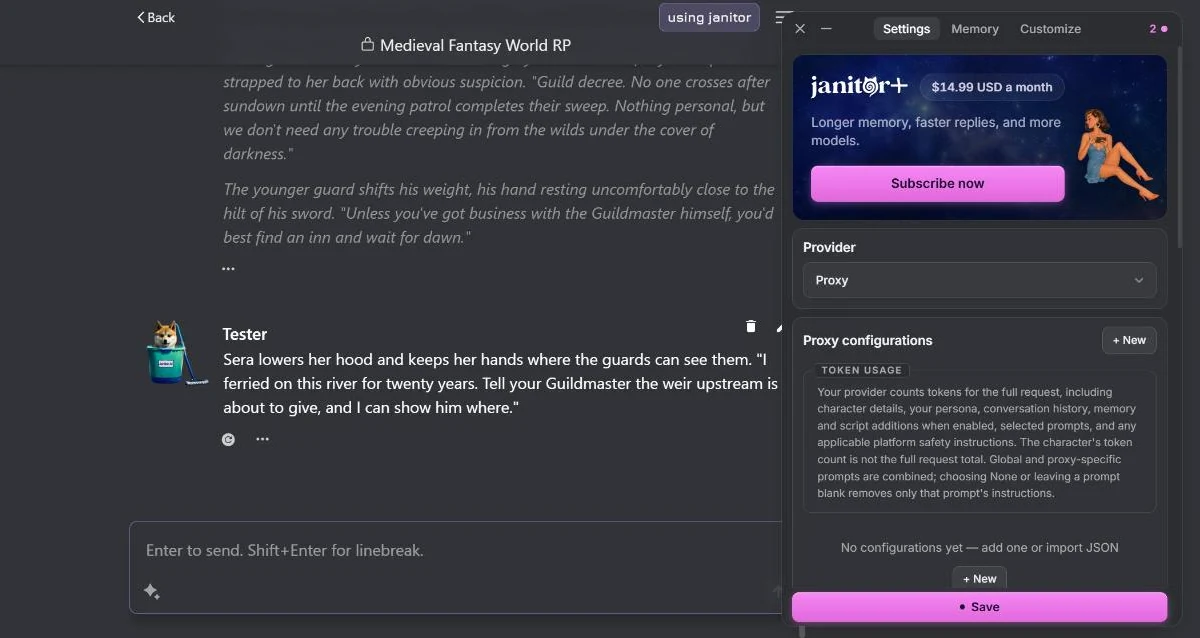
DeepSeek connects through Janitor AI’s custom/proxy configuration (not a one-click provider button), because it’s an OpenAI-compatible API. “Proxy” sounds technical, but it just means: an endpoint you point Janitor AI at, defined by a base URL, a key, and a model name.
Option 1: Connect DeepSeek Directly (Cheapest)
The lowest-cost route, straight from the source:
- Create a DeepSeek API account on DeepSeek’s official platform and add a small amount of credit (a few dollars goes a very long way).
- Generate an API key and copy it somewhere safe. Treat it like a password — and use a key from an official provider rather than a stranger’s proxy (here’s why that matters).
- In Janitor AI, open the API settings and choose the custom / proxy / OpenAI-compatible option.
- Enter the connection details:
- Base URL: typically
https://api.deepseek.com - API key: the key you just generated
- Model name:
deepseek-flash(DeepSeek V4.1 Flash — see the model section below)
- Base URL: typically
- Save and send a test message. A reply means you’re running on DeepSeek.
Because it’s billed directly by DeepSeek with no middleman, this is the cheapest way to run it.
Option 2: Connect DeepSeek via OpenRouter (One Key, Many Models)
OpenRouter is an aggregator that exposes DeepSeek — and dozens of other models — behind a single key. It’s the better route if you want to A/B different models later without juggling separate accounts.
- Create an OpenRouter account, add credit, and generate a key.
- In Janitor AI’s API settings, choose the custom / proxy option again.
- Enter the connection details:
- Base URL:
https://openrouter.ai/api/v1 - API key: your OpenRouter key
- Model name:
deepseek/deepseek-v4.1-flash(OpenRouter uses aprovider/modelformat)
- Base URL:
- Save and test.
Either route lands you in the same place — DeepSeek doing the writing. Direct is cheapest; OpenRouter is the most flexible. Always confirm the current base URLs and model IDs in your provider’s own documentation, as those are the details that occasionally change.
Which DeepSeek Model Should You Use?
DeepSeek’s own API has two models today:
deepseek-flash— DeepSeek V4.1 Flash. It is the newest model and the cheapest one on DeepSeek’s price list. Start here.deepseek-v4-pro— DeepSeek V4 Pro. It costs about four times as much, and DeepSeek has already tried to retire it once. Pick it only if you have tried both and prefer how it writes.
The old choice between a chat model and a reasoning model is now a setting called thinking mode, and it is on by default. With thinking on, the model reasons before it answers, so replies start more slowly. The best DeepSeek model for roleplay explains the two models, the thinking setting, and when DeepSeek is half price.
Best Settings for DeepSeek on Janitor AI
You don’t need to fuss much, but two settings are worth a look:
- Temperature: it only works when thinking mode is off. DeepSeek’s documentation says that in thinking mode the temperature setting is accepted but has no effect, and thinking is on by default. If moving the slider changes nothing, that is why. With thinking off, DeepSeek suggests 1.3 for general conversation and 1.5 for creative writing.
- Context size: larger context lets the model remember more of the conversation, at a slightly higher per-message cost. DeepSeek’s pricing is low enough that a generous context is usually affordable — though no setting beats the underlying context-window limit forever.
Good character + deepseek-flash + a generous context is the whole recipe.
Troubleshooting DeepSeek on Janitor AI
Almost every DeepSeek-on-Janitor problem is one of these:
- Network error / blank reply. Most often a wrong base URL or model name, or the model briefly overloaded. Re-check both against your provider’s docs and retry.
- Authentication / invalid key. Re-copy the key with no stray spaces, and confirm it’s from the matching account (DeepSeek key with DeepSeek URL; OpenRouter key with OpenRouter URL — they aren’t interchangeable).
- Insufficient balance. The quiet one: your API account is out of credit. Top it up.
- A retired model name.
deepseek-chatanddeepseek-reasonerstopped working on DeepSeek’s API on 24 July 2026. If your setup broke over the summer and you changed nothing, check this first. - Wrong model format. Direct DeepSeek uses
deepseek-flash; OpenRouter usesdeepseek/deepseek-v4.1-flash. Mixing the format with the wrong URL is a common slip. - Works on Janitor LLM but not DeepSeek. That isolates the issue to your API config — not your connection or the platform.
For every other Janitor AI error — beyond DeepSeek specifically — the full Janitor AI not working guide covers each one in order.
Is It Worth It?
For the price, DeepSeek is the easiest big upgrade you can make to Janitor AI. It turns the platform’s “this is kind of flat” first impression into something genuinely good, for pennies a session. If you outgrow it, the next steps up are a frontier model (compared in our best LLM for roleplay guide) or moving to a more powerful front-end like SillyTavern.
And if you find yourself wanting a world that remembers — persistent state, mechanics, stakes that carry across sessions — that’s something no character-chat setup provides, however good the model. Which AI RPGs actually remember ranks the platforms built for it.
Frequently Asked Questions
How do I use DeepSeek with Janitor AI? Get a DeepSeek API key (or an OpenRouter key), then in Janitor AI open the API/proxy settings and choose the custom or proxy option. Enter the provider’s base URL, paste your key, and set the model name to a DeepSeek model. Save and send a test message. DeepSeek connects through the proxy route rather than a one-click button because it’s an OpenAI-compatible API.
Is DeepSeek free on Janitor AI? The DeepSeek API itself is paid, but it’s extremely cheap — often pennies for a long session, far less than routing Claude or GPT. On 1 October 2026 OpenRouter listed no free DeepSeek model, so there is no free route through it today. Janitor AI’s own platform is free; the cost is only the DeepSeek API usage.
Which DeepSeek model is best for Janitor AI?
DeepSeek V4.1 Flash, model name deepseek-flash. It is the newest model and the cheapest on DeepSeek’s price list. DeepSeek V4 Pro (deepseek-v4-pro) costs about four times as much and is only worth it if you prefer how it writes. The older names deepseek-chat and deepseek-reasoner were retired on 24 July 2026 and no longer work.
What is the DeepSeek base URL for Janitor AI?
For a direct DeepSeek connection the base URL is typically https://api.deepseek.com, with the model name deepseek-flash. Through OpenRouter the base URL is https://openrouter.ai/api/v1 with the model name deepseek/deepseek-v4.1-flash. Always confirm the current values in your provider’s own documentation, since model IDs occasionally change.
Why is DeepSeek not working on Janitor AI?
The usual causes are a wrong base URL or model name, an invalid or unfunded API key, or the model being briefly overloaded. The most common wrong model name is a retired one: deepseek-chat and deepseek-reasoner stopped working on 24 July 2026. Double-check the base URL and model ID against your provider’s docs, confirm your key is valid and has credit, and retry after a moment if the model is busy. If Janitor’s free model works but DeepSeek doesn’t, the problem is in your API settings, not the platform.
Is DeepSeek good for Janitor AI roleplay? Yes — it’s the most popular budget choice for a reason. It writes far better than Janitor’s free in-house model, follows character instructions more reliably, and is more permissive with dramatic and mature scenes, all at a tiny fraction of the cost of a frontier model. For why it punches so far above its price, see the DeepSeek for roleplay guide. For the price, it’s the sweet spot for Janitor AI roleplay.