SillyTavern: What It Is, How to Set It Up, and Why Roleplayers Swear By It (2026)
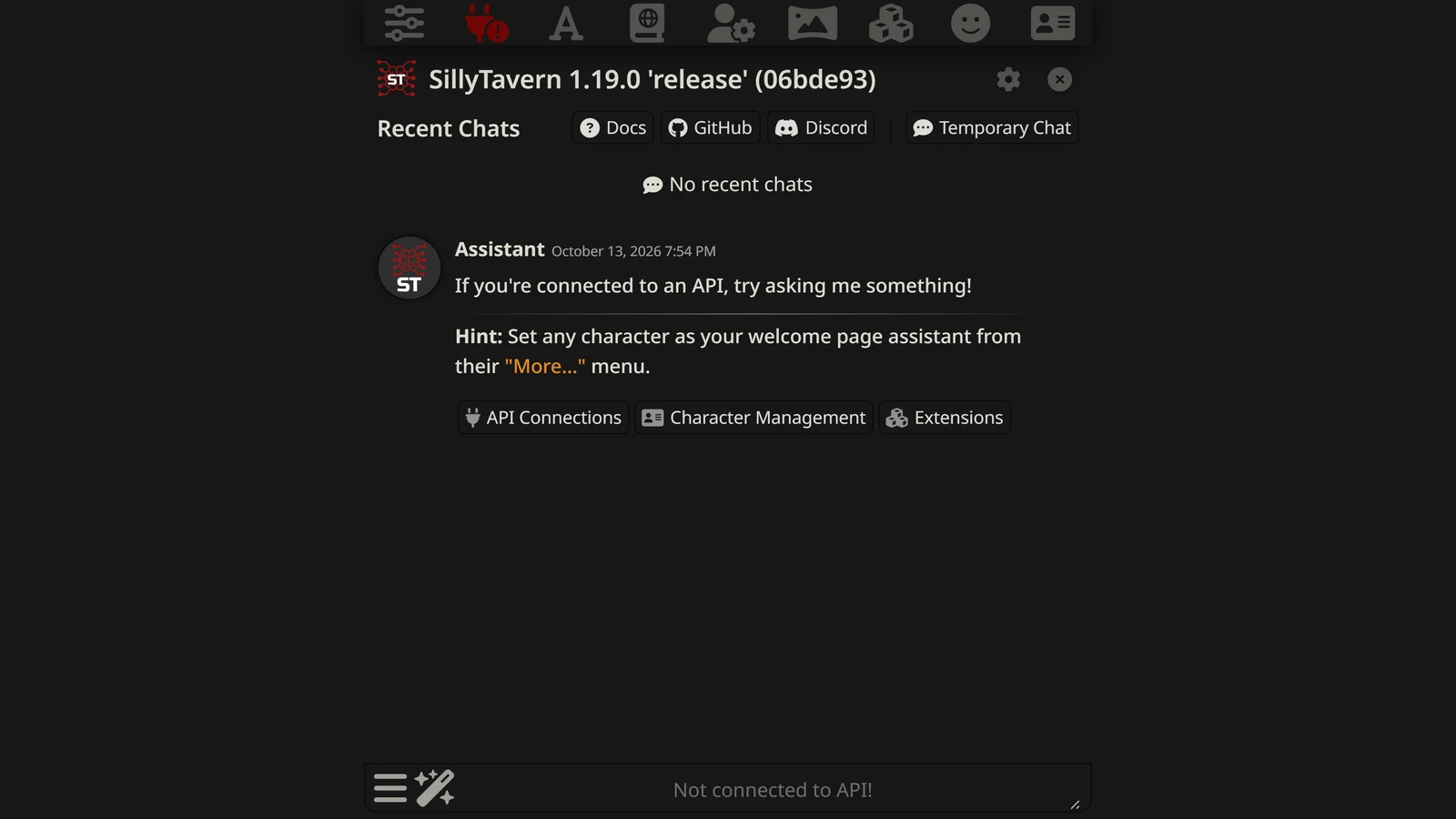
SillyTavern is a free, open-source interface for AI roleplay — a polished front-end you install on your own computer and point at the language model of your choice. It doesn’t replace ChatGPT or Claude so much as wrap a far more powerful roleplay cockpit around whatever model is doing the actual writing: character cards, persistent lorebooks, fine-grained control over the prompt, group chats, and a plugin system for things like text-to-speech and image generation.
It’s also the single most misunderstood tool in AI roleplay. Newcomers install it expecting an AI to be waiting inside, find an empty interface asking for an “API connection,” and bounce. So this guide starts with the thing nobody explains clearly — what SillyTavern actually is and isn’t — then walks through getting it running and deciding whether it’s the right tool for you in the first place.
What Is SillyTavern?
SillyTavern is a front-end: a user interface for chatting with large language models, built specifically for roleplay and character interaction rather than general assistant tasks. It runs locally on your machine, opens in your web browser, and is developed as a community open-source project that’s free to use.
Think of it as the difference between a steering wheel and an engine. The model — Claude, a local Llama fine-tune, DeepSeek, whatever you connect — is the engine that generates the words. SillyTavern is the cockpit that decides exactly what gets sent to that engine and how the conversation is managed: which character is active, what the system prompt says, which lore is injected, how long the memory is, what sampling settings shape the output. The same model produces dramatically better roleplay through SillyTavern than through a bare chat box, because the cockpit gives you control the consumer apps hide.
That control is the whole reason the enthusiast roleplay community standardised on it. It’s the natural next step for players who’ve outgrown the limits of ChatGPT, Janitor AI, Character.AI, or a plain Claude Project.
What SillyTavern Is Not (Read This First)
This is the section that saves you an hour of confusion:
- SillyTavern does not include an AI model. It generates nothing on its own. You must connect it to a model — either one running on your own hardware or one accessed through an API. This is the step that stops most beginners, and it’s by design: SillyTavern’s power comes from being model-agnostic.
- It is not a website you sign up for. There’s no account and no hosted service. You install it on your computer and it runs there. That’s also why it’s private — your chats live on your machine, not someone’s server.
- It is not, by itself, “uncensored.” SillyTavern has no content policy because it isn’t a model. Whether your sessions are filtered depends entirely on the model you connect — a frontier API still applies its guardrails; a local open-weight model does not. We cover this in the uncensored AI roleplay guide.
- It is character-chat-first, not a structured RPG engine. It excels at character roleplay and freeform storytelling. It can run game-like sessions with the right prompt, but it isn’t a mechanical campaign system out of the box.
Internalise those four points and everything else about SillyTavern makes sense.
What You Need to Run SillyTavern
Which model to connect is its own question: the best model for SillyTavern covers chat, local, free, embedding and image models.
Two things: the app itself, and a model to connect it to.
The app runs on Windows, macOS, and Linux, and even on Android via Termux. It’s lightweight — it’s just an interface, so it doesn’t need a powerful machine on its own. Phones and tablets are a separate question with two answers, and we’ve written up both in SillyTavern on your phone: Android can run the whole thing locally, while iPhones and iPads can only reach a copy running somewhere else.
The model is where the real decision is, and it splits into two paths:
- Cloud API — point SillyTavern at a hosted model through its API: Claude, OpenAI, or an aggregator like OpenRouter that exposes many models (including budget options like DeepSeek and roleplay specialists). Easiest path, no powerful hardware needed, pay per token. Note that frontier APIs still apply their content filters. The aggregator route is the one most people end up on — OpenRouter for roleplay walks through connecting it and picking a model.
- Local model — run an open-weight model on your own GPU via a backend like KoboldCpp, Ollama, LM Studio, or text-generation-webui, then connect SillyTavern to it. This is the fully private, fully unrestricted route, but it needs capable hardware (a GPU with roughly 12GB+ of VRAM for a good experience).
Which model you choose matters as much as any SillyTavern setting. Our best LLM for roleplay guide breaks down the options — Claude and GPT for quality, Gemini for context length, DeepSeek for budget, MiniMax M2 for character consistency, and local Llama/Qwen fine-tunes for unrestricted privacy-first play.
How to Install SillyTavern
The install is more approachable than its reputation suggests. The broad shape on any platform:
- Install Node.js (the LTS version). SillyTavern runs on it.
- Get SillyTavern. The recommended method is to clone the official repository’s release branch with Git, which makes updating a one-command affair later. If you’d rather not use Git, you can download the release as a zip and extract it.
- Run the start script. On Windows that’s
Start.bat; on macOS and Linux it’sstart.sh. The first run installs dependencies automatically. - Open the local address it prints (typically
http://localhost:8000) in your browser. That’s SillyTavern running. - Connect a model under the API Connections panel — enter your API key for a cloud model, or the local address of your backend.
For exact, current commands and platform-specific notes, follow the project’s official documentation at docs.sillytavern.app — it’s maintained by the developers and stays current with releases in a way no third-party walkthrough can. (There’s also an official “SillyTavern Launcher” that automates much of the above if you’d prefer a guided installer.)
Once it’s running and connected, you load a character and start playing. For the full step-by-step version of this section — including Windows-specific gotchas, updating, and a troubleshooting checklist for the errors that stop most beginners — see our complete SillyTavern installation guide.
Once it’s installed, here’s how to use SillyTavern day to day — the features that actually matter once you’re up and running.
The Features That Actually Matter
SillyTavern has a deep feature set, but a handful are why people stay:
- Character cards. The portable format for AI characters — a card bundles a persona’s personality, voice, scenario, and example dialogue. SillyTavern reads the widely-used card format, so cards from across the community (including many that originate on Janitor AI or Chub AI) work here, often with more control over how they behave. If you’d rather build your own, see how to write a character card. For importing, exporting and fixing cards that will not load, see SillyTavern character cards.
- World Info / lorebooks. This is the killer feature. A lorebook is a set of entries that get injected into the prompt only when their keywords come up — so a sprawling world’s lore is available on demand without permanently eating your context window. It’s the closest thing to giving the AI a reference book it consults as needed. (It’s the same idea as NovelAI’s Lorebook, but free and on the model of your choice — see SillyTavern vs NovelAI.) New to terms like this? The AI roleplay glossary defines lorebook, context window, and the rest of the jargon in one place.
- Presets and templates. The saved settings that decide how your prompt is assembled before it is sent. What that phrase means depends entirely on whether you connected a Text Completion or a Chat Completion API, and the two are not interchangeable — SillyTavern presets explained covers both halves and why an imported preset so often appears to do nothing.
- Personas. A persistent identity for you, the player, that the AI keeps in mind across characters and sessions.
- Group chats. Multiple characters in one scene, each with their own card, taking turns — far better multi-character handling than a single chat box.
- Extensions. Optional add-ons for text-to-speech narration, image generation (via a Stable Diffusion backend), summarization, and vector-based memory. You bolt on what you want. The text-to-speech extension can give every character its own voice — see AI roleplay with voice for why that matters.
SillyTavern Extensions Explained
Extensions are optional plugins that hook into SillyTavern’s chat pipeline without touching the core interface — you switch on what you want from the Extensions panel and leave the rest off, so the app stays lean by default. A few are worth knowing by name. The TTS extension reads character responses aloud through a voice provider of your choice, turning a text exchange into something closer to a voiced scene. The Image Generation extension connects to a Stable Diffusion backend, local or hosted, so a character or moment in the story can produce an accompanying image on demand, straight from the chat. And the Data Bank — covered in more depth in the memory section below — is vector-based storage that indexes past messages and documents, then pulls back only the relevant pieces when they’re actually needed instead of occupying your context window the whole time.
None of this is required to use SillyTavern well, but it’s why power users rarely go back to a plain chat box afterward: extensions let you shape the tool around the kind of session you actually want — voiced, illustrated, memory-heavy, or all three — instead of accepting whatever fixed feature set a consumer app ships with. Our SillyTavern extensions guide lists what is built in, what the official download list holds, and how to install them safely.
Hiding Text From the AI
SillyTavern’s /hide and /unhide slash commands remove specific messages from what the model actually reads, without deleting them from your visible chat log. Type /hide 4 to exclude message 4 from the prompt (a ghost icon marks it as hidden in the log), or /hide 4-9 to hide a whole range; /unhide reverses it the same way. It’s a chat-log tool that operates on entire messages by index — not an inline tag — which makes it useful for stripping a meta-note, an aside, or an early exchange out of the AI’s context without losing the record for yourself. The full syntax is in SillyTavern’s own STscript command reference.
SillyTavern for Long Campaigns: Managing Memory
Every AI roleplay tool fights the same enemy — the model’s finite context window, which is why long campaigns fall apart around turn 50. SillyTavern gives you more weapons against it than almost anything else:
- World Info / lorebooks keep facts retrievable without permanently occupying context, as above.
- The Summarize extension periodically condenses what’s happened into a running summary the model keeps in view.
- Vector storage (the Data Bank) stores past messages and documents and pulls back only the relevant pieces when they matter — a local, retrieval-augmented memory.
These mitigate the problem; they don’t erase it — and each ships with defaults that decide how much actually survives, which we break down setting by setting in what SillyTavern actually remembers. For a structured campaign you want to hold together over weeks, the same discipline applies as anywhere: track your world state deliberately. The free Campaign Memory Tool works alongside any front-end, SillyTavern included — it keeps your canonical state and generates a clean compression prompt when the AI’s memory starts to drift.
When something breaks, the thing to remember is that SillyTavern generates nothing itself — nearly every error it shows is relayed from your provider, your local backend or your own machine. SillyTavern not working covers how to tell which, and which symptoms were already fixed in a release you may not have installed.
Is SillyTavern Right for You?
Honestly, it depends on what kind of player you are.
SillyTavern is the right tool if you want maximum control, full privacy, the ability to run uncensored local models, and a deep, character-driven roleplay setup — and you don’t mind a one-time setup investment. For power users, nothing else comes close to the control it offers.
It’s probably the wrong tool if you want zero setup and a browse-and-play library — Janitor AI gets you there in two minutes (we compare the two directly in Janitor AI vs SillyTavern) — or if what you actually want is a structured RPG with mechanics, persistent world state, and a designed campaign rather than open character chat. For that, an engineered engine serves you better: the free AI RPG Prompt Builder generates a system prompt you can even drop into SillyTavern.
In fact, the two approaches combine well: SillyTavern as the cockpit, a backend model of your choice as the engine, and an engineered prompt or lorebook giving the session real structure. If you want to see the wider landscape of platforms first, the best AI roleplay platforms guide maps the alternatives. And if it is SillyTavern’s setup rather than its approach that puts you off, SillyTavern alternatives covers the front ends that skip the server. A newer local app that can import SillyTavern data and adds a built-in game mode is covered in Marinara Engine.
Frequently Asked Questions
What is SillyTavern? SillyTavern is a free, open-source front-end for AI roleplay that you install on your own computer. It provides a powerful interface — character cards, lorebooks, prompt control, group chats, extensions — but it doesn’t generate text itself; you connect it to a language model that does.
Is SillyTavern free? Yes. SillyTavern itself is free and open-source. Your only costs are whatever model you connect it to — free if you run a local open-weight model on your own hardware, or per-token API fees if you connect a cloud model like Claude, GPT, or a model via OpenRouter.
Do I need a powerful computer for SillyTavern? Not for SillyTavern itself — it’s just an interface. You only need powerful hardware (a GPU with ~12GB+ VRAM) if you want to run a local model. If you connect a cloud API instead, a basic computer is fine.
Is SillyTavern uncensored? SillyTavern has no content filter of its own because it isn’t a model. Whether your sessions are filtered depends entirely on the model you connect: a frontier API still applies its guardrails, while a local open-weight model is unrestricted. See the uncensored AI roleplay guide.
Does SillyTavern come with an AI? No — and this is the most common beginner confusion. SillyTavern generates nothing on its own. You must connect it to a model, either running locally on your hardware or through an API, before you can chat.
Is SillyTavern good for D&D-style RPGs? It can run game-like sessions with the right system prompt and lorebooks, but it’s character-chat-first rather than a mechanical RPG engine. For structured campaigns, pair it with an engineered prompt or use a dedicated system — see AI D&D.