SillyTavern + KoboldCpp: Local Model Setup Guide (2026)
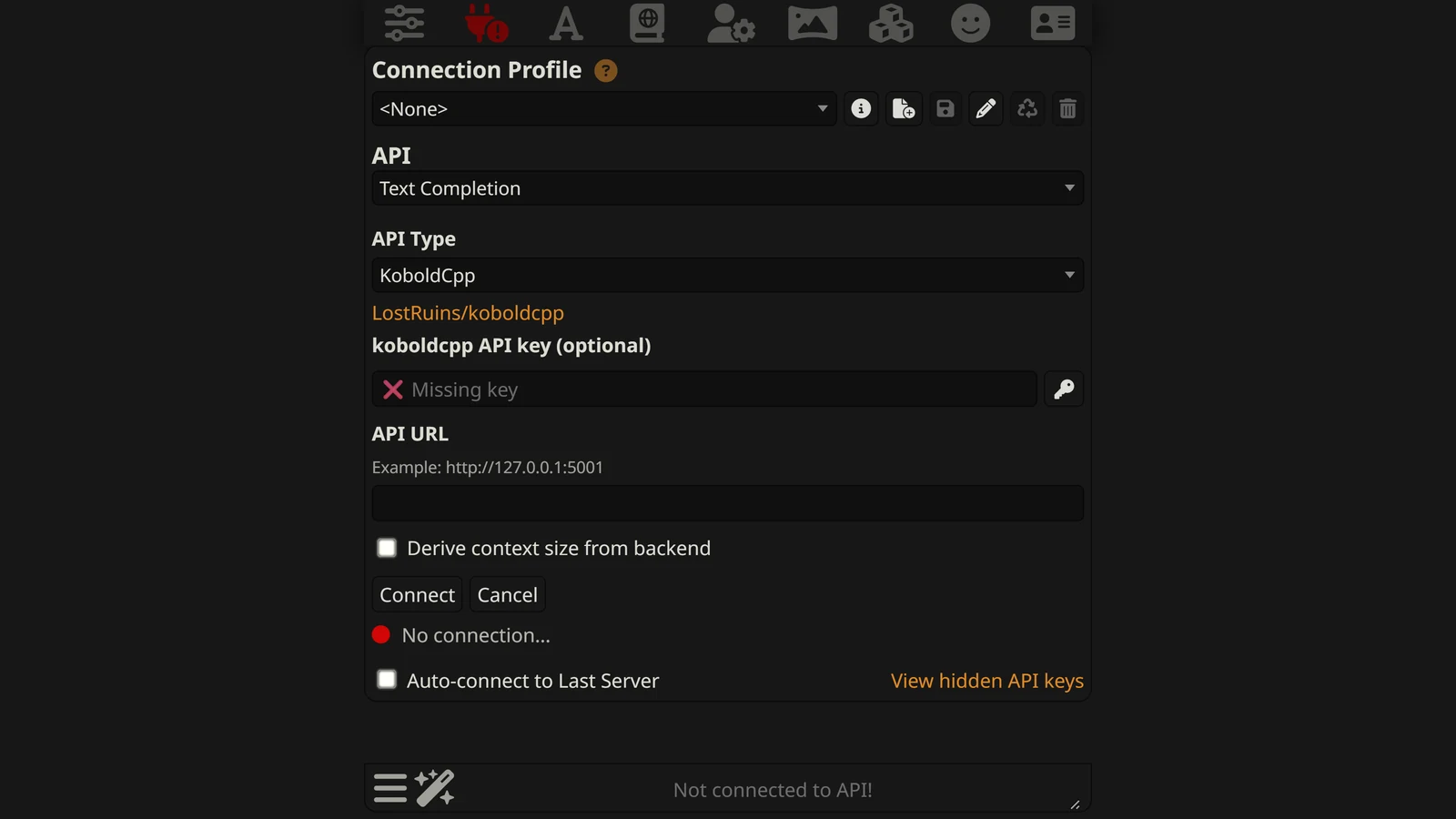
KoboldCpp is the veteran, no-install way to run an AI model locally and connect it to SillyTavern — a single portable program with no setup wizard, built for exactly this pairing since the earliest days of the local-roleplay community. If you want full privacy and zero content restrictions and don’t mind a slightly more hands-on model-picking process than Ollama offers, this is the standard stack.
This is one of two local-backend deep-dives in our SillyTavern setup cluster — see how to install SillyTavern itself first if you haven’t yet, or SillyTavern + Ollama if you’d rather trade a little control for the simplest possible on-ramp.
If you have not decided whether to run a model locally at all, start with local models for AI RPGs — it covers the hardware honestly and prices the trade against paying somebody else. Come back here when you have settled on KoboldCpp. If older guides confuse you by saying “KoboldAI”, KoboldAI vs KoboldCpp vs KoboldAI Lite sorts out which name is which.
What KoboldCpp Is (and Why Pair It With SillyTavern)
KoboldCpp is a free, open-source local inference engine — software that loads an AI model file on your computer and runs it, exposing the result as a local API. It’s built on llama.cpp, the project that made running large language models on consumer hardware practical, and it’s been the community’s default local backend for SillyTavern for years because of three things:
- No installer. It’s a single executable. Download it, run it, done — no dependency chain to fight.
- GGUF-native. It’s built specifically around the GGUF model format, the standard way the community distributes quantized (compressed) open-weight models sized to fit consumer GPUs.
- Deep tavern-ecosystem integration. SillyTavern has first-class support for KoboldCpp’s API, including features like world info budgeting that assume this exact pairing.
Together, SillyTavern and KoboldCpp form a completely local stack: your chats never leave your machine, no account, no subscription, and no model provider’s content policy standing between you and the story.
Hardware: What You Actually Need
This is the honest trade-off against a cloud API — you need a capable GPU:
- ~8GB VRAM — comfortably runs a 7B–8B model at a moderate quantization (commonly labelled Q4 or Q5). This is the realistic entry point on a mid-range gaming GPU.
- 12GB+ VRAM — opens up 13B-class models with real headroom, and is where local roleplay quality starts to feel competitive with cheaper cloud tiers.
- 24GB+ VRAM — lets you run larger models (30B+) at good quantization, or a 13B model at minimal quantization loss.
You can run smaller or more heavily quantized models on less VRAM, or offload part of a model to CPU/RAM — KoboldCpp supports both — but expect a real speed penalty each step down. CPU-only generation works but is slow enough that most people only use it to test the pipeline, not to actually play.
Step-by-Step: Connecting KoboldCpp to SillyTavern
- Download KoboldCpp from the project’s official GitHub releases page — it’s a single
.exe(Windows) or equivalent binary for Mac/Linux. No installation step. - Get a GGUF model. Model files are commonly distributed on Hugging Face. Pick one sized to your VRAM (see above) — see the model picks below for roleplay-specific recommendations.
- Launch KoboldCpp and click Browse next to the Model field to select your downloaded GGUF file. Adjust GPU layers/offload settings if the launcher exposes them (higher = more on GPU = faster, until you run out of VRAM).
- Start it. KoboldCpp opens a local API server — by default something like
http://localhost:5001. The console window will confirm it’s listening; leave it running. - Open SillyTavern and click the plug icon (API Connections).
- Set the API type to Text Completion, with KoboldCpp as the source, and enter the address from step 4.
- Connect, then load a character and send a message. A reply confirms the whole chain is working — SillyTavern to KoboldCpp to your GPU and back.
Which Model Should You Run?
For roleplay specifically, the general-purpose “smartest” model isn’t automatically the best pick — staying in character matters as much as raw capability:
- Community roleplay finetunes — variants like MythoMax and Psyfighter are tuned specifically to hold a character’s voice and personality over a long chat, and remain popular defaults in the SillyTavern community for exactly that reason.
- General open-weight models — Llama 3.3 70B and Qwen3 32B (at a size your hardware supports) are strong, more broadly capable alternatives, at the cost of needing more VRAM for their larger sizes to shine.
Our best LLM for roleplay guide covers the fuller landscape — including where a local model like this fits against frontier cloud options on quality, cost, and content freedom. And because KoboldCpp applies no filter of its own, this pairing is also the reference answer in our uncensored AI roleplay guide.
Troubleshooting
Most KoboldCpp-and-SillyTavern problems fall into a short list:
- SillyTavern can’t connect / no response. Confirm KoboldCpp’s console actually shows it’s running and listening, and that the address in SillyTavern matches exactly (including the port). Also confirm the API type is set to Text Completion, not Chat Completion — this is the single most common misconfiguration.
- Model won’t load / crashes on load. Usually you’ve run out of VRAM for the model and settings you chose. Pick a smaller model, a heavier quantization, or reduce the GPU-offload layers so more of the model runs on system RAM instead.
- Generation is extremely slow. Too much of the model is running on CPU rather than GPU. Increase GPU layers if you have VRAM headroom, or step down to a smaller/more quantized model.
- Replies are repetitive or ignore the character. This is usually a model or sampling-settings issue rather than a connection issue — try a roleplay-tuned finetune instead of a general model, and check SillyTavern’s repetition-penalty and temperature settings.
- Everything was working, then stopped after a KoboldCpp update. Occasionally a new release shifts default ports or settings. Re-check the address KoboldCpp prints on launch and update SillyTavern’s connection to match.
For a fuller list on the KoboldCpp side — a window that closes at once, “Could not load text model”, a graphics card that is not used, long pauses before each reply — see KoboldCpp not working. For what each launcher option does and what the current defaults are, see KoboldCpp settings.
For faults that are not KoboldCpp’s — API error codes, remote connections, lorebooks that stop firing — see SillyTavern not working.
Is KoboldCpp the Right Local Backend for You?
KoboldCpp rewards a bit of manual model-picking with maximum control over exactly which GGUF file, quantization, and settings you’re running — the classic power-user path. If that sounds like more setup than you want and you’d rather pull a model with a single command and skip most of the manual configuration, Ollama is the friendlier on-ramp to the same private, offline result — our dedicated guide covers that pairing in full. For the two side by side, including which SillyTavern settings each one actually receives, see KoboldCpp vs Ollama.
Either way, once you’re running locally, the rest of SillyTavern — lorebooks, personas, group chats, extensions — works exactly the same as it does with a cloud model. The full SillyTavern guide covers all of it.
Frequently Asked Questions
What is KoboldCpp? KoboldCpp is a free, open-source program that runs AI language models locally on your own computer and exposes them as an API. It’s a single portable file with no installer, built on llama.cpp, and it’s the long-standing backend of choice for pairing with SillyTavern for private, offline roleplay.
How do I connect KoboldCpp to SillyTavern?
Download and run KoboldCpp, load a GGUF model file through its Browse button, and start it — this opens a local API server, usually at http://localhost:5001. In SillyTavern, open API Connections, set the API type to Text Completion with KoboldCpp as the source, enter that address, and connect.
What GPU do I need to run KoboldCpp for roleplay? For a good experience, a GPU with roughly 8GB of VRAM comfortably runs a 7B–8B model at a moderate quantization, and 12GB or more opens up 13B models with headroom. Larger models run on less VRAM through heavier quantization or partial CPU offloading, at a real speed cost. CPU-only is possible but slow.
Which model should I use with KoboldCpp for roleplay? Community roleplay-tuned GGUF finetunes — variants like MythoMax and Psyfighter, alongside general-purpose models like Llama 3.3 or Qwen3 at an appropriate size for your hardware — are the standard picks. Our best LLM for roleplay guide covers the trade-offs between the general frontier models and these local options in more depth.
Is KoboldCpp uncensored? KoboldCpp itself applies no content filter — it just runs whatever model you load. Whether output is restricted depends entirely on that model: most open-weight GGUF models used for roleplay have no built-in alignment layer, which is the whole reason this stack is the standard answer for genuinely uncensored AI roleplay.
Why is KoboldCpp not connecting to SillyTavern? The two most common causes are a mismatched API type (KoboldCpp needs Text Completion, not Chat Completion, in most SillyTavern versions) or the wrong address — confirm KoboldCpp’s console shows it’s listening and that you’re using the exact address and port it printed. Running out of VRAM will also cause KoboldCpp to fail to load the model in the first place.