KoboldAI vs KoboldCpp vs KoboldAI Lite (2026): Which One Is Which, and Which to Use
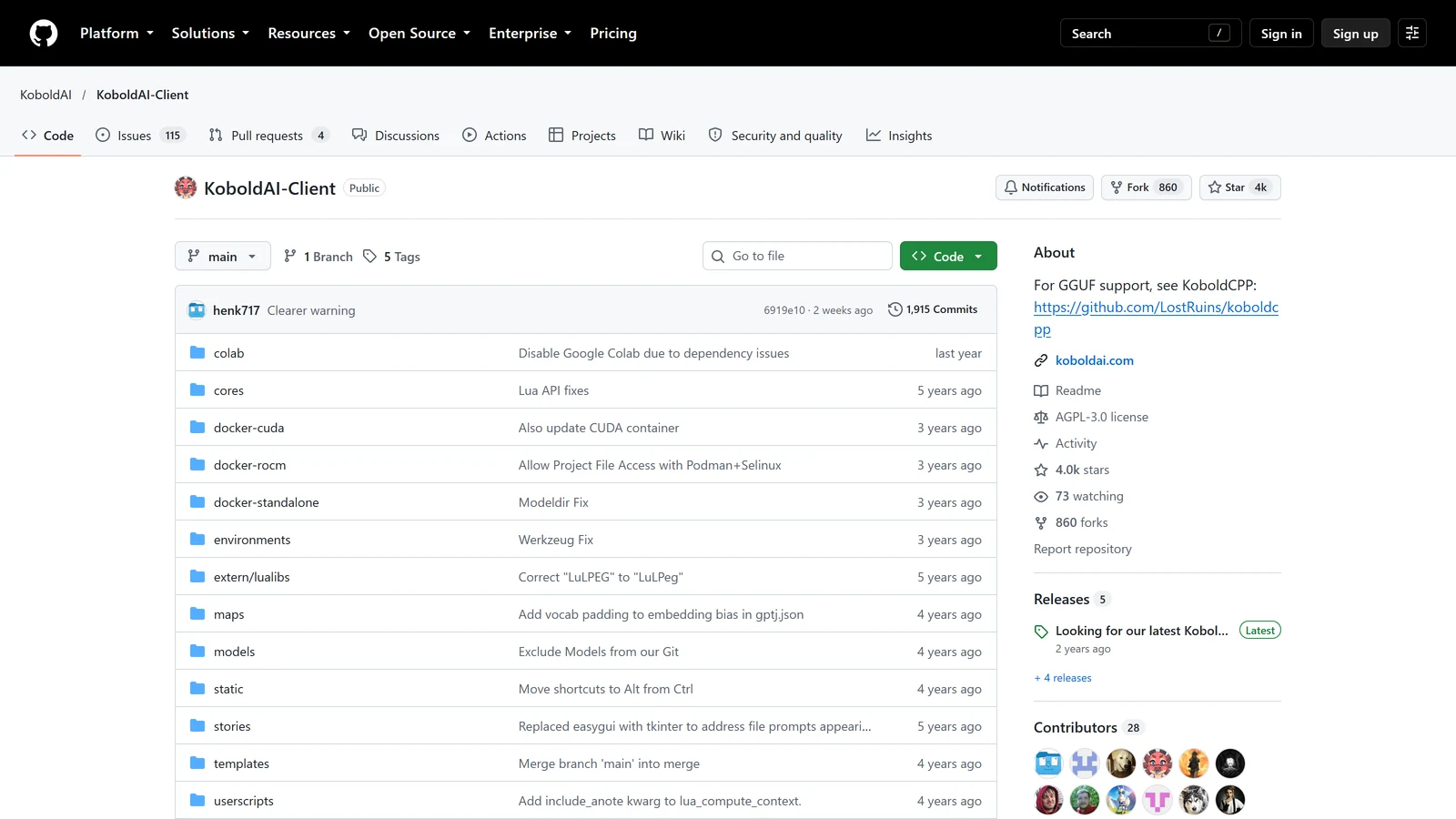
KoboldAI, KoboldCpp and KoboldAI Lite are three different things that share a name, and mixing them up is the most common reason a Kobold guide does not match what is on your screen. KoboldAI is the original program and it is no longer the one to use. KoboldCpp is the program that runs the model on your computer. KoboldAI Lite is the chat page you use to talk to it.
We read each project’s own pages on 27 October 2026: the KoboldAI Client readme, the KoboldCpp wiki and repository, and SillyTavern’s documentation of how it connects to them. We did not install the original KoboldAI for this page, and we did not benchmark anything.
If you already know you want KoboldCpp, the SillyTavern + KoboldCpp setup, the KoboldCpp settings guide and KoboldCpp not working go further. KoboldAI and KoboldCpp are independent projects. Arcanum is not affiliated with either.
The Short Answer
| You want to… | Use |
|---|---|
| Run a model on your own PC | KoboldCpp |
| Try the interface with no download and no graphics card | KoboldAI Lite online, connected to AI Horde |
| Use the original KoboldAI | Not recommended. Its own page says to switch to KoboldCpp |
| Connect SillyTavern to a local model | KoboldCpp, through the Text Completion connection |
| Find out why a guide mentions a screen you cannot see | Check whether it was written for KoboldAI, KoboldCpp or Lite |
Three Names, Three Jobs
| KoboldAI (Client) | KoboldCpp | KoboldAI Lite | |
|---|---|---|---|
| What it is | The original browser front end for AI writing, with its own model loading | A program that loads and runs a model file | A web page for writing and chatting |
| Where it runs | On your PC, or in Google Colab | On your PC | Inside KoboldCpp, or online at lite.koboldai.net |
| Does it run the model | Yes, in its own way | Yes | No. It sends text to something that does |
| Model files | Older formats; the page says it “will not run modern models” | GGUF | Whatever it is connected to |
| Status on its own page | ”Currently not maintained” | Actively released | Part of KoboldCpp |
| Licence | AGPL | AGPL | Part of KoboldCpp |
The easiest way to hold it in your head: KoboldCpp is the engine, KoboldAI Lite is the dashboard, and KoboldAI is the old car both of them grew out of.
KoboldAI: The Original
The KoboldAI Client readme describes it as “a browser-based front-end for AI-assisted writing with multiple local & remote AI models”. It lists Memory, Author’s Note, World Info, Save and Load, adjustable AI settings and an Adventure mode. It could run on your own computer through an installer or a start script, or, as the readme still says, free in a browser through Google Colab.
The same readme now carries a plain warning. It calls itself “the old software which will not run modern models”, says it “is currently not maintained”, and tells the reader “please switch to KoboldCpp”.
The readme also describes the kinds of model it was built around:
| Type | What the readme says it is for |
|---|---|
| Novel | Regular story writing |
| NSFW | Strongly biased toward adult content |
| Adventure | Text-adventure play, with Adventure mode on |
| Hybrid | Blends of the other types |
| Generic | Base models “not trained towards anything specific” |
The names it gives as examples, such as Nerys, Erebus, Janeway, Tiefighter 13B and MythoMax 13B, are models of that period. Guides written in those years are still online, and they use the name “KoboldAI” for the original program, which is a large part of the confusion today.
SillyTavern’s documentation is blunter. It lists KoboldAI Classic under local APIs as “deprecated and abandoned” and says it is limited to 2k context and has no streaming. In practice that means two thousand tokens of memory, a small fraction of what current setups handle. Our presets guide mentions that SillyTavern still keeps a settings folder for it, which is why its name keeps showing up.
Two details on the repository itself, read on 27 October 2026:
- The newest change is a warning. The last commit, on 14 October 2026, is titled “Clearer warning”. The repository’s description reads “For GGUF support, see KoboldCPP”. So the recent activity is the project telling visitors to leave, not new features.
- The Colab route is switched off. The readme still lists free Google Colab editions, but the
colabfolder’s latest change is titled “Disable Google Colab due to dependency issues”, and it dates from last year. Do not rely on the readme’s Colab section. We did not try to run it.
KoboldCpp: What People Mean Now
KoboldCpp’s repository describes itself as: “Run GGUF AI models locally with a KoboldAI UI. One File. Zero Install.” The wiki says it is “inspired by the original KoboldAI” and “builds off llama.cpp”. SillyTavern’s documentation describes it as easy to use, supporting CPU offloading and streaming, and running GGUF models “from a single binary”.
Our other pages cover its settings in detail, so only the points that matter for this comparison are here:
- It is one file. You download it, run it, pick a model file, and it starts a local server.
- It runs GGUF models. That is the format most community roleplay models are shared in.
- It is current. The latest release on 27 October 2026 was 1.123.1, published on 13 October. Our earlier pages were written against 1.122.1.
- It has its own interface. That interface is KoboldAI Lite.
- It speaks the old KoboldAI language. The wiki says KoboldCpp keeps compatibility with both KoboldAI interfaces, so tools made for those interfaces can connect to it.
On a typical start, the defaults we read in 1.122.1 were a context of 16,384 tokens and port 5001. The KoboldCpp vs Ollama comparison lists these and what changes them. Version numbers move quickly, so check the console on your own copy.
KoboldAI Lite: The Part You See
KoboldCpp’s wiki describes Kobold Lite as “a lightweight, standalone Web UI for KoboldCpp, KoboldAI Client, and AI Horde”. It is bundled with KoboldCpp, so there is nothing separate to install. The same interface is also hosted at lite.koboldai.net.
The wiki lists four modes, chosen from the Format menu in Basic Settings:
| Mode | What the wiki says |
|---|---|
| Story | Creative fiction and novel writing, where the AI continues your text |
| Chat | Talk with a character persona, turn by turn |
| Instruct | ”ChatGPT styled instruction-response” |
| Adventure | ”AIDungeon styled interactive fiction”, where you describe actions and the AI narrates results |
Because Lite is only the interface, the quality of what you read depends on the model behind it, not on Lite. The same page connected to a small model and to a large one will feel like two different products.
The wiki’s home page uses “Kobold Lite” and “KoboldAI Lite” for the same thing, and the name is not explained there. They are the same page.
Lite without a computer: AI Horde
The hosted copy at lite.koboldai.net can connect to AI Horde. In the Horde’s own words, which we quoted in our SillyTavern alternatives guide, “volunteers share their computers so anyone can make images and text here, for free.”
That is the route for a player with no graphics card. The cost of it is waiting: which models are available, and how long a reply takes, depends on who is sharing at that moment. Do not paste anything private into a service that other people’s computers process. SillyTavern’s documentation says the same of its AI Horde option, that it works out of the box with responses processed by volunteers’ GPUs and wait times that vary.
”KoboldAI United” and the Naming Trail
The KoboldCpp wiki mentions a second name, KoboldAI United. It describes United as the active project and the Client as “the classic/legacy (Stable) version” that is “no longer actively developed”.
That does not match the Client readme’s advice neatly. The readme says to switch to KoboldCpp. The wiki says United is active. We did not install or run United and cannot tell you more about it than those lines. If a guide tells you to install “KoboldAI United”, check that it is recent, and compare with KoboldCpp, which is the route the original project’s own page points to.
This is a good example of why dates matter. A guide from the period when the original was the main option will tell you to do something that no longer works, and every sentence in it will be correct for its year.
Kobold and AI Dungeon
“AI Dungeon vs KoboldAI” is a common search, and the two are not the same kind of thing.
- AI Dungeon is a service. You open it, pick a model tier and play. See our AI Dungeon review.
- Kobold is a front end. You choose and supply the model. The rest is up to you.
Lite’s Adventure mode is described by its wiki as AI Dungeon styled, so the play style is familiar: you type an action, and the AI narrates the result. What you do not get is a company that provides the model, the memory features around it, or support. In return you get the control over samplers, the freedom to run offline, and no subscription.
For a player who wants the AI Dungeon experience without AI Dungeon, our AI Dungeon alternatives page compares the options. It contains a section titled SillyTavern + KoboldAI. As this page explains, the Kobold half of that pairing today means KoboldCpp.
KoboldCpp or Something Else
KoboldCpp is not the only way to run a model locally. The KoboldCpp vs Ollama comparison covers the nearest alternative, and the local models guide covers whether to run a model on your own PC at all. SillyTavern’s documentation also names llama.cpp, Ollama, Oobabooga and TabbyAPI as local APIs. We did not compare them on this page.
Which One Should You Use?
You want to try it for free, today. Open lite.koboldai.net and connect to AI Horde. Expect waiting. Do not enter anything you would not want a stranger’s computer to see.
You have a graphics card and want to play locally. KoboldCpp. Start with the setup guide if you use SillyTavern, or just open its built-in Lite page if you do not.
You found a guide that mentions Colab, play.bat or Erebus. It was written for the original KoboldAI. Treat it as history and look for a current guide.
You use SillyTavern. Choose Text Completion, then the KoboldCpp type. The KoboldCpp troubleshooting page covers the connection.
You want hosted AI with no setup. A hosted platform is less work than any Kobold route. See the AI Dungeon alternatives and our free AI roleplay list.
Frequently Asked Questions
What is the difference between KoboldAI and KoboldCpp?
KoboldAI is the original program, a browser front end that ran models through Python. Its own page now calls it old software that will not run modern models, and says it is not maintained. KoboldCpp is a separate, later project inspired by it that runs GGUF model files from a single download. When people say Kobold today, they almost always mean KoboldCpp.
What is KoboldAI Lite?
KoboldAI Lite is the web page you type into. KoboldCpp’s wiki describes it as a lightweight, standalone web interface for KoboldCpp, KoboldAI Client and AI Horde. It comes bundled with KoboldCpp, and a hosted copy runs at lite.koboldai.net.
Is KoboldAI still maintained?
The original KoboldAI Client page says it is currently not maintained and tells users to switch to KoboldCpp. KoboldCpp itself was still being released: its latest release on 27 October 2026 was version 1.123.1, published on 13 October.
Do I need a graphics card to use Kobold?
Not to try it. KoboldAI Lite at lite.koboldai.net can connect to AI Horde, where volunteers share their computers. To run a model on your own PC with KoboldCpp, a graphics card helps a great deal, because it decides how large a model runs at a usable speed.
Is KoboldAI like AI Dungeon?
KoboldAI Lite has an Adventure mode that its wiki describes as AI Dungeon styled interactive fiction. It is a front end, not a service: you supply the model, either your own or a shared one, so the writing depends on the model you choose.
Which should I connect SillyTavern to?
KoboldCpp. SillyTavern’s documentation lists KoboldCpp as a local API and describes KoboldAI Classic as deprecated and abandoned, limited to 2k context and without streaming.
The descriptions, status warning, model types and licence of the original KoboldAI are from its public readme on GitHub, read on 27 October 2026. The description and licence of KoboldCpp, the title and date of the original repository’s last commit, the latest change to its Colab folder and the latest KoboldCpp release (1.123.1, 13 October 2026) are from the public GitHub repositories on the same day. The descriptions of Kobold Lite, its four modes, KoboldAI United and the Client are from the KoboldCpp wiki. The descriptions of KoboldCpp, KoboldAI Classic and AI Horde as SillyTavern connections are from SillyTavern’s documentation. The context and port defaults are from our earlier reading of KoboldCpp 1.122.1 on 10 October 2026. We did not install KoboldAI, KoboldAI United or AI Horde clients, did not test lite.koboldai.net, and did not benchmark anything.
KoboldAI, KoboldCpp, AI Horde, SillyTavern, AI Dungeon and llama.cpp are separate projects and products. Arcanum is not affiliated with any of them. Product names and trademarks are the property of their respective owners.