Marinara Engine in 2026: A Free Local AI Frontend With a Game Mode, and How It Compares With SillyTavern
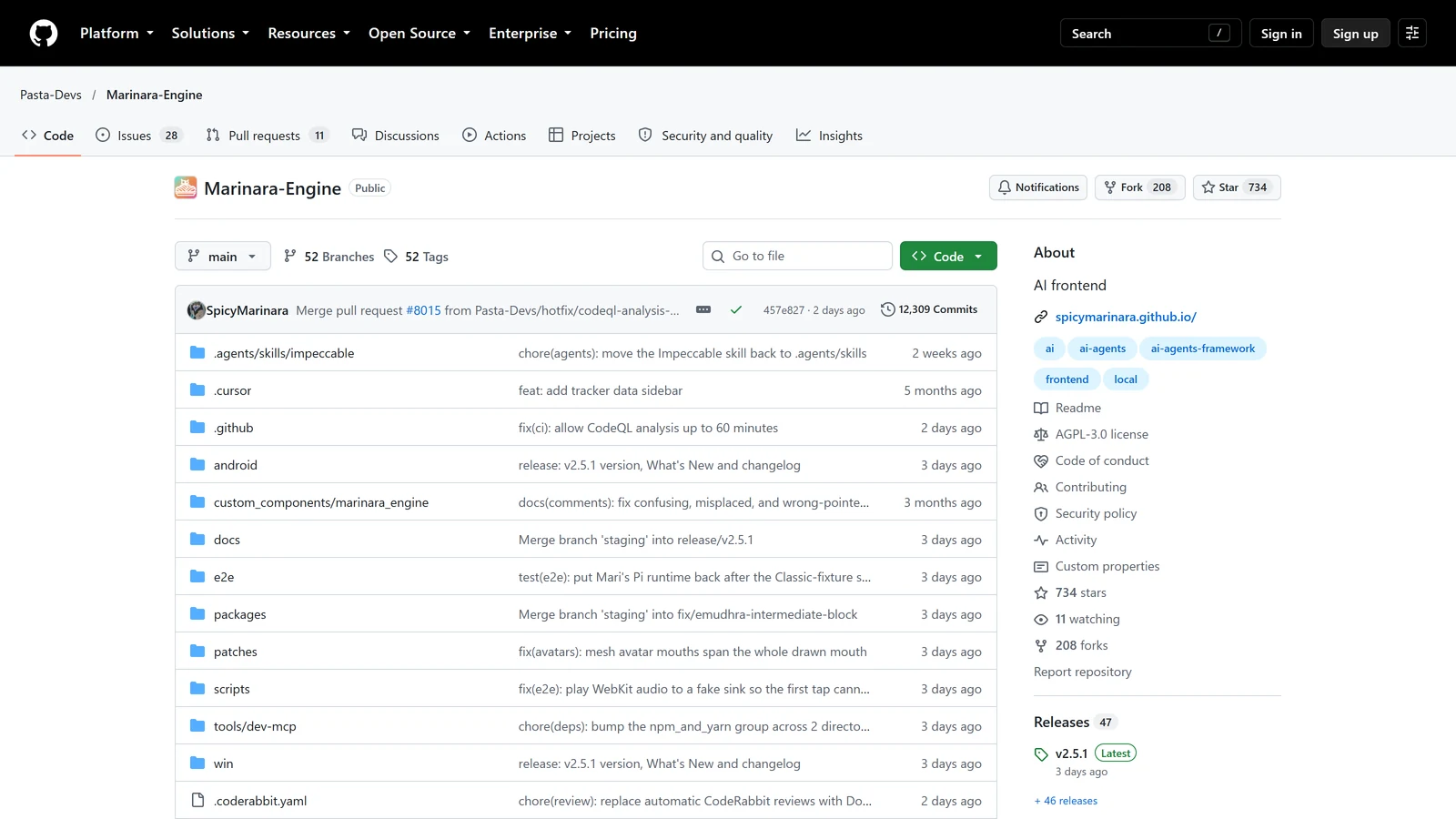
Marinara Engine is a free, open-source app that you install on your own computer and connect to an AI model of your choice. It has three chat modes, and one of them, Game Mode, adds an AI Game Master that runs a single-player RPG with a map, a party, quests and combat.
We have not used Marinara Engine, and this page is not a review: it is not rated on our benchmark. Everything below comes from its GitHub page, its release list and its documentation, read on 23 October 2026. Where we could not confirm something, we say so. Our statements about SillyTavern come from our own SillyTavern guide.
The Short Version
| Question | Answer on 23 October 2026 |
|---|---|
| What is it? | A local app for AI chat, roleplay and games, by a group called Pasta-Devs |
| Is it free? | Yes, and open source under the AGPL-3.0 licence. You pay your AI provider |
| Is it finished? | No. Its own page labels it beta, with “rough edges, missing features, and breaking changes” |
| How new is it? | The project was created on 4 March 2026. The latest release, v2.5.1, came out on 20 October 2026 |
| Where does it run? | Windows, macOS, Linux and Docker, plus an Android install and an iPhone web app |
| Do I need an API key? | Almost always, yes. Subscription logins and a built-in local model are the exceptions |
| Does it have a game mode? | Yes, with an AI Game Master. Its larger “Overworld RPG” version is not ready yet |
| Where do my chats live? | On your own machine. It says no account is required |
If you only read one line: Marinara Engine is a SillyTavern-style frontend that adds a built-in RPG mode, and it is young and moving fast.
What It Is
Its own description is “a local, AI-powered chat, roleplay, and game engine”, built around the idea that “you install it, you run it, and it just works”. The README calls it a passion project that started as a small personal playground. Its look is a retro design by default, with a SillyTavern-inspired look as an option.
It has three chat modes:
- Conversation. Discord-style direct messages with your characters, with groups, profiles, selfies, calls and small table games such as chess and poker.
- Roleplay. An immersive roleplay screen with character sprites, backgrounds, weather effects and a visual-novel display.
- Game. A single-player RPG run by an AI Game Master. This is the mode that matters for this site, and it has its own section below.
Characters can share memory across modes. You can create or import character cards, and a built-in Card Browser searches several sites at once, including Chub.ai, JannyAI, Pygmalion and Wyvern. Our guides to Chub AI and Wyvern Chat cover two of those libraries.
Around that core there is a large set of optional extras. The main ones:
- Agents. Optional AI helpers that work alongside a chat: they track world state, check prose, draw pictures, play music and more. A fresh install comes with none. You download the ones you want from an official catalogue. The README names writer agents (such as a continuity checker), tracker agents (world state, quests, inventory, relationships) and others (an illustrator, a storyboard maker, long-term memory, a combat agent). Agents make extra AI calls, so they add cost.
- Prompt tools. Presets, lorebooks with keyword triggers, regex scripts and macros. If those words are new, our SillyTavern lorebook guide explains them.
- Professor Mari. A built-in assistant that can draft lorebooks and themes.
- Themes. Custom CSS themes, fonts, colours and movable chat widgets.
- Apps and games. A social feed where your characters post, and conversation games you can play against them.
- Optional multiplayer. Shared sessions that every participant must opt into, and the host controls generation.
How to Install It
Its documentation lists these paths:
| Platform | Method |
|---|---|
| Docker or Podman | The recommended method |
| Windows | An installer from the releases page, or an install from source |
| macOS and Linux | A manual guide |
| Android | An APK that sets up Termux and opens the local server, or a manual Termux install |
| iPhone and iPad | A web app you add to the home screen |
On Windows you need Windows 10 or 11 and, to run it, Node.js (version 24, 25 or 26) and Git. The installer can fetch them for you. It then builds the app and makes a desktop shortcut, and the app opens in your browser at http://127.0.0.1:7860. The guide warns that antivirus tools may flag the installer, which it describes as a known false alarm because the installer downloads Node.js and Git. Only run it from the official releases page.
Its FAQ says there is no separate native mobile app. On a phone you use the same web app in a browser, which you can install to the home screen. The Android APK runs the server on the phone itself, through Termux. Our guide to SillyTavern on mobile covers the same trade-off for the older tool.
By default only your own computer can reach it. Other devices on your network need Basic Auth unless you change settings, and powerful actions such as backups need an admin secret. If you plan to use it from a phone, read the remote access guide before you open it up.
Connecting a Model
Marinara does not include a large model. You connect one, and its FAQ says you almost always need an API key for that. The supported providers include OpenAI, Anthropic, Google Gemini and Vertex AI, OpenRouter, NanoGPT, Mistral, Cohere, xAI, DeepSeek, Z.AI and Arli AI, plus any OpenAI-compatible server, such as Ollama, LM Studio or KoboldCpp for models on your own machine.
Two options need no API key:
- Subscription logins. It can use a Claude Pro or Max plan, a ChatGPT account (through Codex) or SuperGrok and X Premium+ (through the Grok CLI), after you sign in once on the computer that runs Marinara. Check each provider’s own terms before you rely on this.
- A built-in local model. A small model that Marinara downloads and runs on your machine for helper jobs such as trackers and lorebook search. It is not the model that writes your story.
Each chat can have its own connection, or pick from a random pool. For choosing a model, see our guides to the best LLM for roleplay and OpenRouter for roleplay.
Game Mode
Game Mode is why this tool is on this site. Its documentation says it “turns Marinara Engine into a single-player role-playing game run by an AI Game Master”, an AI that narrates the world, plays every character you meet and decides what happens next. The engine tracks the state for you: the map, your party, NPCs, items, quests, in-world time and weather.
The setup wizard
Creating a game opens a seven-step wizard. The only required field is the connection for the Game Master; everything else has a default. The steps are connection, world, party, goals, lorebooks, features and Game Master.
On the World step you set the genre, tone, difficulty (Casual, Normal, Hard or Brutal), content rating (SFW or NSFW) and language. The docs say NSFW “only permits adult content, it does not force it”. You also choose a combat preference, Classic or Tactical. Tactical games play fights on a board with movement and terrain.
You can choose to be run by a Game Master Marinara builds for you, or to use one of your own character cards as the Game Master.
Dice, rules and combat
This is the part that speaks to the design question we ask of every game: where do the rules live?
The documentation says that combat round math is calculated by the engine, not the model, “so results stay fair and consistent”. By default Marinara uses its own rules, built-in d20 checks and a six-attribute character sheet. You can install a ruleset instead, and the docs give 5e (SRD 5.1) as an example. A ruleset that resolves its own fights shows its own battle screen, and the log prints the arithmetic, such as an attack roll plus modifiers against a target number. It also says every action is written to the character sheet the moment it lands.
That is the design we describe in our guide to why AI RPGs struggle with mechanics: the numbers live in the system, and the model narrates. What we cannot tell you is how well it works in play, because we have not played it.
The three kinds of AI call
The docs explain where the cost comes from, and it is a useful list for any AI game:
- World generation. Once, when you click Start Game. The model must return one large, strict document with the world, map, NPCs, party sheets and on-screen widgets. The docs call this the most demanding step.
- Gameplay turns. Each message builds a fresh prompt from the current state. A turn that rolls dice normally costs two requests, a draft and a rewrite with the real numbers. An option, off by default, finishes it in one.
- Session summaries. When you end a session, the Game Master writes a recap, and when you start the next one it writes a short bridging message. Older sessions are compressed.
Choosing a model for it
The docs are direct. For world generation, “use a capable, current top-tier model on a paid connection”, and avoid free or auto-routing models and small open-weight models, which “usually fail this step”. For ongoing turns you can sometimes use a cheaper model, but if the Game Master starts forgetting NPCs or contradicting details, move back up. If world generation fails with a JSON error, the guide’s first advice is to check that the connection is not a free or auto-routing model, and there is a repair tool for slightly broken output.
Memory in Game Mode
The memory section says Game chats get Memory Recall and not the chat summary features. Memory Recall searches your older messages for the parts related to what you just said and adds them back into the prompt. It needs an embedding model set on a connection, and it is on by default in Game chats that have an active scene. The Game Master also writes session summaries, and there is a Game Session Keeper agent for continuity. As with every system of this kind, the docs say older text falls out of the model’s window. Our guide to why AI campaigns forget explains why.
What is not ready
The wizard offers two game modes: Overworld RPG, a world you walk on a map, with towns and dungeons, and Classic, where the story is told scene by scene with a scene map and battles. The docs say plainly that Overworld RPG “is still being finished”, that its card is greyed out, and that every new game starts as Classic for now. Visuals, music and storyboards are optional extras that need their own connections.
What It Costs
Marinara is free. The FAQ says you pay whatever your AI provider charges. Some options cost nothing to try: Pollinations image generation needs no key, Stable Horde is free, and the built-in local model runs on your machine. The rest depends on the model you choose and how many agents you turn on. If you want to understand the pricing styles you will meet, our guide to what AI RPGs cost compares them.
Marinara Engine vs SillyTavern
The README does not compare the two directly. It says Marinara has a SillyTavern-inspired look option, can import from SillyTavern, and aims for simple setup. SillyTavern is the long-established tool in this category, and our guide describes it as a free, open-source frontend that you connect to a model, with character cards, lorebooks, group chats and extensions. The comparison below sets what each project says about itself.
| Marinara Engine | SillyTavern | |
|---|---|---|
| Age | Created March 2026, beta | Long established |
| Cost | Free, AGPL-3.0, plus your provider | Free and open source, plus your provider |
| Install | Windows installer, Docker, manual, Android APK | Install Node.js, then the app; Android through Termux |
| Built-in RPG mode | Yes, Game Mode with an AI Game Master | No. It is character-chat-first, per our guide |
| Rules | Engine-side d20 checks, optional rulesets | Whatever your prompt and lorebooks provide |
| Extra helpers | Downloadable agents, a built-in assistant | Extensions |
| Lorebooks, regex, presets | Yes | Yes |
If you are already a SillyTavern user, Marinara’s import guide says you can bring over characters, chats, group chats, presets, lorebooks, backgrounds and personas, one file at a time or by scanning a whole SillyTavern folder. That makes trying it low risk, because your old setup stays where it is.
What we cannot tell you is which is better. SillyTavern’s strength is how long it has existed and how many people have written guides, extensions and presets for it. Marinara’s is that it ships an RPG mode that SillyTavern leaves to you, and it makes setup easier. Its weakness, in its own words, is that it is beta software that changes quickly: releases came on 15 September, 6 October and 20 October. For other choices, see SillyTavern alternatives and RisuAI vs SillyTavern.
What We Could Not Confirm
- How it plays. We have not run a Game Mode campaign, so we cannot say how good the Game Master is, or how well the engine keeps its numbers.
- How stable it is. It labels itself beta. Check the troubleshooting guide and its Discord before you trust a long campaign to it.
- What a turn costs. It depends on your model and agents.
- How the Overworld RPG will work. It is not available yet.
- Safety of third-party imports. Its docs keep custom agent and extension imports off by default and ask you to review what each one requests. We did not audit any.
A Short Checklist
- Want to try it? Use the Windows installer or Docker, and connect a model you already use.
- Coming from SillyTavern? Import a copy of your folder and keep the original.
- Want Game Mode? Use a strong model for the world generation step, and drop to a cheaper one for turns only if the Game Master stays consistent.
- Seeing a JSON or 422 error on world generation? Check that the model is not a free or auto-routing one.
- On a phone? Add the web app to your home screen, or use the Android APK, and read the remote access guide first.
- Turning on agents? Remember each one adds AI calls and cost.
Frequently Asked Questions
What is Marinara Engine?
A free, open-source app you run on your own computer for AI chat, roleplay and games. It has Conversation, Roleplay and Game modes, optional downloadable agents, lorebooks and presets, and you connect your own AI model. Its own page labels it beta software.
Is Marinara Engine free?
Yes. The software is free and licensed under the AGPL-3.0. You pay whatever your AI provider charges, unless you use a free option such as its built-in local model, Pollinations image generation or Stable Horde. Subscription logins let you use a Claude, ChatGPT or Grok plan you already pay for.
How do I install Marinara Engine?
On Windows, download the installer from its GitHub releases page and run it; it can install Node.js and Git for you, and the app opens in your browser at 127.0.0.1:7860. Docker is the recommended method. There are manual guides for macOS and Linux, an Android APK that sets up Termux, and a web app for iPhone.
Does Marinara Engine have an Android app?
It has an Android APK, but the documentation describes it as a Termux bootstrap and WebView shell that runs the server on the phone itself. The FAQ says there is no separate native mobile app. On iPhone you add the web app to the home screen.
Does Marinara Engine have a game mode?
Yes. Game Mode is a single-player RPG run by an AI Game Master, with a map, party, NPCs, items, quests, time and weather. Combat math is calculated by the engine, not the model, and you can install rulesets such as 5e SRD 5.1. Its Overworld RPG version is not ready yet, so new games start as Classic.
Can Marinara Engine import SillyTavern data?
Yes. Its guide says it imports characters, chats, group chats, presets, lorebooks, backgrounds and personas, one file at a time or by scanning a whole SillyTavern folder.
Does Marinara Engine need an API key?
Almost always. You need at least one connection to an AI provider before you can chat. The exceptions are the subscription logins for Claude, ChatGPT and Grok, and its small built-in local model, which handles helper jobs and does not write your story.
Is Marinara Engine better than SillyTavern?
We cannot say, because we have not used it. SillyTavern is the long-established tool with a huge library of guides and extensions. Marinara is newer and in beta, and it adds a built-in Game Mode and easier setup. It can import SillyTavern data, so you can try it without losing your old setup.
Marinara Engine, SillyTavern and the AI services named on this page are third-party products and names are used nominatively. Arcanum is not affiliated with Pasta-Devs or any provider named here. Everything on this page was read from public pages on 23 October 2026 and may change.