Wyvern Chat in 2026: A Free Queue, Worlds With d20 Combat, and What the Paid Features Cost
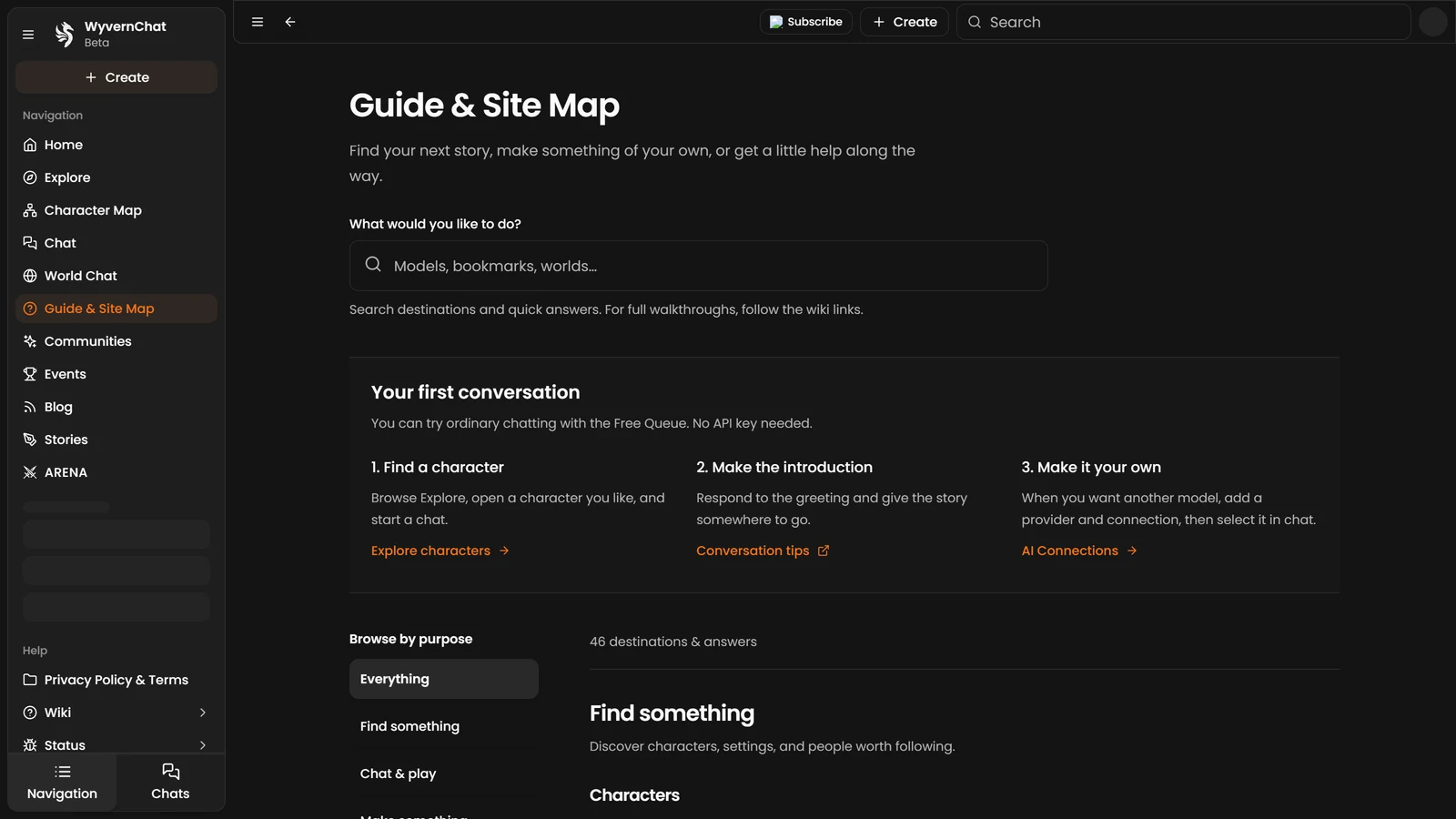
Wyvern Chat is a free browser app where you chat with AI characters, write stories, and play inside worlds that other people have built. Its chat runs on a free shared model queue with no sign-up key, and its worlds can add stats, an inventory, money and dice-based combat on top.
We have not played Wyvern Chat, and this page is not a review: it is not rated on our benchmark. Everything below comes from Wyvern Chat’s own app guide, its wiki and its policy pages, read on 21 October 2026, plus the pricing page of Featherless, the company whose subscription unlocks its paid features. Where we could not confirm something, we say so.
The Short Version
| Question | Answer on 21 October 2026 |
|---|---|
| Is it free? | Yes. New chats use the Free Queue, which costs nothing and needs no API key |
| Does it have a subscription of its own? | No. Its paid features come from linking a paid Featherless account |
| Can I use my own model? | Yes. It supports Featherless, OpenAI, Anthropic Claude, Google Gemini, OpenRouter and InfermaticAI, plus custom providers |
| Is it an AI RPG? | It is a character-chat app first. Worlds can add real RPG systems, but each world’s creator decides which ones |
| Does it allow adult content? | Yes, if it is rated and tagged. A list of things that are never allowed applies to everyone |
| Is there a phone app? | We found no app listing linked from the site; it runs in a browser |
If you only read one line: Wyvern Chat is a free place to try character chat and community-built worlds, and its Worlds feature is the part that matters for anyone who wants a game and not just a conversation.
What Wyvern Chat Is
Wyvern Chat calls itself “an AI Swiss Army knife”. Its own wiki describes a web app where you can chat with AI models, create stories and scenarios, and play text-based games. In practice it is a library of characters and worlds made by its users, with tools to make your own.
The pieces you will meet first are these:
- Characters. User-made character cards you browse on the Explore page, open and chat with. The guide calls them characters or bots.
- Personas. Your own side of the conversation: who you are playing.
- Lorebooks. Collections of facts and background that the AI can be given when a topic comes up.
- Group chats. One conversation with several characters, or with other people.
- Worlds. Settings with locations, characters, lore and starting scenarios. This is where the game features live, and it has its own section below.
- Stories. A separate writing workspace for novels, with chapters and scenes. It is apart from the character and world chats.
- Arena. A separate game where you collect Arena bots, train them and battle.
It is run by the WyChatTeam, and it carries a “Beta” tag next to its name in the site navigation. Its guide page lists a wiki, a status page and a Discord server for help.
The Free Queue: How You Chat for Free
New chats on Wyvern Chat default to something it calls the Free Queue. The wiki describes it as a shared connection that Wyvern Chat runs on its own account, so you can try the app straight away. It costs nothing and needs no API key.
Its FAQ lists which model sits behind each Free Queue option:
| Free Queue option | Model behind it |
|---|---|
| Neon-v2 | glm4-32b |
| Mistral Nemo Instruct | mistral-nemo-12b-lc |
| Dan’s Personality Engine | mistral-24b-lc |
| LooseCannon | mistral-nemo-12b-lc |
| Stellar Odyssey | mistral-nemo-12b-lc |
Two things to know. First, these are open models of modest size, not the largest commercial ones, so expect the writing to feel like the open-model tier and not like a frontier model. Second, a queue is shared: if a model is busy or down, the app tells you. Its FAQ gives the message, “This model is having trouble responding, please try a different model or wait for this one to become operational”, and says to check the model status page from Featherless.
The Free Queue has one limit that is easy to miss. Some advanced features do not run on it. The wiki names Actor mode as the main one. If the app says no connection is available for a feature even though you never touched your settings, the Free Queue is the reason, and you need a real connection.
Bring Your Own Model
When you want a different model, Wyvern Chat lets you connect one. The wiki’s steps:
- Open AI Connections from the sidebar under Account.
- On the Providers tab, add your API key once for the provider you want.
- On the Connections tab, click New, name it, pick the provider and pick a model from that provider’s live list.
- Select the connection in your chat settings.
The providers it lists are Featherless (through a linked account or a key), OpenAI, Anthropic Claude, Google Gemini (directly or through Google Vertex), OpenRouter and InfermaticAI. ElevenLabs is there too, but for text-to-speech only. You can also add a custom provider, such as a model server on your own computer, as long as it speaks the same API format OpenAI uses.
Three details from the wiki are worth knowing:
- There is no test button. Adding a key checks that it works, and picking a model fetches the provider’s list, which fails visibly if the key is bad. The real test is sending a message.
- Your connections follow your account, not your device.
- “Use Browser Request” exposes your key. It sends requests straight from your browser instead of through Wyvern Chat’s server, which puts your API key on your own device and network. The wiki says not to turn it on for a connection you plan to share, and to be careful on a shared network.
If you are choosing a model for roleplay, our guides to the best free model for roleplay and OpenRouter for roleplay cover the options this page does not.
Chat Mode: What You Get Around the Conversation
Chat Mode is described as the core of the app. The tools around a chat are the same kind you would find in other character-chat apps, and a few go further:
- Edit, rewind and continue on every message. Rewind removes a message and everything after it.
- Summaries, an author’s note and an attached lorebook under the chat settings.
- A persona selector, and an option to impersonate your persona.
- Immersive Mode, a visual-novel layout with large character images.
- Simple and Advanced settings. Simple hides the deeper tools; Advanced shows model parameters, overrides and a Debug panel.
- Director’s Whisper, a megaphone button that sends the AI a one-time hidden note. It is free.
For a comparison of how other apps handle the same job, see our guides to Janitor AI, how to use Chub AI and SillyTavern.
Worlds: The Game Part
This is the part of Wyvern Chat that connects to what this site covers. A World is a setting with environments, locations, characters and lore, and a player can start a chat from one of its scenarios. Under a character’s greeting in a chat there is also a “Start in world” option, so you can take a character you already like into a world.
The wiki’s guide for creators says the AI reads one block of text assembled from everything the creator built, in a fixed order: the world overview, the environment, the location, the characters in the scene, lore entries, the chat history, and last the final instructions. It adds that most worlds that “don’t work” are missing one or two pieces or have fields in the wrong place. That is a fair description of the whole genre, and it is a reminder that a world on Wyvern Chat is only as good as the person who built it.
On top of that foundation, a creator can switch on optional game systems, one at a time. Nothing turns on automatically:
| System | What the wiki says it does |
|---|---|
| Inventory | Players carry, equip and use items |
| Currency | Money, and the markets that need it |
| RPG Stats | Stat-based mechanics, with species, occupations and traits |
| Combat | Turn-based battle |
| Creatures | A creature-catching system with a party, a dex, encounters, evolution and moves |
| Property | Player housing, with a catalogue of furnishings |
| Relationships | Directional feelings between characters, factions and the player |
| Travel and time | Moving between locations, and advancing hours |
Stats
If RPG Stats is on, the default system is SPECIAL: Strength, Perception, Endurance, Charisma, Intelligence, Agility and Luck. A creator can replace it with their own list, for example D&D’s six. Players assign stats by point buy, with 21 points to spend between a base of 3 and a maximum of 8 by default, or the world can use fixed values, free assignment or rolled stats.
Combat: Dice or Numbers
The combat chapter says there are two ways to decide an attack, and a creator picks one:
- Storyteller (dice and outcomes). Every action rolls against a difficulty and lands on a four-tier scale: critical success, success, failure or fumble. The AI is told which tier landed and narrates it. The wiki lists d20 resolution for this style.
- Numbers (stats and damage). Attacks use a real damage formula with move power, attacker and defender stats and hit chance. The AI is not told the number, only a description of the result.
A world can mix them, for example creature battles by Numbers and character duels by dice. Turn order can be by stat, by roll or simultaneous. There are two presets, “Pokémon-style” and “D&D-style”; a third, “Fallout / VATS”, is shown as coming soon.
If you have read our guide to why AI RPGs struggle with mechanics, the design here is the one we call good practice: the dice and the stats are kept by the system, and the AI narrates what happened. What we cannot tell you is how well any one world uses it.
Commands in the Chat
Players trigger the mechanics by typing a line that starts with > at the end of a message. Examples from the wiki are >travel "North Road", >attack player wolf and >like Mira player "protected the caravan". The engine validates the command, runs it before the AI writes its reply, and gives the result to the AI as a system note. The command line stays visible in the message.
The wiki also describes Scan Turn, a tool that reads the recent conversation and proposes game changes, such as adding someone to your party or changing a relationship. You can require approval for each change or let it apply them. It does not need a paid subscription, but your AI provider may charge you for its calls.
What We Could Not Test
We did not enter a world, so we cannot tell you whether the combat reads well, whether the model keeps the stats straight, or how a typical community-built world compares with a world someone has spent months on. If you are choosing between platforms for the game itself, our ranking of AI RPG platforms is built from games we have played, and Wyvern Chat is not on it.
Memory
Wyvern Chat gives you several tools for a long chat, and the wiki is honest about their limits.
- Summaries. A chat can keep a summary, which you can switch on and view in the chat settings.
- Lorebooks. Facts attached to the chat that the AI is given when relevant.
- Lexicon Sidechat. Free. It looks only at as much of the chat as fits in one AI request, so on a long chat the oldest messages may not be seen. You have to ask it to look for memories yourself.
- Memory Scan. A subscriber feature. It reads a range of the chat’s history, proposes new memories, characters, places and events, and lets you review them before they are saved. It can run by itself every set number of messages.
The wiki’s own warning on Memory Scan is the right one: it is “a real improvement for long chats, not a guarantee that nothing will ever be forgotten.” For why that is true of every model-based game, see why AI campaigns forget.
What the Paid Features Cost
Wyvern Chat has no subscription of its own. Its wiki says the paid features come from linking a paid Featherless account: open Account settings, then Integrations, then choose Featherless and approve the connection.
On 21 October 2026, Featherless’s pricing page listed a Chat plan at $25 a month, billed monthly and cancellable, with unlimited tokens, a 32K context window and four concurrent units, and it names Wyvern as one of the apps it works with. Its page says the plan is for interactive, human-typed use. Featherless sets the price, so check its page before you subscribe.
According to the Wyvern wiki, a paid Featherless account unlocks:
| Feature | What it does |
|---|---|
| No limit on private content | Free accounts have caps on private characters, lorebooks, worlds, backgrounds, collections and themes |
| Director Mode | Keeps a scene state, with story beats and character intentions, and can feed it to the AI |
| Actor Mode | Has the AI write your own persona’s messages for you |
| Memory Scan | The tool described above |
| AI Assistant in chat | Help inside a chat, and actions without leaving the page |
| Subscriber badges and themes | Cosmetic |
The free caps are specific. Every account starts with 30 private characters and 30 private lorebooks, 5 private worlds and 5 backgrounds, 10 collections and 2 custom themes. Publishing an item adds private slots. Free accounts can create at most 10 new private characters and 10 new private lorebooks a day, and everyone, paid or not, can publish at most 5 public characters and 5 public lorebooks a day.
Actor Mode needs a real connection as well as the subscription, because it does not run on the Free Queue.
Content Rules
Wyvern Chat allows mature content, and requires it to be marked. Every character gets one of three ratings:
- None. No worse than a 16+ show or game. It allows violence, death, war and romance.
- Mature. Extreme themes such as heavy gore or suicide, with nothing sexual.
- Explicit. Anything sexual.
Content is tagged too, and some tags are required. New characters go through an automated reviewer the team calls Bob the Skull, and anything it does not approve goes to human moderators. The FAQ says a review usually takes no more than 12 hours.
Some things are never allowed. The list includes sexualised minors (and characters who read as juvenile, or have no stated age in a setting where they might be underage), bestiality, necrophilia and guro, hate speech, real-world individuals, stolen content and spam. Its guide says the best way to get a character approved is to state an age of 18 or above.
We did not find the minimum age for using the site on the pages we read, so we cannot give you one.
When Something Goes Wrong
The app’s guide and FAQ cover a short list of problems.
The AI is not responding. The guide says to check the selected connection and model, then the status page. If the model is unavailable, try another or wait. If you use your own provider, check the saved API key in AI Connections. The status page is at status.wyvern.chat.
“This model is having trouble responding.” This is the model connection, not your settings. Check Featherless’s model status page, and try another Free Queue option.
The bot repeats itself. The FAQ says this is common early in a chat. It may be repeating the example messages the creator wrote, spitting out its own instructions, or looping on its greeting. The easy fix is a community sampler preset called Toadplant’s De-Repeater: bookmark it, then in the chat’s settings open the Overrides tab and choose it under Parameter Preset Override. The harder fix is raising the repetition penalty settings, with a repetition range of 512 to 1500 and a penalty of 1 to 1.15. The FAQ says these were tested on Llama 3.1, Magnum and Mistral finetunes. Change one setting at a time.
Messages end with <|im_end|>. That is the marker a model uses to end a turn. The FAQ gives three causes: you are using DeepSeek, which has no instruct template of its own; the stop sequence is missing from a preset you edited; or the model copied a variant of the marker from your chat history. Its fixes are to turn on “Ban HTML in output”, to switch the instruct template from ChatML to DeepSeek, or to add <|im_end|> to the stop sequences.
It logged me out. The FAQ says Wyvern Chat only allows one open tab, for security. Close the others.
My new character is not on Explore. It needs approval before it is listed. See the review times above.
Two searches we saw for this app are about errors with numbers, such as error 400 or “no content generated”. Neither its guide nor its FAQ documents them, so we cannot tell you what they mean. The guide’s advice for any failure is to check the connection and model, then the status page, then ask on its Discord with the error text and without your API key.
Where It Sits Among the Alternatives
| If you want | Look at | Our guide |
|---|---|---|
| The same kind of free character chat, with a very large library | Janitor AI | Janitor AI |
| A character library that works with SillyTavern | Chub AI | How to use Chub AI |
| Full control, and your own model | SillyTavern | SillyTavern guide |
| More free options | Several free platforms | Best free AI roleplay |
| A game you can compare on seven axes | Scored platforms | Best AI roleplay platforms |
What sets Wyvern Chat apart from the others in that list, from what we have read, is that a world there can carry real game rules, a stat system and a combat system, inside a free app. What it shares with them is that the writing quality depends on the model you pick, and the world quality depends on who made it.
A Short Checklist
- Want to try it? Open a character from Explore and chat on the Free Queue. No key is needed.
- Chat feels flat? Connect a stronger model under AI Connections, and keep the key private.
- Want the game layer? Start from a world’s scenario, not from a character, and read the world’s description to see which systems it uses.
- Bot repeating? Try Toadplant’s De-Repeater, then change one sampler setting at a time.
- Thinking of subscribing? Check Featherless’s page first. The price is its, not Wyvern’s.
- Long chat? Use summaries and a lorebook, and remember Memory Scan is a paid tool and not a guarantee.
Frequently Asked Questions
Is Wyvern Chat free?
Yes. New chats use the Free Queue, which Wyvern Chat runs on its own account. It costs nothing and needs no API key. Some advanced features, such as Actor mode, need a real connection and do not run on the Free Queue.
Does Wyvern Chat have a subscription?
Not of its own. Its wiki says the paid features come from linking a paid Featherless account. On 21 October 2026 Featherless listed a Chat plan at $25 a month, and it names Wyvern as an app it works with. Featherless sets the price.
What models does Wyvern Chat use?
On the Free Queue, its FAQ lists Neon-v2 on glm4-32b, Mistral Nemo Instruct, LooseCannon and Stellar Odyssey on mistral-nemo-12b-lc, and Dan’s Personality Engine on mistral-24b-lc. You can also connect Featherless, OpenAI, Anthropic Claude, Google Gemini, OpenRouter or InfermaticAI, or a custom provider that uses the OpenAI API format.
Is Wyvern Chat an AI RPG?
It is a character-chat app first. Its Worlds feature lets creators add stats, an inventory, currency, creatures, property and turn-based combat, with dice-based or number-based fights. Each world’s creator decides which systems it uses. We have not played one, so we cannot rate it.
Does Wyvern Chat allow NSFW content?
Yes, if it is rated and tagged. Characters are rated None, Mature or Explicit, and some tags are required. Its policy lists content that is never allowed, including the sexualisation of minors, bestiality, necrophilia and guro, and hate speech.
Does Wyvern Chat have an app?
We found no store app linked from its site on 21 October 2026. It runs in a browser. Its wiki mentions an export bundle for a desktop app called Wyldfire, which we did not look into.
How do I stop a Wyvern Chat bot repeating itself?
Its FAQ suggests a community sampler preset called Toadplant’s De-Repeater, applied under Overrides in the chat settings. Or raise the repetition range to between 512 and 1500 and the repetition penalty to between 1 and 1.15, one setting at a time.
Why does Wyvern Chat say the model is having trouble responding?
It means the connection to the model has a problem. Its FAQ says to check Featherless’s model status page and try another model or wait. Its guide also points to the status page at status.wyvern.chat.
Does Wyvern Chat remember long chats?
It has summaries, lorebooks and a free Lexicon Sidechat, and a subscriber tool called Memory Scan that proposes memories from a chat’s history. Its own wiki says Memory Scan is not a guarantee that nothing will be forgotten. We have not tested any of them.
Is Wyvern Chat safe to use?
We cannot give a safety verdict, because we have not tested it. We can say that it moderates new characters with an automated reviewer and human moderators, that it warns you not to share API keys when asking for help, and that its wiki warns that the “Use Browser Request” option puts your key on your own device and network.