SillyTavern as a Game Master: Dice Rolls, Objectives, Author's Note and Group Chat (2026)
SillyTavern is not a game engine, but it has the parts a game master setup needs: a narrator card, dice, objectives, an Author’s Note for the current scene, variables and group chats. What it does not have is rules. It never decides whether your attack hits. It hands the AI a prompt, and the AI writes what happens. Every feature below makes the prompt better. None of them makes the outcome binding.
We read SillyTavern’s documentation for macros, Author’s Note, group chats, the Objective extension and function calling, plus the README and metadata of the D&D Dice extension, all on 31 October 2026. We did not install the extensions, we did not run a campaign with this setup, and we did not test any of the macros. Where a statement is our inference from the documents instead of the documents themselves, we say so.
SillyTavern and its extensions are independent projects. Arcanum is not affiliated with them. D&D is a trademark of its owner and is named only to identify what the dice extension is for.
The Short Answer
| Game master job | SillyTavern feature | Does it bind the AI? |
|---|---|---|
| Run the world and narrate | A narrator card plus a lorebook | No. It is instructions in the prompt |
| Play the party and non-player characters | A group chat with reply-order rules | No. It decides who speaks, not what happens |
| Roll dice | D&D Dice extension, or the roll macro | Only if the result reaches the AI. One route does not |
| Keep a quest on track | Objective extension | No. It inserts a task and asks the model to check it |
| Remind the AI of the current scene | Author’s Note | No. A reminder at a depth you choose |
| Track a number such as hit points | Variables in macros | No. Bookkeeping you do |
What “Game Master” Means Here
A game master, in the tabletop sense, does three jobs. They tell the story, they play every character you do not, and they apply the rules, including the dice. A language model can do the first two well and the third badly, because it can write a roll and a result in the same breath, and nothing stops it writing the result it wanted. Our page on AI RPG mechanics explains that gap, and our review of Tabled describes one platform that takes the dice away from the model.
SillyTavern’s position is different. It is a front end that assembles a prompt from your character card, lorebook, persona, chat history and settings, and sends it to the model you connected. Everything on this page therefore falls into one of two groups: things that change what the prompt says, and things that change who the model is asked to be. Neither group enforces anything.
The Narrator Card
Nothing in the character card format requires a card to be a person. A card named Narrator, with a description of the world, the tone and how play should run, is the usual way to run an adventure, and our character card guide shows where each field ends up in the prompt. Put the facts of the world in a lorebook, which only inserts an entry when its keywords appear, and keep the card for how the narrator behaves.
A narrator card plays everybody. One model, one voice, one prompt. That is simple, and it is also why characters can blur together over a long session. For that, there is the group chat.
Group Chats: A Party and Its Voices
SillyTavern’s documentation on group chats describes how characters are chosen to reply. The four reply-order strategies are:
| Strategy | How it picks the next speaker |
|---|---|
| Manual | You choose, from the menu or with the /trigger command. Your messages do not trigger replies |
| Natural Order | Looks for member names in the last message, then uses each character’s Talkativeness (a slider from 0 percent, “Shy”, to 100 percent, “Chatty”; 50 percent by default), then picks randomly if no one was activated |
| List Order | Follows the order of the members list |
| Pooled Order | Picks one random character who has not spoken since your last message |
Two other settings change what the model sees. In the default Swap character cards mode only the active speaker’s card is in the prompt. In Join character cards mode all members’ information is joined into one prompt, which the documentation says “can help in cases when altering large chunks of the context is undesirable, e.g. with llama.cpp prompt caching”. It also warns that this mode “can lead to unexpected behavior, including but not limited to: characters being confused about themselves, having merged personalities”. You can mute a character, or use Force Talk to make one reply even if muted.
For a game master setup, the practical reading is this: make the narrator one card, make each recurring non-player character or party member another, and let the reply rules do the choreography. Our group chat guide goes through the controls. The documentation does not claim any of this makes a story better, and we did not test it.
The narrator as a command
The documentation’s slash command list includes /sys, which “sends a neutral message as a system narrator”, /sendas, which sends a message as a specific character, and /comment, which adds a note “invisible to the AI”. Those three are the closest SillyTavern comes to a game master’s table talk: narration without a character behind it, a line spoken by a chosen non-player character, and a private note. The page itself warns that its list “is updated rarely”, and tells you to type /help slash in a chat for the commands your own version has.
Dice: Three Ways a Number Reaches the AI, and One That Does Not
This is the part where small details change the result, so we read the sources closely.
The D&D Dice extension
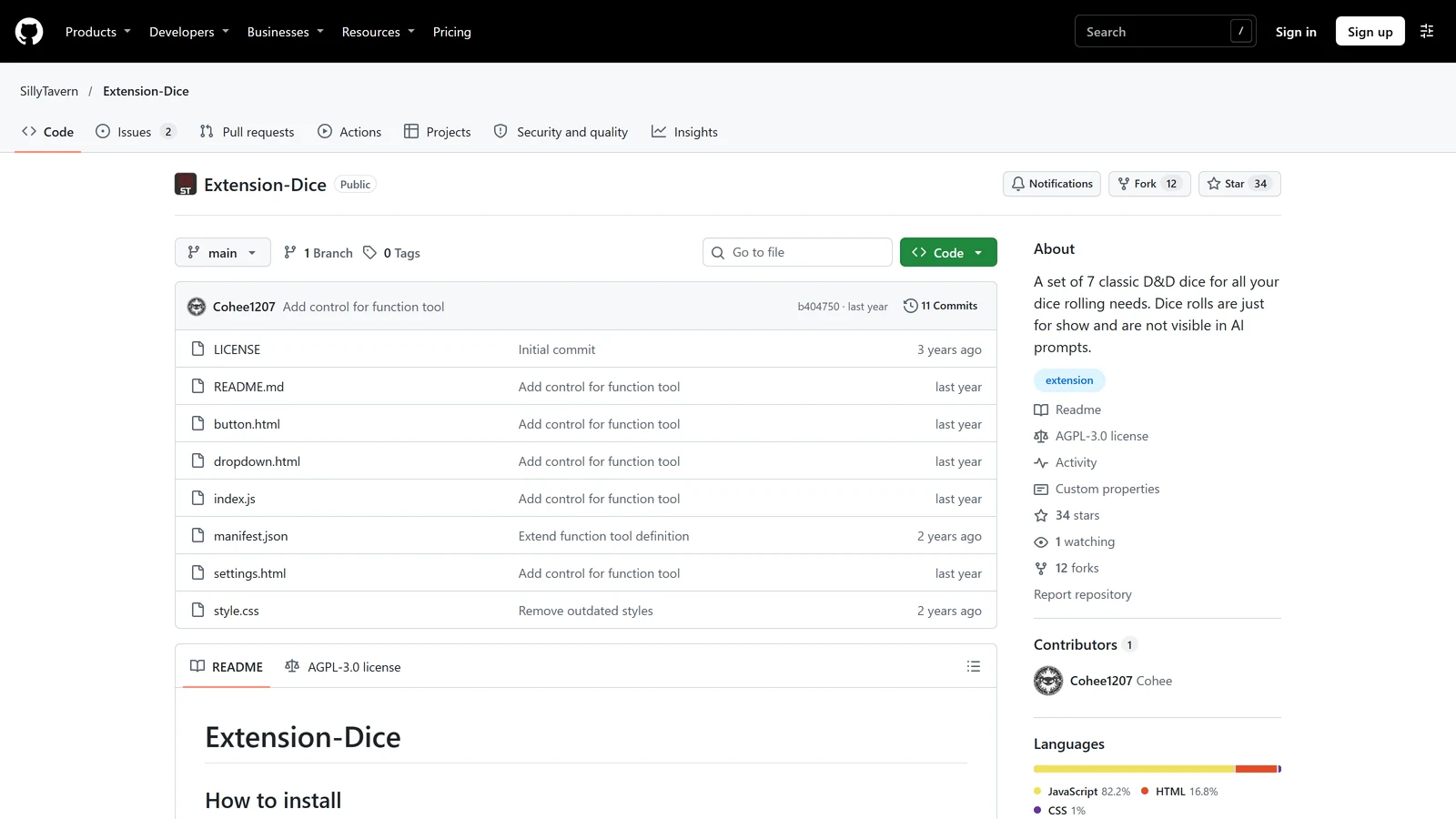
The extension’s README describes “a set of 7 classic D&D dice for all your dice rolling needs”, and adds, in a line that is also its repository description: “Dice rolls are just for show and are not visible in AI prompts.” That sentence is about the wand menu. If you open the wand menu, click Roll Dice and pick a die, the roll appears for you, and the AI does not see it. If you want the AI to respond to a roll you made that way, you have to type the result into your message yourself.
The extension has two other routes.
| Route | What the README says | Does the AI see the result? |
|---|---|---|
| Wand menu | Open the wand menu, click Roll Dice, pick a die or a custom one | No. “Just for show and not visible in AI prompts” |
| Slash command | /roll 1d20. The result can be passed down the pipe, for example /roll quiet=true 1d20 | /echo | It depends on what you pipe it into. SillyTavern’s scripting page says /roll adds a hidden message to the chat |
| Function tool | Off by default. Turn on “Use function tool” in the extension’s settings. “To roll the dice, just ask for it”, for example “Roll a d20” | Yes, because the model asks for the roll and receives the result |
The function tool has conditions, and SillyTavern’s function calling page lists them:
- It works only with Chat Completion connections. The page names the supported sources, including Custom (OpenAI-compatible), Claude, DeepSeek, Google AI Studio, OpenRouter, OpenAI, xAI and others. Text Completion APIs do not support function calls, though local servers such as Ollama may run in Custom OpenAI-compatible mode under Chat Completion.
- You must switch on “Enable function calling” in the AI Response Configuration panel.
- “There is no guarantee that an LLM will perform any function calls at all.” Most need an explicit activation in the prompt, such as asking to roll a die.
- Continuations, impersonation and background prompts cannot trigger a tool call.
- Some models do not support function calling even when their provider does.
- There is a recursion limit, default five rounds.
The page itself lists “introduce true randomness into the conversation (dice rolls, coin flips, etc.)” as an intended use. The extension’s own repository shows its last push on 1 August 2025, version 2.0.0, under the AGPL-3.0 licence, which is a fact about its maintenance and not a statement that it is broken. We did not run it.
The roll macro
SillyTavern’s macro documentation lists {{roll::1d20}} as a “dice roll using droll syntax”, and shows {{roll 1d20}} and {{roll::2d6+3}} in its examples. Macros are placeholders that SillyTavern replaces when it builds the prompt, and the documentation says they work in places such as the chat input, the expanded editor and the Prompt Manager. Our reading is that a card or Author’s Note containing {{roll::1d20}} would send a number to the model each time the prompt is built. The documentation does not say whether that number is fixed for a message or changes when you regenerate a reply. It does say that {{random::a::b::c}} “re-rolls each time”, while {{pick::a::b::c}} is a stable choice “consistent per chat and position” that you can re-roll with /reroll-pick. If you want a result that does not change when you swipe a reply, {{pick}} over a list of numbers is the documented stable tool. That is our inference, and we did not test it.
Does any of this make the dice fair?
Partly, and only at one step. The three routes that reach the AI produce the number outside the model, so the model did not choose it. But nothing then checks that the story uses the number. A model that is sent “17” can still write a miss. SillyTavern’s own function calling page is plain that a model may ignore the tool.
That is the difference from a platform that applies the outcome itself. In our Tabled review, the dice are rolled and audited on a server and handed to the narrator already committed, and experience and character death are handled by the server. SillyTavern gives you the ingredient, a number from outside the model. It does not give you the enforcement. For a solo game with a fair-minded player that may be enough, and for a game where you want the AI to be unable to fudge, it is not. Our guide to playing D&D solo with AI covers the practical side of rolling yourself.
The Objective Extension: A Quest That Does Not Drift
The Objective extension is one of the official downloads. SillyTavern’s documentation says it lets you “specify an Objective for the AI to strive towards during the chat”, broken down “into step-by-step tasks”, which can branch into child tasks. Its documented steps:
- Install Objective from Download Extensions and Assets.
- Type an objective and click Auto-Generate Tasks. This sends a request to your connected model for a list of tasks. The page warns that doing it again “will delete all existing tasks for the currently selected Objective”.
- Edit the tasks as you like. You can also add, delete and complete tasks by hand, and branch a task into subtasks.
- Set Position in Chat, the depth in the prompt where the current task is inserted. “The lower the number, the more attention the AI will give to the task”, and a high value risks the AI “never” getting “around to the task at all”.
- Set Task Check Frequency, how often the model is asked whether the task is done. At 3, it is asked every third message.
The page’s cost warning is the one to remember: “Task Checking happens in a separate API request. Setting Task Check Frequency to 1 will double your API calls to the LLM service. Be careful with this if you are using a paid service.” Its examples of objectives, such as slaying a demon or robbing a temple, are the kind of goal a game master would set. The task the model works on is always the first incomplete one, and tasks are chosen depth-first. We did not use the extension, so we cannot say how reliably the model judges completion.
Author’s Note: The Current Scene
SillyTavern’s page describes the Author’s Note as text inserted “into the prompt at any position and at any frequency you desire”. For a game master it is the place for the state of play that changes faster than a lorebook entry: where the party is, what is chasing them, whose turn it is.
| Setting | What the documentation says |
|---|---|
| After Scenario | Placed near the top, after the Scenario field of the character definition |
| In-chat | Placed in the chat history at a depth. Depth 0 is the very end. Depth 4 puts it before the most recent three messages |
| Frequency | 0 never inserts it, 1 every message, 4 every fourth |
| Per chat vs default | The box at the top applies to the current chat and “is not automatically transferred to any new chat”. The box at the bottom is the default for each new chat |
The page’s rule of thumb is that “the closer the Author’s Note is to the bottom of the prompt, the more impact it has on the next AI response”. Its examples are reminders such as a hero’s wound or a character who cannot speak. Macros appear inside its examples, so a note can name the current character or user.
Variables: Bookkeeping, Not Rules
SillyTavern’s macros include variables. {{setvar::name::value}} sets a local variable, {{getvar::name}} reads it, and {{addvar}}, {{incvar}} and {{decvar}} change it. Global versions exist too, with a global in the name. The documentation shows a condition macro as well: {{if ...}}text{{/if}}.
In principle, you can keep a number, say a count of rations, in a variable, show it in the Author’s Note with {{getvar::rations}}, and update it yourself with {{decvar::rations}}. That is our reading of the macro list, and we did not try it. The point to take from the documentation is what is missing: nothing in it applies a rule to a variable. SillyTavern stores the number. You, not the engine, decide when it changes, and the AI can still write a story that contradicts it.
A Starting Setup, From the Documents
None of this is tested, so treat it as a checklist built from the pages above and not as a recipe.
- A narrator card for tone and how to run the game, and a lorebook for the facts of the world.
- Decide how dice reach the AI. If your connection is Chat Completion and supports function calling, try the D&D Dice function tool. If not, use the roll macro, or roll yourself and type the result.
- An Author’s Note at a shallow depth for the current scene, with frequency 1 so it is in every prompt.
- One objective if the story drifts, with the task check frequency high enough to keep costs sensible.
- A group chat only when you need distinct voices for party members, and Swap character cards unless you have a reason to join them.
- Write down what you cannot enforce. If a rule must hold, such as damage, hit points or death, write the outcome into the chat yourself.
For the other features that make a long campaign hold together, see our SillyTavern memory guide and extensions guide. If you want the look of a game on top of this, our page on visual novel mode, expressions, Live2D and VRM covers the visual side. For a map of everything we have on tabletop play with AI, start at AI for tabletop RPGs.
What We Did Not Check
| Not checked | Why it matters |
|---|---|
| A real session with any of these features | We read the documents. We did not play |
Whether {{roll}} re-rolls when you swipe a reply | The documentation does not say |
What /roll does to the AI’s prompt when its hidden message is sent | The scripting page calls it a hidden message. We did not check what that means for the prompt |
| How well a model uses a roll or judges an objective | That depends on the model and the prompt |
| Whether the D&D Dice extension works with the current SillyTavern release | Its last push was in August 2025 |
| Which models support function calling | The documentation says that varies, so check your provider |
Frequently Asked Questions
Can SillyTavern roll dice?
Yes, in three documented ways, and they differ in whether the AI sees the result. The D&D Dice extension’s wand menu rolls are, in its own words, just for show and not visible in AI prompts. Its function tool lets a model ask for a roll on a compatible Chat Completion connection. SillyTavern’s roll macro puts a dice result into the prompt text itself.
Does the AI have to follow the roll?
No setting makes it. A roll gives the model a number, and the model still writes the story. SillyTavern’s own function calling page says there is no guarantee a model will perform any function calls at all. A game that enforces the outcome in code, as some platforms do, is doing something SillyTavern does not.
What does the Objective extension do?
You type a goal and SillyTavern asks your connected model to break it into tasks. It inserts the current task into the prompt at a depth you choose and, every few messages, asks the model whether the task is done. The documentation warns that checking every message doubles your requests to the AI, which matters on paid services.
What is the difference between a narrator card and a group chat?
A narrator card is one character card, usually named Narrator, that describes the world and how to run the game, and one model plays everything through it. A group chat holds several cards, so party members or non-player characters answer separately and in turn, with reply order rules you choose.
Can SillyTavern track hit points and inventory?
It can store variables, such as a number you add to or subtract from with built-in macros, and put them in the prompt. Nothing in the documentation applies game rules to them. You update the numbers and the AI reads them, so it is bookkeeping you do yourself, not a rules engine.
Which SillyTavern features need a Chat Completion connection?
Function calling does. SillyTavern’s documentation says it is only available for Chat Completion APIs and that Text Completion APIs do not support function calls, although some local servers such as Ollama can run as an OpenAI-compatible Chat Completion source. The macros, Author’s Note and group chats work with either type.
SillyTavern’s documentation for macros, Author’s Note, group chats, slash commands, the Objective extension and function calling, and the D&D Dice extension’s README and repository metadata, were read on 31 October 2026. We did not install or run any of the extensions or macros for this page. SillyTavern, the D&D Dice and Objective extensions, Ollama and the platforms named are separate projects and companies. Arcanum is not affiliated with any of them.