SillyTavern Release vs Staging Branch (2026): Which One Should You Run?
SillyTavern is published on two Git branches, and the choice is made the day you install it: release is the stable one, and staging is the same project a few steps further along. Almost every install guide tells you to pick release. Almost every “why is my new model missing” thread ends with someone saying “use staging”. Both are right, and the reason is worth understanding before you switch.
We looked at both branches on 27 October 2026: the commits between them, the release history, SillyTavern’s documentation for installing and updating, and its contributing guide. We did not run the staging branch for this page, so nothing below is a stability test. It is a description of the gap, how to see it yourself, and how to move across it.
Related setup pages: the SillyTavern guide, the installation guide, and SillyTavern not working. SillyTavern is an open-source project. Arcanum is independent and not affiliated with it.
The Short Answer
- Stay on release if your chats work and you only update when a new version is announced.
- Move to staging only for a specific thing that is merged there and not yet released. The usual case is a model your provider launched after the last release.
- If the only reason is a missing model, you may not need to move at all. Connecting through OpenRouter lists new models without any SillyTavern update. See the section on that below.
- Back up first before you change branch, whichever way you go.
What the Two Branches Are
The project’s contributing guide explains the purpose of staging in one line. It tells contributors to create pull requests for the staging branch, and says “99% of contributions should go there”. The reason it gives: “That way people could test your code before the next stable release.”
So the arrangement is:
release | staging | |
|---|---|---|
| What it is | The stable branch | Where contributions are merged first |
| Who is it for | Almost everyone | People who want changes early, and testers |
| How often it moves | Only when a new version is published | Whenever a contribution is merged |
| Has the change been in other people’s hands for long | Yes, it came from staging | Not necessarily |
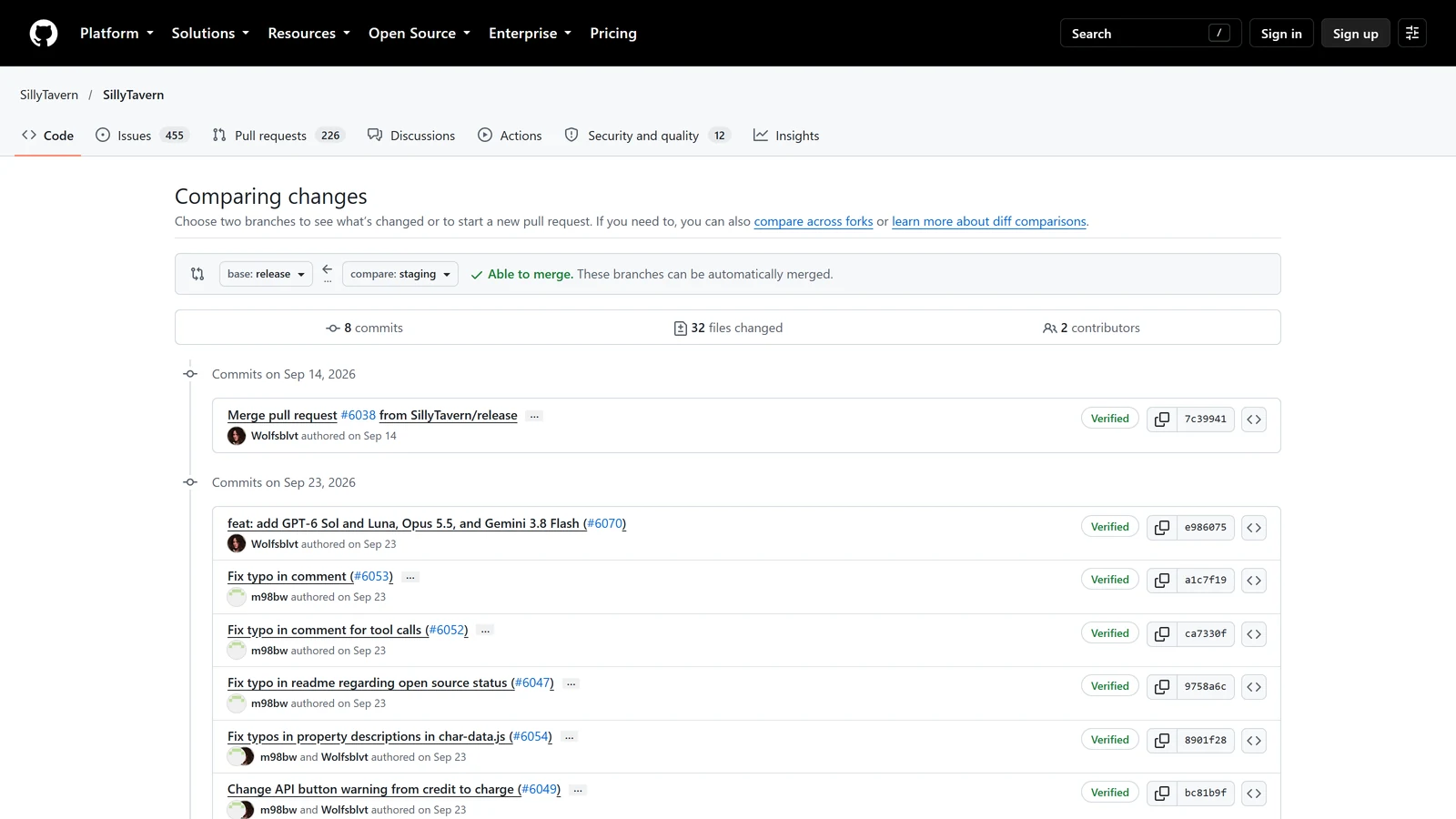
The relationship runs one way. A change reaches staging first, and release picks it up when a version is published. The branch history shows the 1.19.0 release being merged back into staging on 14 September. On 27 October 2026 the comparison on GitHub said staging was 8 commits ahead of release and 0 behind. Staging had everything release had, plus eight more.
That “0 behind” matters for the question of switching. Moving from release to staging adds changes. It does not take any away.
What the Gap Looked Like on 27 October 2026
Release had been at 1.19.0 since 14 September 2026. Staging had eight commits on top of it. These are their titles, with dates:
| Date | What the commit says it does |
|---|---|
| 14 Sep | Merge of the 1.19.0 release back into staging |
| 23 Sep | Add GPT-6 Sol and Luna, Opus 5.5, and Gemini 3.8 Flash |
| 23 Sep | Fix a typo in a comment |
| 23 Sep | Fix a typo in a comment about tool calls |
| 23 Sep | Fix a typo in the readme about open source status |
| 23 Sep | Fix typos in property descriptions in the character data file |
| 23 Sep | Change an API button warning from “credit” to “charge” |
| 2 Oct | Docs: route new provider contributions before implementation |
Read plainly, that is one change that a player would notice, which is the model addition, and six small text fixes and a documentation change. The comparison touched 32 files, but 16 of them were translation files, and the others included the main page, the readme, the contributing guide and the chat completion code.
We read the list of files and the commit titles. We did not read the code of the model commit, so we cannot say more about it than its title says.
This is a snapshot. It will be out of date the day the next version ships, and a busy week on staging can make the gap far larger than this one.
Why the gap was this small
Because the interesting part of staging had mostly stopped. The newest commit on 27 October was dated 2 October, a documentation change. Nothing had been merged in the 25 days since. A gap of eight commits is what a quiet month looks like, not what the branch always looks like.
The Version Number Does Not Tell You
This is the part that surprises people. On 27 October 2026, the package.json file on release said 1.19.0, and the one on staging also said 1.19.0. The version string is only changed when a release is prepared. Everything merged since then reports the old number.
So, if you are on staging and you open SillyTavern’s About page, it will probably show the same version as a release install. And if a guide says “this needs 1.19.0”, staging does not tell you whether it has the thing, either.
That also explains a common source of confusion in support threads. Two people with the same version number can have different features, and the difference is the branch.
Our pages that depend on the branch name it. The SillyTavern Claude guide says which Claude models are in the release and which only reached staging. The SillyTavern Gemini guide does the same for a Gemini model-handling fix.
How to Check Which Branch You Are On
If you installed with Git (the recommended route in the documentation), open a terminal in the SillyTavern folder and run:
git branch --show-currentIt prints release or staging. This is a standard Git command, not a SillyTavern feature.
If you installed from a zip file, there is no branch to check, because you downloaded a snapshot of one. SillyTavern’s update page says zip users must not copy over the whole /public/ folder, because that “could break the new install”. The page does not say which branch the zip is built from, and we did not verify it.
On Docker, the branch is in the image tag you pulled. The update steps in the documentation use ghcr.io/sillytavern/sillytavern:latest, and a note says to use sillytavern:staging instead “if you are targeting the staging branch”.
How the Choice Is Made at Install
SillyTavern’s Windows installation page shows the choice in one step. When you clone with Git, you “type ONE of the following”:
git clone https://github.com/SillyTavern/SillyTavern -b releaseor
git clone https://github.com/SillyTavern/SillyTavern -b stagingThe page lists them side by side and does not recommend either. It also does not explain the difference, which is why so many players pick at random. Our Termux guide uses release and says it is the right choice unless you have a reason to want staging.
Switching Branches
SillyTavern’s installation and update pages do not describe switching an existing install. The steps below are ordinary Git. They are not documented by SillyTavern, and we did not test them on a fresh install for this page.
Before you do anything, back up. The update page says “Make sure to have a backup if needed” before its destructive steps, and for zip installs it says to copy the /data directory and config.yaml. Do the same here. Your characters, chats, presets and settings are in data/, so copying that folder is the whole backup. Our presets guide lists what is inside it.
Release to staging:
git fetch
git checkout staging
git pull
Staging back to release:
git checkout release
git pull
Two things to know.
- Going back removes the extra changes. Staging was ahead of release and not behind, so returning to release drops what staging added. Your data folder is separate from the code, but a backup is how you know your characters and chats are safe.
- Local edits get in the way. The update page lists modified system files, such as default presets or
package-lock.json, as a reason a pull can be blocked. If Git complains, do not reach for a reset. Read the message, move your edited file out of the way, and try again. The page’s own advice for stuck pulls includesgit pull --rebase --autostash, and it warns that its stronger fix “can be destructive”.
After switching, start SillyTavern normally. The start scripts run npm install when a new requirement has been added, according to the same page.
Updating Within a Branch
On either branch, a Git install updates with git pull. The documentation says Git installs are updated “automatically and safely” that way. On Windows it suggests UpdateAndStart.bat first.
The difference is in when something is there to pull. On release, nothing changes between versions. On staging, a pull can bring a change on any day.
How long you wait on release
If the thing you want is in staging, the question is how long it takes to reach release. Looking at the last six releases:
| Version | Date | Days since the one before |
|---|---|---|
| 1.14.0 | 22 Nov 2025 | |
| 1.15.0 | 28 Dec 2025 | 36 |
| 1.16.0 | 14 Feb 2026 | 48 |
| 1.17.0 | 28 Mar 2026 | 42 |
| 1.18.0 | 3 May 2026 | 36 |
| 1.19.0 | 14 Sep 2026 | 134 |
Four of the five gaps were between 36 and 48 days. The latest gap was 134 days. On 27 October, 1.19.0 was 43 days old, which is already longer than three of the four shorter gaps.
That is a pattern in the history, and it is not a promise. We do not know when 1.20 will ship, and nobody outside the project does.
When Staging Is the Right Choice
A model is missing from the dropdown. The model lists for several providers are written into the code, so a model launched after a release is absent until a version adds it. That is the case in the table above: on 27 October, staging had GPT-6 Sol and Luna, Opus 5.5 and Gemini 3.8 Flash, and release did not.
You are reporting or testing a fix. If a developer says “fixed in staging”, then pulling staging is how you check it.
You are contributing. The contributing guide sends nearly all pull requests to staging.
When Release Is the Right Choice
Your setup works. A change that helps someone else’s setup can break yours, and a branch that gets changes sooner has had less time to show that. We did not see a problem on staging, and we did not look for one. The point is only that release gets the longer wait for a reason.
You use extensions. If an extension stops working after you move to staging, going back to release is a quick way to find out whether the branch is the cause.
You want help from guides. Our guides are written against the 1.19.0 release. When you ask anyone for help, “I’m on staging” is useful information, and it is the first thing a helper will ask.
You play on a phone through Termux. Our Termux guide uses release, and a failed update is more annoying on a phone.
You May Not Need Either
If the reason you are reading this is a model that is not in the list, look at the connection type first.
- A built-in provider (Claude, Gemini, OpenAI and others) uses a model list that ships with the version. New models can be missing.
- A router such as OpenRouter lists its own models and sends them to SillyTavern, so a new model appears without an update. Our OpenRouter guide covers the setup, and the Claude guide uses this route for the models release does not yet list.
- A custom endpoint. SillyTavern’s documentation says that with the Custom (OpenAI-compatible) source you type the URL and, if the service does not list models, you enter the model ID yourself.
A router has its own prices, so check them before you rely on one. The point is that a missing model is a reason to look at routes, and staging is only one of them.
If Something Breaks After You Switch
- Read the console. The terminal window where SillyTavern runs prints the first error. Our SillyTavern not working guide covers the common ones.
- Go back one branch.
git checkout releaseandgit pull, then start again. If the problem disappears, it is the branch. - Restore your data folder from the backup only if your own data looks wrong. We did not test whether a branch switch changes
data/, which is why the backup comes first. - Tell the project. The contributing guide describes staging as the place where code is tested before release. A clear report is the use of it.
Frequently Asked Questions
What is the difference between the release and staging branch in SillyTavern?
Release is the stable branch and staging is the development branch. Changes are merged into staging first, and the project’s contributing guide says the reason is that people can test the code before the next stable release. Release only moves when the maintainers publish a new version.
Should I use release or staging?
Use release unless you need something that has only been merged into staging, such as a new model in the dropdown. Staging gets changes earlier and has had less time in other people’s hands. If your setup works on release, there is nothing to gain by moving.
How do I know which branch I am on?
Open a terminal in the SillyTavern folder and run git branch —show-current. The version number in the app cannot tell you, because on 27 October 2026 both branches reported version 1.19.0.
How do I switch from release to staging?
SillyTavern’s documentation only shows choosing a branch when you first clone it. For an existing git install, ordinary Git commands do the switch: git fetch, then git checkout staging, then git pull. This is general Git, not a documented SillyTavern feature. Copy your data folder and config.yaml first.
Can I use the staging branch with Docker?
Yes. SillyTavern’s update instructions say to replace the latest image tag with staging if you are targeting the staging branch. The image name is ghcr.io/sillytavern/sillytavern.
Why is a new model missing from SillyTavern’s list?
The model list is partly built into the release. When a provider launches a model after a release, it can be missing until a later version adds it. On 27 October 2026 the staging branch already had three models that release did not. A router such as OpenRouter lists new models without any SillyTavern update.
The comparison of the two branches (8 commits ahead, 0 behind, 32 files, the commit titles and dates), the version number in each package.json, and the release dates are from SillyTavern’s public GitHub repository, read on 27 October 2026. The purpose of staging is from the repository’s contributing guide. The clone commands, the update steps, the Docker tag, the backup advice and the warnings about stuck pulls are from SillyTavern’s documentation pages on installing and updating, read on the same day. The git checkout steps are general Git and are not described in SillyTavern’s documentation. We did not run the staging branch, did not read the code of the model commit, and did not test switching branches. The “when to choose” advice is our reading.
SillyTavern, OpenRouter and the model names mentioned are the property of their respective owners. Arcanum is not affiliated with any of them.