OpenRouter in SillyTavern (2026): Setup, Free Models, Provider Settings and Every Common Error
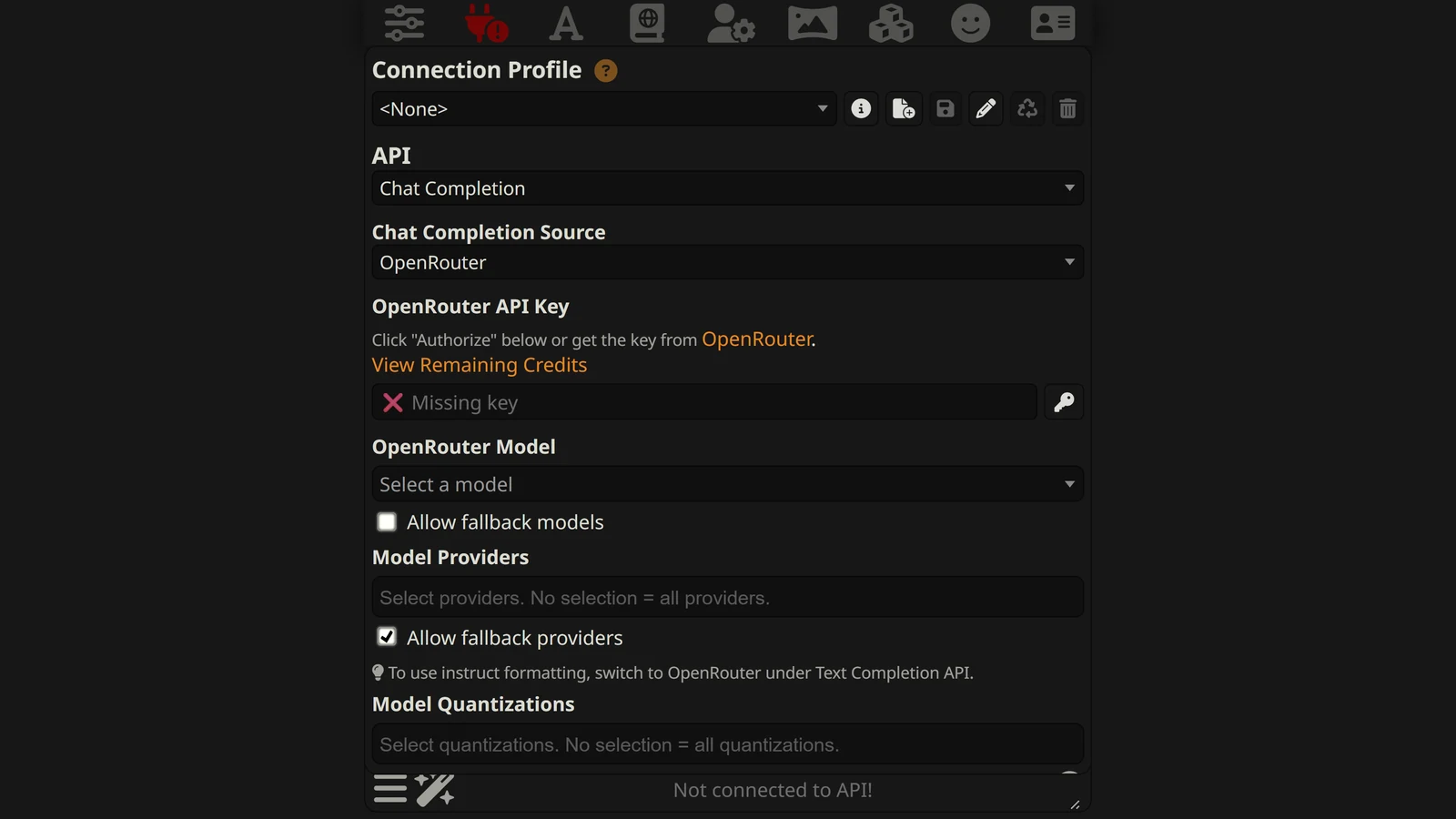
To use OpenRouter in SillyTavern, you choose “OpenRouter” as the Chat Completion source, click Authorize or paste an API key, and pick a model from the list. One key then reaches hundreds of models. That is the easy part. OpenRouter also adds a layer that no single provider has: it chooses which company runs your model, it can swap models, and it can shorten your prompt. SillyTavern has a control for each of these, and most players never open them.
This guide is about SillyTavern and OpenRouter together. For what OpenRouter is and whether it is worth using, see OpenRouter for roleplay. For how it compares with other routers, see OpenRouter vs NanoGPT vs Chutes.
Everything here comes from two places: the code of SillyTavern 1.19.0 (released 14 September 2026, still the current release on 13 October 2026) and OpenRouter’s documentation and public model list, read on 13 October 2026. We read what SillyTavern sends and what OpenRouter says it does with it. We did not send paid requests, so this page makes no claim about speed or writing quality.
New to SillyTavern? Start with the SillyTavern guide. Looking for which model to pick? See the best model for SillyTavern.
The Short Answer
- Source: API Connections, then Chat Completion, then OpenRouter. Click Authorize or paste a key.
- Pick a model by name. The default entry, “Use OpenRouter website setting”, lets your OpenRouter account choose.
- Change two defaults: Context Size (4,095) and Max Response Length (300).
- Free models exist but are limited to 50 requests a day until you have bought 10 credits.
- The reasoning checkbox only hides thinking. Turning thinking off takes a second setting.
- Middle-out is on “Allow” by default. It can remove the middle of a long chat.
- Most errors are relayed. The number tells you whose problem it is.
Step 1: Connect
- Open the API Connections panel (the plug icon).
- Set the API to Chat Completion.
- Set the Chat Completion Source to OpenRouter.
- Get a key in one of two ways:
- Click Authorize. SillyTavern sends you to openrouter.ai to sign in, and the key comes back by itself.
- Or create a key on OpenRouter’s keys page and paste it into the box.
- Click Connect.
- Choose a model. SillyTavern’s documentation also suggests the Test Message button to check the connection.
Under the key box there is a link, View Remaining Credits, which opens your balance on OpenRouter.
Chat Completion or Text Completion?
OpenRouter appears in SillyTavern twice. SillyTavern’s documentation says: “All models are available through either API, but their features may differ”. It gives the example that image inlining and tool calling are “only available with the Chat Completion API”.
Use Chat Completion unless you have a reason not to. The reason to use Text Completion is instruct templates: the panel itself says “To use instruct formatting, switch to OpenRouter under Text Completion API.” Our SillyTavern presets guide explains the difference between the two modes.
The rest of this page is about Chat Completion.
”Use OpenRouter website setting”
This is the first entry in the model menu, and it is what SillyTavern selects by default. With it selected, SillyTavern sends OpenRouter no model name. OpenRouter then uses the default model saved in your account on its website.
That is useful if you like to change models from the OpenRouter site. It is confusing if you do not know it is there. If replies read like a different model from the one you expected, look at this menu first and pick your model by name.
Model names on OpenRouter have the shape maker/model, for example google/gemini-3.8-flash or deepseek/deepseek-v4.1-flash.
Step 2: Change These Two Defaults
| Setting | SillyTavern’s default | What to do |
|---|---|---|
| Context Size (tokens) | 4,095 | Raise it. Most current models allow far more |
| Max Response Length (tokens) | 300 | Raise it to 1,024 or more for any model that reasons |
Context Size is how much of your chat SillyTavern sends each turn. SillyTavern reads each model’s limit from OpenRouter’s list and shows it next to the model name, but it does not move the slider up for you. At 4,095 tokens the model sees a card, some lore and a handful of messages.
Max Response Length is the one that produces empty replies. OpenRouter’s documentation explains it with an example that uses SillyTavern’s exact default:
“a request with
max_tokens: 300that returnscompletion_tokens: 302andreasoning_tokens: 301produced a single visible token.”
In plain words: the model was allowed 300 tokens, spent 301 of them thinking, and had one left for the reply. OpenRouter says reasoning tokens “are considered output tokens and charged accordingly”, and that on most providers they count against the same limit as the visible reply. So you pay for the empty reply as well.
”Max prompt cost”
When a model is selected, SillyTavern shows a line called Max prompt cost. By its code, this is the model’s input price times your Context Size plus its output price times your Max Response Length. It is the most one message could cost if the context were completely full. A real message early in a chat costs much less. Use it as a ceiling, and watch it when you raise Context Size on an expensive model.
Free Models: What You Really Get
OpenRouter’s free models have IDs that end in :free. Its documentation gives the limits:
| Credits you have bought, all time | Requests per minute | Requests per day |
|---|---|---|
| Less than 10 | 20 | 50 |
| 10 or more | 20 | 1,000 |
Fifty requests is not much for roleplay. Every message, every regeneration and every swipe is a request. So is each background job you have switched on, such as a summary. An active evening can use 50 in an hour.
The 1,000 level is permanent once you have bought 10 credits in total. Note the fee: OpenRouter charges 5.5% with a $0.80 minimum on card purchases, so buying $10 of credits costs $10.80.
Three more facts from OpenRouter’s pages:
- More keys do not help. “Making additional accounts or API keys will not affect your rate limits, as we govern capacity globally.”
- A negative balance blocks free models too. OpenRouter says that with a negative credit balance you may see 402 errors “including for free models”.
- The list changes. On 13 October 2026 OpenRouter’s public list had 15 free models. None was a Gemini, DeepSeek or Claude model. Two were Google’s open Gemma 4 models. A guide that promises a famous model for free was written for a list that has moved on.
For free options that do not depend on this list, see the best free model for roleplay. Gemini has a free tier of its own through Google, which our SillyTavern and Gemini guide covers.
The Provider Settings
This is what makes OpenRouter different. A model such as DeepSeek V4.1 Flash is not run by one company. Several hosts run it, at different prices, with different speeds and sometimes at different quality. OpenRouter picks one for each request.
How OpenRouter picks by default
OpenRouter’s documentation says that by default requests are “load balanced across the top providers to maximize uptime”, “prioritizing price”. Among stable hosts, the cheaper one is chosen more often. Its own example: a host that costs a third as much is nine times more likely to be picked first.
So with default settings, your replies can come from different hosts on different turns.
Model Providers
The Model Providers box in SillyTavern lets you name the hosts you want, in order. When you choose any, SillyTavern sends that list to OpenRouter as a fixed order. OpenRouter says that when an order is set, “load balancing will be disabled”.
Reasons to do this:
- Consistent output. One host, one version of the model, every turn.
- Caching. A cache lives at one host. Staying there keeps the discount.
- Privacy. You can choose hosts by their data policy.
- Price or speed. You can choose the host you prefer.
Allow fallback providers
This checkbox is on by default. Its tooltip says: “Automatically chooses an alternative provider if chosen providers can’t serve your request.”
With it on, your list is a preference. If your chosen host is down, OpenRouter uses another. With it off, your list is a rule, and the request fails if none of your hosts can serve it.
SillyTavern shows a small warning icon next to Model Providers when your selection does not fit the model. Its tooltip says: “Deselect inapplicable provider(s) or select an applicable provider to avoid a 404 error.”
Allow fallback models
This one is off by default and it is easy to confuse with the previous checkbox. Its tooltip says: “Automatically chooses an alternative model if the chosen model can’t serve your request.”
Fallback providers means the same model from a different host. Fallback models means a different model. For roleplay, a different model in the middle of a scene changes the voice of the story. Leave it off unless you would rather have any reply than none.
Model Quantizations
Hosts can run a compressed version of an open model to save cost. The Model Quantizations box lets you accept only certain levels, from 4-bit up to 32-bit. If you leave it empty, any level is accepted. If you care about getting the full-quality version of an open model, this box and the Model Providers box are how you ask for it.
Middle-out: The Setting That Can Remove Your History
In the response settings there is a menu called Middle-out Transform, with three choices: Auto, Allow and Forbid. SillyTavern’s default is Allow. Its tooltip says: “Allow compressing requests by removing messages from the middle of the prompt.”
OpenRouter’s documentation describes the feature this way:
“The plugin works by removing or truncating messages from the middle of the prompt, until the prompt fits within the model’s context window.”
It adds that this “can be useful for situations where perfect recall is not required”.
For a roleplay campaign, recall is the point. The middle of your prompt is where older history and lorebook entries usually sit. If a prompt is too long for the model and this is allowed, part of that is removed and nobody tells you. If it is forbidden, OpenRouter says the request “will fail with an error message” instead.
When does a prompt get too long? SillyTavern trims the chat to your Context Size before it sends, so normally it does not. By our reasoning, it can happen if you unlock the slider and set it above the model’s real limit, or if the host that serves your request has a smaller window than the one in OpenRouter’s list.
Our suggestion: set Middle-out to Forbid and keep Context Size a little under the model’s limit. An error you can see is better than a story with a hole in it.
One note on names. OpenRouter’s current documentation calls this feature “context compression” and describes it as a plugin. SillyTavern 1.19.0 sends the older request field named “middle-out”. OpenRouter’s page no longer mentions the old name, so we cannot tell you from the documentation how the old field is treated today.
Reasoning: Hiding It Is Not Turning It Off
Many current models think before they answer. SillyTavern has two controls for this, and with OpenRouter they do not do what their names suggest.
Request model reasoning (a checkbox, ticked by default). For OpenRouter, unticking it tells OpenRouter to leave the thinking out of the reply. OpenRouter’s documentation is clear about what that means:
“The model will still use reasoning, but it won’t be returned in the response. The tokens are still billed and count against
max_tokens.”
So unticking the box alone saves you nothing. You stop seeing the thinking and keep paying for it.
Reasoning Effort (a menu). By the code, SillyTavern translates it for OpenRouter like this:
| Reasoning Effort | Checkbox ticked | Checkbox not ticked |
|---|---|---|
| Auto | Nothing sent | Nothing sent |
| Minimum | low | none |
| Low | low | low |
| Medium | medium | medium |
| High | high | high |
| Maximum | high | high |
The one cell in bold is the off switch. Untick Request model reasoning and set Reasoning Effort to Minimum. SillyTavern then sends the effort “none”, which OpenRouter says “disables reasoning entirely”.
SillyTavern’s own note under the menu says the same, with a warning: this “disables reasoning entirely on models that support that, but can cause errors with some models”. OpenRouter marks some models as having mandatory reasoning, and says such a model “rejects” a request to turn it off. If you get an error after setting this, change Reasoning Effort to Low.
This is different from a direct DeepSeek connection, where the checkbox alone turns thinking off. Our SillyTavern and DeepSeek guide covers that case.
Prompt Caching
A long chat sends mostly the same text every turn. Many hosts charge much less for input they have already seen. With OpenRouter, how you get that discount depends on the model.
Most models: automatic. OpenRouter says “Most providers automatically enable prompt caching”, and names OpenAI, DeepSeek, Grok, Moonshot and Groq among them. You do nothing.
Claude: you have to ask. OpenRouter says Anthropic requires caching to be enabled in the request. SillyTavern can do that, but the switch is not in the interface. It is in the file config.yaml in your SillyTavern folder, under the heading claude:
| Line in config.yaml | Default | What it does |
|---|---|---|
enableSystemPromptCache | false | Caches the system prompt |
cachingAtDepth | -1 (off) | Caches the chat history up to a depth. The file suggests 0 “for most use cases” |
extendedTTL | false | Keeps the cache for 1 hour and not 5 minutes |
By the code, these settings apply to Claude models reached through OpenRouter as well as to a direct Claude connection. Restart SillyTavern after you edit the file.
Read the file’s own warnings before you turn them on. For the system prompt cache: use it “only when the prompt before the chat history is static and doesn’t change between requests”, otherwise “you’ll just waste money on cache misses”. For caching at depth: “Use with caution. Behavior may be unpredictable and no guarantees can or will be made.”
The reason for the warning is that writing to Claude’s cache costs more than normal input. The file gives the figures: 1.25 times the base price for the 5-minute cache and 2 times for the 1-hour cache. A cache you write and never read costs you extra. Things that change the start of a prompt include random macros, a summary that is rewritten, and lorebook entries placed before the chat history.
Gemini. The same file has a gemini line called enableSystemPromptCache, marked “Only for OpenRouter”. It is off by default.
Staying on one host. OpenRouter says it uses “provider sticky routing” to send your next requests to the same host after a cached one, and that this expires “after 10 minutes of inactivity”. If you take a long break in a session, the first message after it may not be cached.
What the OpenRouter Errors Mean
SillyTavern does not write replies. With OpenRouter there are three parties: SillyTavern, OpenRouter and the host that runs the model. The error number tells you which one is speaking.
| Code | What OpenRouter’s documentation says | What to do |
|---|---|---|
| 400 | Bad request: invalid or missing settings | Reset unusual sampler values; check Reasoning Effort |
| 401 | Invalid credentials: “OAuth session expired, disabled/invalid API key” | Click Authorize again or paste a new key |
| 402 | ”Your account or API key has insufficient credits” | Add credits, or raise the limit on that key |
| 403 | Forbidden: permissions, a guardrail block or a moderation flag | Read the message; it names the reason |
| 408 | ”Your request timed out” | Try again; choose a faster host |
| 429 | ”You are being rate limited” | Wait. On a free model, you may be out of daily requests |
| 502 | ”Your chosen model is down or we received an invalid response from it” | Try again, or allow fallback providers |
| 503 | ”There is no available model provider that meets your routing requirements” | Loosen Model Providers, quantizations or privacy settings |
”User not found”
Players report this message with code 401. OpenRouter’s documentation describes 401 as invalid credentials: an expired sign-in, or a disabled or invalid key. The fix is a new key. Click Authorize again, or create a key on OpenRouter and paste it. If you pasted the key by hand, check for a space at the start or end.
”No endpoints found” and 404
We did not find this exact wording in OpenRouter’s current documentation. What the documentation does describe matches it: when your restrictions leave no host that can serve the model, “the request fails with a 404”.
There are two places those restrictions come from:
- SillyTavern’s Model Providers box, when it names a host that does not serve this model and fallback providers are off. This is the case SillyTavern’s own tooltip warns about.
- Your OpenRouter privacy settings. OpenRouter says hosts that log prompts, or whose policy it could not confirm, are not used unless you allow them. If every host of a model is in that group, no host is left. Free models are a common case.
Start by clearing the Model Providers box. If the error stays, review the privacy settings in your OpenRouter account.
”Provider returned error”
This is OpenRouter telling you that the host failed, not OpenRouter itself. OpenRouter passes on the host’s own code where it has one. Try again once. If it repeats, choose a different host in Model Providers or make sure fallback providers are allowed.
An error that says only “OK”
If your SillyTavern is older than 1.19.0, you may see an error whose whole text is the word for success. Some hosts return an error inside a reply marked as successful, and older versions showed the status text. The 1.19.0 release notes say: “Provider error responses returned with HTTP 200 now show the provider error instead of the HTTP status text.” Update, and the real message appears.
429 on a paid model
A 429 does not always come from OpenRouter. Its documentation says you may be limited “either by an OpenRouter platform limit” or “by the upstream provider”. A popular model on a small host can be busy. Naming a second host in Model Providers, with fallback on, usually solves it.
402 with money in the account
Two causes are documented. A key can have its own spending limit, which is separate from your balance. And OpenRouter holds back an estimate of the cost of requests that are still running, so several large requests at once can be refused even with a positive balance. The second kind passes after a short wait.
Empty replies
OpenRouter’s documentation lists when a model “may not generate any content”:
- “The model is warming up from a cold start.”
- “The system is scaling up to handle more requests.”
- A reasoning model “spent the whole
max_tokensbudget on reasoning”. For this case it says: “Retrying does not help; raisemax_tokensor cap reasoning instead.”
In SillyTavern, the third is the first to rule out. Raise Max Response Length. OpenRouter adds that you “may still be charged for the prompt processing cost” when nothing is generated.
Smaller Things Worth Knowing
Extra samplers. For OpenRouter, SillyTavern also sends Top K, Min P, Top A and Repetition Penalty. Not every host supports every one. A setting a host does not support may simply be ignored.
Gemini through OpenRouter. For Google’s Gemini models, SillyTavern adds its safety list with every adjustable category set to off, the same as on a direct Google connection.
Web search. The panel’s own note on “Enable web search” says: “Not free, adds a $0.02 fee to each prompt.” Few roleplay scenes need it.
OpenRouter knows you use SillyTavern. SillyTavern labels its requests with its name and website. This is how OpenRouter can publish which models SillyTavern users run most. We used that list in the best model for SillyTavern.
Checklist
- Chat Completion, OpenRouter, Authorize or paste a key, Connect.
- Pick a model by name, not “Use OpenRouter website setting”.
- Context Size raised from 4,095. Check Max prompt cost afterwards.
- Max Response Length at 1,024 or more for models that reason.
- Middle-out set to Forbid.
- Allow fallback providers on. Allow fallback models off.
- To turn thinking off: untick Request model reasoning and set Reasoning Effort to Minimum.
- On Claude, decide about caching in
config.yaml. - When something fails, read the code first: 401 is the key, 402 is money, 404 and 503 are routing, 429 is a limit.
Frequently Asked Questions
How do I connect OpenRouter to SillyTavern?
In SillyTavern, open API Connections, choose Chat Completion as the API and OpenRouter as the source. Click Authorize to sign in to OpenRouter and receive a key, or paste a key you created on OpenRouter’s keys page. Click Connect, then choose a model. Raise Context Size from the default of 4,095 tokens and Max Response Length from the default of 300.
Is OpenRouter free in SillyTavern?
Partly. OpenRouter has free versions of some models, with IDs that end in :free. Its documentation limits them to 20 requests a minute and 50 requests a day, or 1,000 a day once you have bought at least 10 credits in total. On 13 October 2026 its list had 15 free models, and none of them was a Gemini, DeepSeek or Claude model.
What does ‘Use OpenRouter website setting’ mean in SillyTavern?
It is the first entry in the model menu and SillyTavern’s default. With it selected, SillyTavern sends no model name, and OpenRouter uses the default model saved in your OpenRouter account. If replies seem to come from a model you did not choose, check this entry first and pick a model by name.
How do I disable reasoning for OpenRouter in SillyTavern?
It takes two settings. Untick Request model reasoning and set Reasoning Effort to Minimum. SillyTavern then asks OpenRouter for no reasoning at all. Unticking the checkbox alone only hides the thinking: OpenRouter says the model still reasons and the tokens are still billed. Some models do not allow reasoning to be turned off and return an error.
Why does OpenRouter return an empty response in SillyTavern?
OpenRouter’s documentation gives three causes: the model is starting from cold, the provider is scaling up, or a reasoning model spent the whole response limit on reasoning. SillyTavern’s default Max Response Length is 300 tokens, which is small enough for the third cause. Raise it to at least 1,024 before you try anything else.
What does ‘No endpoints found’ mean with OpenRouter?
It means no provider is allowed to serve your request. The usual causes are a provider selected in SillyTavern’s Model Providers box that does not host the model, with fallback providers switched off, or privacy settings in your OpenRouter account that exclude every provider of that model. Clear the Model Providers box or review your privacy settings.
How do I enable Claude prompt caching with OpenRouter in SillyTavern?
It is not in the interface. Open config.yaml in your SillyTavern folder and, under claude, set cachingAtDepth to a whole number such as 0, or set enableSystemPromptCache to true. Then restart SillyTavern. Both are off by default, and the file warns that a prompt which changes between requests will waste money on cache misses.
What is the Middle-out Transform in SillyTavern?
It is an OpenRouter feature that shortens a prompt that is too long for the model by removing or cutting messages from the middle. SillyTavern’s default is Allow. For roleplay that can remove part of your history without telling you. Set it to Forbid if you would prefer an error, and keep Context Size below the model’s real limit.
The connection steps and the Chat Completion and Text Completion note are from SillyTavern’s documentation. The default settings, the default model entry, the Max prompt cost formula, the provider, fallback, quantization and Middle-out options and their tooltips, the reasoning mapping, the caching code, the sampler list and the request labels are from the code and interface of SillyTavern 1.19.0 (release of 14 September 2026); the caching defaults and warnings are from its default config.yaml, and the “HTTP 200” fix is from its release notes. The free-model limits, the fee, the routing rules, the data-policy rule, the reasoning rules, the caching rules, the context-compression description and the error codes are from OpenRouter’s documentation. The count of 15 free models is from OpenRouter’s public model list. All were read on 13 October 2026. We did not send paid requests to test these behaviours. We have no commercial relationship with SillyTavern or OpenRouter.
SillyTavern, OpenRouter, Gemini, Gemma, DeepSeek, Claude, Grok, NanoGPT and Chutes are the property of their respective owners. Arcanum is not affiliated with any of them.