DeepSeek in SillyTavern (2026): Setup, Best Settings, and the Thinking Switch Nobody Finds
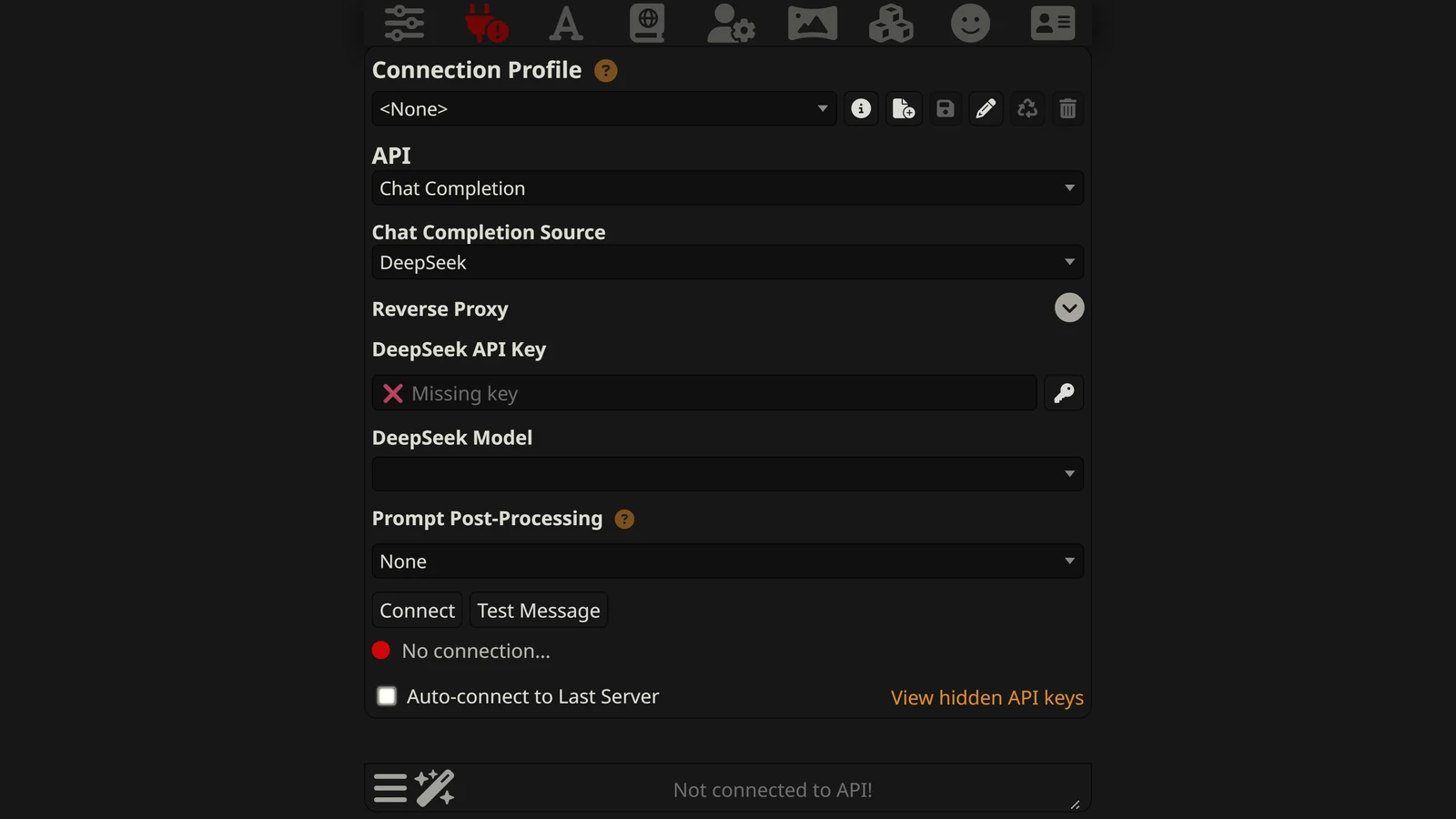
To use DeepSeek in SillyTavern, you add a balance to a DeepSeek account, create an API key, choose “DeepSeek” as the Chat Completion source in SillyTavern, and paste the key. After that, three settings decide how it plays: the model name, the thinking switch, and the response limit. Most guides get at least one of them wrong, because all three changed in 2026.
This guide is about SillyTavern and DeepSeek together. For which DeepSeek model to choose and what a campaign costs, see our best DeepSeek model for roleplay page. For what DeepSeek is and why roleplayers like it, see DeepSeek for roleplay.
Everything here comes from two places: the code of SillyTavern 1.19.0 (released 14 September 2026, still the current release on 13 October 2026) and DeepSeek’s API documentation, read on 13 October 2026. We read what SillyTavern sends and what DeepSeek says it does with it. We did not open a paid account or send requests, so this page makes no claim about speed or writing quality.
New to SillyTavern? Start with the SillyTavern guide. Something broken that is not about DeepSeek? See SillyTavern not working.
The Short Answer
- Source: API Connections, then Chat Completion, then DeepSeek.
- Model:
deepseek-flash. The namesdeepseek-chatanddeepseek-reasonerno longer exist. - Thinking switch: the Request model reasoning checkbox. Ticked means thinking on. It is ticked by default.
- Temperature: does nothing while thinking is on.
- Change two defaults: Context Size (4,095) and Max Response Length (300).
- Caching is automatic and makes repeated input about 50 times cheaper.
- It is not free, but a long evening costs cents.
Step 1: Get a DeepSeek API Key
- Create an account on DeepSeek’s developer platform.
- Add a balance. DeepSeek’s API is prepaid: its pricing page says fees are “directly deducted from your topped-up balance or granted balance”.
- Create an API key and copy it.
Keep the key private. Anyone who has it can spend your balance.
Step 2: Connect It in SillyTavern
- Open the API Connections panel (the plug icon).
- Set the API to Chat Completion.
- Set the Chat Completion Source to DeepSeek.
- Paste the key and click Connect.
The model menu is empty until you connect. It says “Connect to the API”. After you connect, SillyTavern fills it with the list DeepSeek sends back for your key.
Which model name to pick
DeepSeek’s price list has two models today:
| Name to pick | Model | Notes |
|---|---|---|
deepseek-flash | DeepSeek V4.1 Flash | Newest and cheapest. Released 10 September 2026 |
deepseek-v4-pro | DeepSeek V4 Pro | About four times the price |
Two older names need a word, because SillyTavern itself still uses one of them.
deepseek-v4-flash is SillyTavern 1.19.0’s built-in default. DeepSeek retired the V4 Flash model, but its change log says the name is “temporarily routed to V4.1 Flash”, and its price list says those requests are “billed at the Flash price”. So the default works today and gives you the current model. The word “temporarily” is DeepSeek’s. Pick deepseek-flash if your menu shows it, and you will not have to think about this again.
deepseek-chat and deepseek-reasoner are gone. DeepSeek retired both on 24 July 2026. SillyTavern 1.19.0 handles this for you: when it loads an old setting with deepseek-chat, deepseek-reasoner or deepseek-coder, it changes it to deepseek-v4-flash. If you are on an older SillyTavern and DeepSeek stopped working over the summer, update first.
The old choice did not disappear. It became a setting, and it is the next section.
The Thinking Switch Nobody Finds
Both DeepSeek models have a thinking mode. Before the model answers, it writes out its reasoning, then gives the reply. With thinking on you get what used to be called the reasoner. With thinking off you get what used to be called chat.
DeepSeek’s guide says thinking is “enabled by default”, at the effort level high.
In SillyTavern the switch has a name that hides what it does: Request model reasoning, a checkbox in the AI Response Configuration panel. For most providers this checkbox only shows or hides the thinking text. For DeepSeek it is different, and SillyTavern says so in bold under the checkbox when DeepSeek is the source:
“This setting enables or disables reasoning generation by the model.”
That sentence is new. The release notes for SillyTavern 1.19.0 list it as an addition, a “message indicating that the ‘Request mode reasoning’ checkbox controls whether reasoning is generated at the source, for Deepseek API”. On an older version the checkbox is there without the explanation.
We checked the code. For a DeepSeek request, SillyTavern sends the thinking mode as enabled when the box is ticked and disabled when it is not. Nothing else decides it.
The box is ticked in SillyTavern’s default settings. So a new setup has thinking on twice: by SillyTavern’s default and by DeepSeek’s.
| Request model reasoning | What DeepSeek does | What you notice |
|---|---|---|
| Ticked (default) | Thinks, then replies | Slower start; a thinking block above the reply; temperature ignored |
| Not ticked | Replies directly | Faster; no thinking block; temperature works |
Reasoning Effort
The Reasoning Effort menu sets how hard the model thinks. SillyTavern only sends it when Request model reasoning is ticked. DeepSeek has three levels, and SillyTavern’s six choices map onto them like this:
| Reasoning Effort in SillyTavern | What DeepSeek receives |
|---|---|
| Auto | Nothing; DeepSeek’s default, high, applies |
| Minimum | low |
| Low | low |
| Medium | high |
| High | high |
| Maximum | max |
So there are really three settings, and Medium is the same as High. DeepSeek’s own table shows the same thing from its side: a request for medium is treated as high.
Which should you use for roleplay?
| Your game | Setting |
|---|---|
| Fast, chatty scenes with one character | Request model reasoning off |
| A campaign with stats, inventory or strict rules | Request model reasoning on, Reasoning Effort Low |
| Almost never | Maximum |
Thinking costs you twice. You wait while the model reasons, and you pay for the reasoning as output. On a model this cheap the money is small. The wait is what you feel.
Change These Two Defaults
| Setting | SillyTavern’s default | What DeepSeek allows |
|---|---|---|
| Context Size (tokens) | 4,095 | 1,000,000 |
| Max Response Length (tokens) | 300 | 384,000 |
Context Size is how much of your chat SillyTavern sends each turn. At 4,095 tokens a character card and a lorebook can take most of the room, and the model sees only the last few messages. For DeepSeek, SillyTavern lets the slider go up to 1 million, but it does not move it for you.
You do not need 1 million. Between 32,000 and 100,000 tokens holds a long session. Our SillyTavern memory guide covers what to do past that.
Max Response Length is the limit on what the model may generate in one turn. With thinking on, the reasoning is generated too. DeepSeek’s reference shows how much room it expects thinking to need: when no limit is sent, its default is 8,000 tokens with thinking off and 64,000 with thinking on.
SillyTavern always sends a limit, and its default is 300. With thinking on, the model can spend all 300 tokens reasoning and have nothing left for the reply. SillyTavern’s own documentation describes the symptom, “responses are coming back incomplete or empty”, and suggests “anywhere from 1024 to 4096 tokens” for reasoning models.
Set Max Response Length to at least 1,024 with thinking on. With thinking off, the default of 300 only limits the length of the reply, and you can set it to the reply length you want.
Why Your Temperature Slider May Do Nothing
DeepSeek’s guide says thinking mode “does not support the temperature, presence_penalty, or frequency_penalty parameters”, and then:
“for compatibility with existing software, setting these parameters will not trigger an error but will also have no effect.”
SillyTavern sends all three on every DeepSeek request. With thinking on, DeepSeek accepts them and ignores them. You can move temperature from 0.7 to 1.5 and nothing breaks and nothing changes.
Top P is limited as well. DeepSeek says it “only takes effect in thinking mode”, where values below 0.95 are treated as 0.95. With thinking off, it is fixed at 1.0.
So the rule for SillyTavern is short:
- Request model reasoning ticked: temperature, Frequency Penalty and Presence Penalty do nothing. Shape the style with your prompt.
- Request model reasoning not ticked: temperature and the penalties work. Top P does not.
This also explains a common complaint. If DeepSeek repeats itself and raising the penalties does not help, check the checkbox. The penalties only work with thinking off. Our page on the AI roleplay repetition loop covers fixes that do not depend on sliders.
Settings We Suggest
These are a starting point built from DeepSeek’s own recommendations and the rules above. We did not test them against each other.
| Setting | Fast chat | Rules-heavy campaign |
|---|---|---|
| Model | deepseek-flash | deepseek-flash |
| Request model reasoning | Off | On |
| Reasoning Effort | (not sent) | Low |
| Temperature | 1.3 | (ignored) |
| Frequency / Presence Penalty | 0 to start | (ignored) |
| Top P | (ignored) | 1.0 |
| Context Size | 32,000 to 100,000 | 32,000 to 100,000 |
| Max Response Length | Your reply length, for example 500 | 1,024 or more |
| Streaming | On | On |
The temperature of 1.3 is DeepSeek’s own figure for “General Conversation”. Its table gives 1.5 for “Creative Writing / Poetry” and says the default is 1.0.
Do you need a downloaded DeepSeek preset?
“SillyTavern DeepSeek preset” is one of the most searched phrases about this pair, usually with a version number after it. A Chat Completion preset is two things in one file: slider values and a set of prompts. For DeepSeek with thinking on, the slider values do nothing, as shown above. What is left is the prompt.
So a preset written for DeepSeek V3 or R1 can still be useful for its prompt, and its sampler advice is out of date. Our SillyTavern presets guide explains how to import one and how to see what is inside it.
What SillyTavern Does to Your Prompt for DeepSeek
Two things happen without a setting, and both come from the code.
Roles are merged
People search for which Prompt Post-Processing option to use with DeepSeek. For a direct DeepSeek connection, SillyTavern 1.19.0 decides for you. It always applies the conversion it calls Semi-strict. SillyTavern’s documentation describes that as: “merge roles and allow only one optional system message”.
In practice, your opening system prompt stays a system message. Any system message that appears later in the chat, such as a lorebook entry or an Author’s Note inserted at depth, is sent with the user role and joined to the message next to it. The model still reads the text. It just does not arrive marked as a separate system instruction.
The menu matters if you reach DeepSeek another way, for example through a Custom OpenAI-compatible endpoint.
A prefill works
A prefill is when the prompt ends with the first words of the model’s reply, to push the tone or the format. Some providers reject that. DeepSeek supports it as a beta feature called “Chat Prefix Completion”, and SillyTavern uses DeepSeek’s beta address so that it works. If your prompt ends with an assistant message, SillyTavern marks it as a prefix and DeepSeek continues from it.
One exception, from the code: this is skipped when tools (function calling) are in use.
Caching: The Reason DeepSeek Is Even Cheaper Than Its Price List
A long chat is mostly repeated input. Every turn sends the same card, the same lorebook and the same history, plus one new message. DeepSeek charges far less for input it has already seen.
| DeepSeek V4.1 Flash, per million tokens | Peak | Off-peak |
|---|---|---|
| Input, not in cache | $0.30 | $0.15 |
| Input, already in cache | $0.006 | $0.003 |
| Output | $1.20 | $0.60 |
Cached input costs one fiftieth of new input. On a turn that sends 40,000 tokens of card, lore and history, the input costs about 1.2 cents with no cache and about 0.02 cents if all of it is cached.
You do not switch this on. DeepSeek’s page says the cache “is enabled by default for all users, allowing them to benefit without needing to modify their code”. SillyTavern has no DeepSeek cache setting, because none is needed.
There is a condition. DeepSeek’s cache works on the start of the prompt. In its words, a request “can only hit the cache if it fully matches a cache prefix unit”. If turn two begins exactly like turn one, the shared part is cheap. If something near the top changes, everything after the change is charged at the full price.
What follows is our own reasoning from that rule, not a test. These things change the top of a SillyTavern prompt from one turn to the next:
- A full context. When the chat is longer than Context Size, SillyTavern drops the oldest messages each turn. The history then starts at a different place every time, and the cache can only cover what comes before it. A larger Context Size delays this.
- Lorebook entries placed before the chat history. If different entries fire on different turns, the top of the prompt changes. Entries inserted lower down, inside the chat, do less harm. Our SillyTavern lorebook guide explains positions.
- Random macros such as
{{random}}in a system prompt or card. - A summary that is rewritten and inserted near the top.
SillyTavern’s settings file gives the same warning about Claude’s cache: use it only when the prompt before the chat history “is static and doesn’t change between requests”, otherwise “you’ll just waste money on cache misses”. With DeepSeek the stakes are lower, because even the full price is small.
Peak and off-peak
Every DeepSeek price has two levels. Its price list says: “Peak hours are 01:00 - 04:00 and 06:00 - 10:00 UTC, Monday through Friday, excluding Chinese public holidays. All other hours are off-peak, including weekends.”
Off-peak is half price. For most players in Europe and the Americas, an evening session is off-peak already.
What the DeepSeek Errors Mean
SillyTavern does not write replies. It passes your prompt to DeepSeek and passes the answer back. So the errors are DeepSeek’s, relayed.
One thing to know first: when streaming is off and DeepSeek returns an error, SillyTavern’s server passes the message to the page with its own status, 500. The real status is in the terminal window where SillyTavern runs, on a line that starts DeepSeek API returned error:.
DeepSeek publishes seven error codes:
| Code | DeepSeek’s name | What it means for you |
|---|---|---|
| 400 | Invalid Format | The request was malformed. Read the message; update SillyTavern if you are behind |
| 401 | Authentication Fails | Wrong API key. Create a new one and paste it again |
| 402 | Insufficient Balance | ”You have run out of balance.” Top up |
| 422 | Invalid Parameters | A setting is outside the allowed range. Reset your sliders |
| 429 | Rate Limit Reached | Too many requests at once |
| 500 | Server Error | DeepSeek’s side. Wait and try again |
| 503 | Server Overloaded | High traffic. Wait and try again |
A few notes on these.
402 is the one to check first when DeepSeek suddenly stops after working for weeks. It is a prepaid balance, and it runs out quietly.
429 is hard to reach alone. DeepSeek’s limit is on requests running at the same moment: 2,500 for deepseek-flash and 500 for deepseek-v4-pro, per account. One player cannot get near that.
“DeepSeek API key is missing” is SillyTavern’s own message, written to the terminal. It means no key is saved for the DeepSeek source. Paste it again and click Connect.
A long wait is not always an error. DeepSeek keeps the connection open while it works, and its page says the server closes it only “if the request has not started inference after 10 minutes”. With thinking on at a high effort, a slow start is expected. Turn on streaming and you will see the thinking arrive.
Empty replies
In order of how often they are the cause:
- Max Response Length is too small for thinking. Raise it to 1,024 or more.
- The balance is empty. Look for 402 in the terminal.
- A content filter stopped the reply. DeepSeek’s reference lists
content_filteras one of the reasons a reply can end: “content was omitted due to a flag from our content filters”. Regenerating may get through. If a scene is refused every time, our page on why AI refuses to roleplay covers the choices.
DeepSeek Direct or Through OpenRouter?
You can also use DeepSeek models in SillyTavern through a router such as OpenRouter. The differences that matter:
| DeepSeek direct | Through OpenRouter | |
|---|---|---|
| Who runs the model | DeepSeek | One of several hosts; OpenRouter picks unless you choose |
| Model name | deepseek-flash | deepseek/deepseek-v4.1-flash |
| Thinking switch in SillyTavern | Request model reasoning turns it off | The checkbox only hides the thinking; turning it off takes two settings |
| Older models (V3.2, R1) | Retired | Still listed |
| Peak and off-peak prices | Yes | Depends on the host |
| Free version | None | None listed on 13 October 2026 |
The thinking row catches people. The same checkbox does a different job on each source. Our SillyTavern and OpenRouter guide explains it. If you want the wider comparison of routers, see OpenRouter vs NanoGPT vs Chutes.
A note on Text Completion. Searches for a DeepSeek “instruct template” or “context template” come from the days of DeepSeek R1 on local machines and routers. SillyTavern’s DeepSeek source is a Chat Completion source. Instruct and context templates do not apply to it.
Checklist
- Balance added, key created, pasted under Chat Completion, DeepSeek.
- Model set to
deepseek-flash. - Request model reasoning: decide. Off for fast chat, on for rules.
- Context Size raised from 4,095.
- Max Response Length at 1,024 or more if thinking is on.
- Temperature 1.3 if thinking is off. Ignore it if thinking is on.
- When something fails, read the terminal for DeepSeek’s real code. Check 402 first.
Frequently Asked Questions
How do I use DeepSeek in SillyTavern?
Create an API key on DeepSeek’s platform and add a balance. In SillyTavern, open API Connections, choose Chat Completion as the API, choose DeepSeek as the source, paste the key and click Connect. Pick deepseek-flash from the model menu, then raise Context Size from the default of 4,095 tokens and Max Response Length from the default of 300.
How do I turn off DeepSeek thinking in SillyTavern?
Untick Request model reasoning in the AI Response Configuration panel. For DeepSeek this checkbox is the real switch: SillyTavern sends thinking as enabled when it is ticked and disabled when it is not. It is ticked by default, and DeepSeek’s own default is also thinking on, so a new setup always starts with thinking on.
What is the best temperature for DeepSeek in SillyTavern?
With thinking on, none: DeepSeek says temperature has no effect in thinking mode. With thinking off, DeepSeek’s own table recommends 1.3 for general conversation and 1.5 for creative writing, and the default is 1.0. So first decide whether thinking is on. If it is, the temperature slider is not connected to anything.
Should I use deepseek-chat or deepseek-reasoner in SillyTavern?
Neither. DeepSeek retired both names on 24 July 2026. The current models are deepseek-flash, which is DeepSeek V4.1 Flash, and deepseek-v4-pro. The old choice between chat and reasoner is now the thinking setting on either model. SillyTavern 1.19.0 changes a saved deepseek-chat or deepseek-reasoner setting to deepseek-v4-flash by itself.
Why does DeepSeek give an empty response in SillyTavern?
Usually the response limit is too small for thinking. SillyTavern’s default Max Response Length is 300 tokens, and with thinking on the model can spend all of it on reasoning before it writes the reply. Raise Max Response Length to at least 1,024, or turn thinking off. If the terminal shows a 402 error instead, your DeepSeek balance is empty.
Is DeepSeek free in SillyTavern?
No. SillyTavern is free, but DeepSeek’s API is paid from a prepaid balance. It is cheap: on 13 October 2026 DeepSeek V4.1 Flash cost $0.30 per million input tokens and $1.20 per million output tokens at peak hours, and half of that off-peak. OpenRouter listed no free DeepSeek model on the same day.
Which Prompt Post-Processing should I use for DeepSeek?
For a direct DeepSeek connection you do not need to choose. By its code, SillyTavern 1.19.0 always applies its semi-strict conversion to DeepSeek requests, which merges messages so that roles alternate and only one system message is kept at the start. The menu matters when you reach DeepSeek through a custom endpoint instead.
Does prompt caching work with DeepSeek in SillyTavern?
Yes, and you do not switch it on. DeepSeek says its cache is enabled by default for all users. Input the cache has already seen costs $0.006 per million tokens at peak hours instead of $0.30. It only works when the start of your prompt is the same as last turn, so prompts that change near the top lose the discount.
The default settings, the default model name, the automatic change of retired model names, the thinking parameter, the Reasoning Effort mapping, the semi-strict conversion, the prefix handling, the beta address and the error messages are from the code of SillyTavern 1.19.0 (release of 14 September 2026). The help text under the checkbox, the description of semi-strict and the reasoning quote are from SillyTavern’s interface and documentation. Model names, prices, peak hours, the thinking-mode rules, the temperature table, the cache rules, the limits and the error codes are from DeepSeek’s API documentation and change log. The OpenRouter model names and the count of free models are from OpenRouter’s public model list. All were read on 13 October 2026. The cost example and the list of what breaks the cache are our own reasoning from those rules. We did not open a paid account or send requests. We have no commercial relationship with SillyTavern, DeepSeek or OpenRouter.
SillyTavern, DeepSeek, OpenRouter, NanoGPT, Chutes and Claude are the property of their respective owners. Arcanum is not affiliated with any of them.