Claude in SillyTavern (2026): Setup, Which Model, Prefill, Caching and Every Common Error
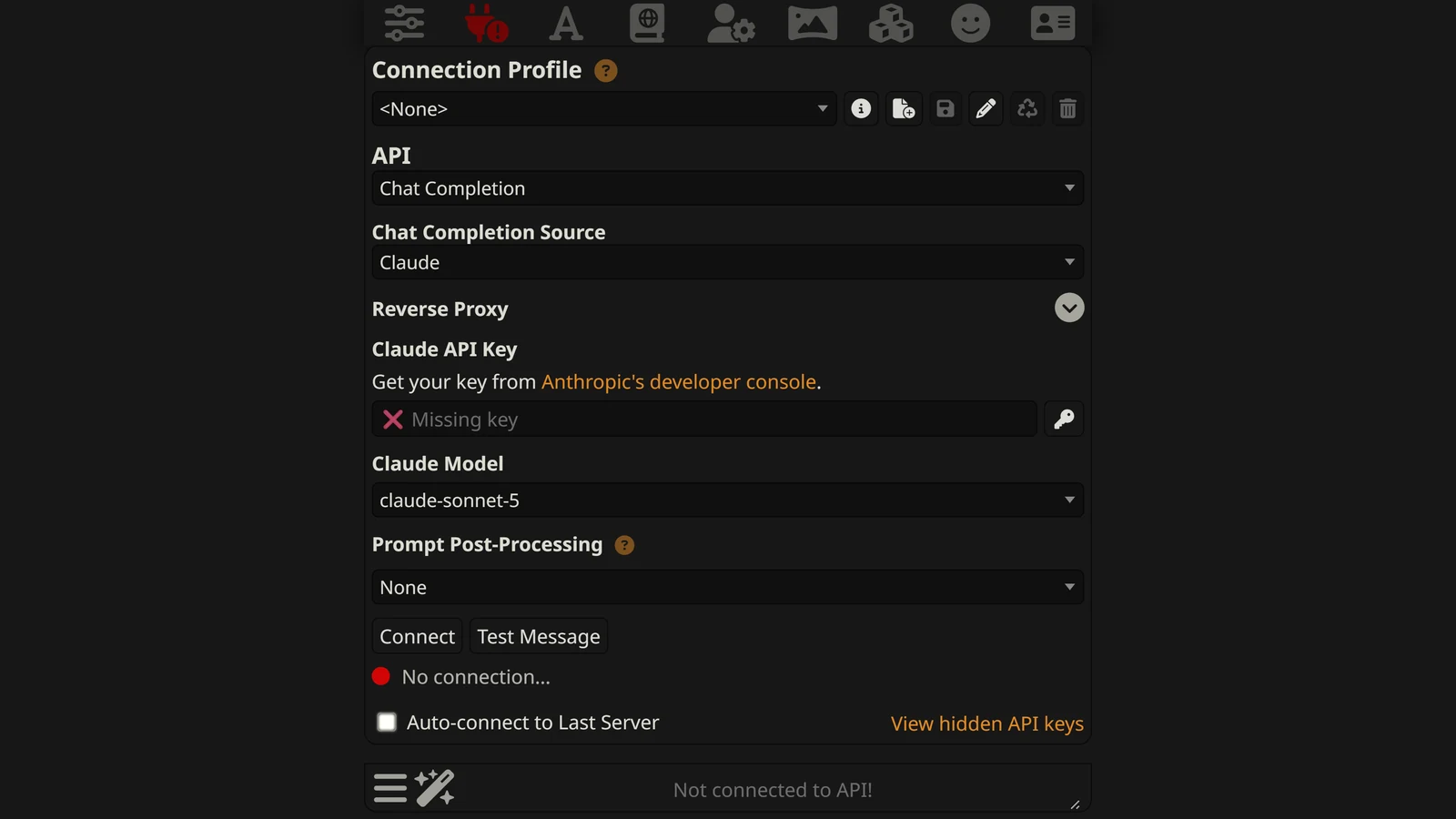
Claude in SillyTavern means connecting SillyTavern’s Chat Completion API to Anthropic’s Claude models with your own API key, so every message you send is a paid request to Anthropic. It is one of the most popular ways to roleplay with Claude, and in autumn 2026 it is also one of the most confusing. Anthropic released three new models in three weeks. SillyTavern’s current release came out before any of them, and Claude itself stopped accepting two settings that roleplay presets have relied on for years.
This page untangles all of that. It covers the setup, which model to use and how to reach the newest ones, what SillyTavern now does with your prefill and temperature, how to make long chats cheaper with prompt caching, whether a Claude subscription helps, and what each error means.
How we checked. We read SillyTavern 1.19.0, the current release (14 September 2026), in its source code, along with its staging branch as of 18 October 2026. Claude’s rules come from Anthropic’s own documentation, read the same day: the models overview, the pricing page, the model migration guides and the error reference. We have not run a long chat on each model ourselves. Where a behaviour comes from the code or the docs, we say which. Arcanum has no commercial relationship with Anthropic or SillyTavern.
The Short Answer
| You want | Do this |
|---|---|
| To connect | API Connections, then Chat Completion, source Claude, paste a Console API key |
| The best model for most chats | Sonnet: Sonnet 5 on SillyTavern 1.19.0, or Sonnet 5.5 through OpenRouter |
| Opus 5.5, Sonnet 5.5 or Haiku 5.5 | Use OpenRouter (all three), or the staging branch (Opus 5.5 only) |
| Your old prefill to keep working | It cannot. SillyTavern now sends it as a user message. Move it into the prompt. |
| To change temperature | You cannot on current Claude models. SillyTavern removes it. |
| Cheaper long chats | Turn on prompt caching in config.yaml |
| To use your Pro plan | You cannot. Max and Team plans include monthly API credits that work. |
| To fix a 529 | Wait and regenerate. It is Anthropic, not you. |
Which Claude Models SillyTavern Can Use
Anthropic’s models page lists four current models. All four have a 1M-token context window and up to 128K tokens of output.
| Model | Released | Input / output per million tokens | Cache read per million | Default thinking effort |
|---|---|---|---|---|
| Claude Fable 5.1 | 1 September 2026 | $10 / $50 | $0.25 | high |
| Claude Opus 5.5 | 22 September 2026 | $4 / $20 | $0.20 | medium |
| Claude Sonnet 5.5 | 28 September 2026 | $2 / $10 | $0.10 | high |
| Claude Haiku 5.5 | 7 October 2026 | $0.10 / $0.50 (prompts up to 100,000 tokens) | $0.01 | medium |
Two older models are still on sale and still matter here, because SillyTavern 1.19.0 can select them: Claude Opus 5 at $5 / $25 and Claude Sonnet 5 at $2 / $10. Anthropic’s pricing page notes that Sonnet 5’s $2 / $10 price, first announced as introductory, “is now the standard price.”
Haiku 5.5 has a second price band. Anthropic says a request “whose prompt is over 100,000 tokens pays higher prices”: $0.50 input and $2.50 output. A long roleplay with a big lorebook can cross that line, so keep the context below 100,000 tokens if you choose Haiku to save money.
What SillyTavern 1.19.0 lists
SillyTavern 1.19.0 was released on 14 September 2026, a week before Opus 5.5. Its Claude model list starts with:
claude-fable-5-1claude-fable-5claude-opus-5claude-sonnet-5- then the 4.x models, back to Claude Sonnet 4 and Opus 4.
The default model for a new install is claude-sonnet-5. There is no field to type a model name for the Claude source, so you cannot add a model that is not on the list.
How to reach the newer models
| Route | Opus 5.5 | Sonnet 5.5 | Haiku 5.5 | Notes |
|---|---|---|---|---|
| SillyTavern 1.19.0, Claude source | No | No | No | Wait for the next release |
| SillyTavern staging branch, Claude source | Yes (added 23 September) | No | No | Staging is the development branch: newer, less tested |
| OpenRouter source, any version | Yes | Yes | Yes | Same per-token prices as Anthropic’s |
OpenRouter’s model list, read on 18 October, includes anthropic/claude-opus-5.5, anthropic/claude-sonnet-5.5 and anthropic/claude-haiku-5.5 at $4 / $20, $2 / $10 and $0.10 / $0.50. OpenRouter adds its own fee when you buy credit; our OpenRouter in SillyTavern guide covers the setup and the fee.
Which to choose. For most players, Sonnet 5 on the Claude source is a fine choice today: same price as Sonnet 5.5, no extra service in between. If you want the newest models, OpenRouter is the simplest route. Our best Claude model for roleplay page compares the models themselves.
How to Set Up Claude in SillyTavern
1. Get an API key
Sign in to the Claude Console at platform.claude.com, which is separate from the claude.ai chat app. Create an API key and add credit to the organization, or claim plan credits if you have a Max or Team plan (see the subscription section below).
Copy the key when it is shown. You cannot read it again later; you can only make a new one.
2. Connect
- Open API Connections (the plug icon at the top).
- Set API to Chat Completion.
- Set Chat Completion Source to Claude.
- Paste the key into the API key field.
- Choose a model from Claude Model.
- Press Connect.
If SillyTavern is not installed yet, start with our SillyTavern installation guide.
3. Check two settings before your first chat
Max Response Length. SillyTavern’s shipped default is 300 tokens. Current Claude models think before they answer, and the effort settings below decide how much. Thinking happens inside the same response budget in SillyTavern’s request, so 300 tokens can leave a reply short. Raise it to 1,000 or more for roleplay.
Context Size. SillyTavern’s shipped default for Chat Completion is 4,095 tokens, far below Claude’s 1M. That small number keeps costs down but makes the character forget quickly. Raise it to what you are willing to pay for: every token of context is sent, and billed, on every message. The cost table below shows what that means in dollars.
What SillyTavern Does With Claude’s Settings
SillyTavern’s code knows which Claude models reject which settings, and it quietly changes the request to avoid errors. That is helpful, but it also means some sliders in the interface do nothing. Here is what 1.19.0 does for Claude Opus 4.7 and later, which includes every Opus 5, Sonnet 5 and Fable model.
| Setting in SillyTavern | What is actually sent | Why |
|---|---|---|
| Temperature, Top P, Top K | Removed | Anthropic: non-default values are “rejected” |
| Assistant Prefill | Sent as a user message | Anthropic: a prefilled last assistant turn “is rejected” |
| Reasoning Effort | Sent as Claude’s effort level, or left out on Auto | Current models use adaptive thinking |
| Request model reasoning | Asks Claude for a readable summary of its thinking | Thinking is otherwise returned empty |
| Verbosity | Sent as effort, only when Reasoning Effort is on Auto | SillyTavern’s own note: Reasoning Effort “takes precedence over Verbosity” |
Temperature: the slider does nothing
Anthropic’s Opus 5.5 guide is plain: “Omit temperature, top_p, and top_k, or leave them at their defaults: any other value is rejected.” Sonnet 5.5 is the same. SillyTavern 1.19.0 handles this by deleting all three from the request for these models, whatever the sliders say.
So on the Claude source you will not see a temperature error. You will just see no effect. If a preset tells you to raise temperature for “more creative” Claude replies, ignore it; creativity on current Claude models comes from the prompt.
The error does still happen elsewhere. Anthropic’s rules for Haiku 5.5 are stricter than for the others: “If a request includes temperature, it must be 1. If it includes top_p, it must be 0.99, its default.” A frontend or proxy that sends Haiku 5.5 a temperature of 0.9, or a top_p of 1, gets a 400 error. If you use Haiku 5.5 through OpenRouter or a custom endpoint and every reply fails, reset the samplers first.
The prefill: what happened to it
For years, the Assistant Prefill box was the most important Claude setting in SillyTavern. Text in it was sent as the beginning of Claude’s own reply, and Claude continued from there. Presets used it to set a tone, force a format, or start every reply in character.
Anthropic ended that. Its error reference says: “Claude 4.6 and later models … do not support prefilling assistant messages.” Sending one returns a 400 invalid_request_error.
SillyTavern 1.19.0 does not drop your prefill. For these models, its code takes the final assistant message, which is where the prefill goes, and changes its role to user. The text still reaches Claude, but as something you said at the end of the prompt.
That changes what the text does:
| Your prefill text | What it did before | What it does now |
|---|---|---|
{{char}}: | Made Claude start speaking as the character | A stray line at the end of your message |
Understood. Continuing the story: | Put Claude in “continue” mode | Claude reads you saying “Understood”, which can confuse it |
<thinking> or format tags | Forced a format | An instruction Claude may or may not follow |
| Style instructions written as a reply | Set the voice | Works only if it reads as an instruction |
What to do. Empty the Assistant Prefill box. Move anything useful into the prompt as a plain instruction: “Write only as Mira. Start your reply with her action.” Anthropic’s own advice for replacing a prefill is to “ask in the system prompt for a direct answer” and to move continuation requests into the user message. Our SillyTavern presets guide explains where each part of a preset goes.
The Assistant Impersonation Prefill box, used when Claude writes your character’s next message, works the same way and needs the same fix.
Reasoning Effort and thinking
Every current Claude model thinks before it answers. On Opus 5.5 and Fable 5.1 thinking is always on; Anthropic’s docs list it as “Adaptive (always on).” You control how much with effort, not with an on/off switch.
SillyTavern maps its Reasoning Effort setting like this for these models:
| SillyTavern Reasoning Effort | Effort sent to Claude |
|---|---|
| Auto (default) | Nothing: Claude uses its own default (medium on Opus 5.5 and Haiku 5.5, high on Sonnet 5.5) |
| Minimum | low |
| Low | low |
| Medium | medium |
| High | high |
| Maximum | max |
Anthropic also offers an xhigh level between high and max; SillyTavern 1.19.0 has no option for it.
What we would use. Medium for everyday roleplay, high for a complicated scene, low when you want faster and cheaper replies. Thinking tokens are billed as output whether or not you see them. Request model reasoning only decides whether SillyTavern shows you a summary of the thinking; the thinking happens either way.
Use system prompt
The Claude source has a Use system prompt switch. When it is off (SillyTavern’s default), the system content is folded into the first user message. When it is on, it goes into Claude’s real system prompt. Switch it on: it is how Claude expects to receive instructions, and caching the system prompt (next section) needs it.
Prompt Caching: How to Make Long Chats Cheaper
Every time you send a message, SillyTavern sends the whole prompt again: the character card, the lorebook entries, the chat history. In a long chat, almost all of it is the same as last time. Prompt caching lets Anthropic store that unchanged beginning and charge much less to read it again.
On the newest models the saving is large. A cache read costs $0.20 per million tokens on Opus 5.5 (5% of the normal input price) and $0.10 on Sonnet 5.5. Writing to the cache costs a little more than a normal read: 1.25 times the input price for a cache that lasts 5 minutes, 2 times for one that lasts an hour. Anthropic’s minimum is 512 tokens for the current models; anything shorter is not cached, and no error tells you so.
How to turn it on
Caching is not in SillyTavern’s interface. It is in config.yaml, in SillyTavern’s main folder, under claude:. The shipped values are:
claude:
  enableSystemPromptCache: false
  cachingAtDepth: -1
extendedTTL: falsecachingAtDepthcaches the chat history. The file’s own comment says a value of 0 “should be ideal for most use cases.” Set it to0.enableSystemPromptCachecaches the system prompt. Set it totrueonly if your system prompt does not change between messages, and switch on Use system prompt in SillyTavern.extendedTTLswitches the cache from 5 minutes to 1 hour. Leave it off unless you often pause for more than 5 minutes between messages; the hour-long cache costs twice the input price to write.
Save the file and restart SillyTavern.
When caching does not help
The cache only works on a prompt whose beginning is the same as last time. Anything that changes near the top breaks it, and then you pay the write price for nothing. SillyTavern’s own config file warns about this: use system prompt caching “only when the prompt before the chat history is static,” and it names the {{random}} macro and lorebooks as the usual problems.
- A
{{random}}or time macro in the character card changes the prompt every message. - Lorebook entries that switch on and off and are inserted above the chat history change the beginning. Entries placed inside the chat at a depth do less damage. Our SillyTavern lorebook guide explains the positions.
- Changing the model, the effort level or the preset mid-chat starts a new cache.
The same settings also apply to Claude models reached through OpenRouter: SillyTavern’s code applies cachingAtDepth to Claude requests there too.
What a Long Chat Costs
Here is an example evening: 100 messages, a 30,000-token prompt each time (a detailed card, a lorebook, a long history) and replies of about 400 tokens. Thinking tokens are left out, because their size depends on effort; at medium they can add a few hundred output tokens per reply.
With caching we assume about 28,000 tokens of each prompt are read from the cache and 2,000 are new, written to a 5-minute cache.
| Model | Without caching | With caching |
|---|---|---|
| Haiku 5.5 | about $0.32 | about $0.07 |
| Sonnet 5 / Sonnet 5.5 | about $6.40 | about $1.18 (Sonnet 5.5) |
| Opus 5.5 | about $12.80 | about $2.36 |
| Fable 5.1 | about $32.00 | about $5.20 |
How the Sonnet 5.5 line works out: without caching, 100 × 30,000 input tokens at $2 per million is $6.00, plus 100 × 400 output tokens at $10 per million is $0.40. With caching, 2.8 million cached tokens at $0.10 per million is $0.28, 200,000 new tokens written at $2.50 per million is $0.50, and the output is still $0.40.
Two lessons. Caching cuts a long evening by about 80% on every model. And on Sonnet 5, whose cache reads cost $0.20 rather than Sonnet 5.5’s $0.10, the cached evening is a little dearer (about $1.46), which is one small reason to prefer 5.5 once you can reach it.
Can You Use a Claude Subscription in SillyTavern?
People search for this more than for almost anything else about Claude and SillyTavern, so here is the precise answer.
- SillyTavern’s Claude connection needs an API key from the Claude Console. Anthropic’s help centre says API usage is billed separately from paid Claude plans (Pro, Max, Team and Enterprise).
- Max and Team plans now include monthly API credits. Anthropic’s help article lists $100 a month on Max 5x and $200 on Max 20x; Team plans get $20 per Standard seat and $100 per Premium seat, pooled and capped at $500. Free, Pro and Enterprise plans are not eligible.
- You claim them by linking a Console organization. On claude.ai, go to Settings, then Billing, and choose “Link organization” in the API credits section. The credits then appear in that Console organization, and an API key from it works in SillyTavern like any other.
- They cover the API. Anthropic lists “The Claude API (Messages API and Message Batches API)” among what the credits cover. They do not raise your limits in the Claude app.
- They do not roll over. “Unused credits expire at the end of each billing cycle.” And when they run out, “API requests stop until your next monthly credits arrive” unless you have bought credit; the help article adds that usage “is never charged to your Claude plan.”
So if you already pay for Max, you have $100 or $200 of SillyTavern play each month at no extra cost. At the example rates above, $100 is roughly 85 cached evenings on Sonnet 5.5.
Searches also ask about “Claude Code proxies” and “bridges” that route SillyTavern through a Claude subscription login. We have not tested any of them and do not link them. If you consider one, read Anthropic’s own help articles on how plans and third-party tools are billed first, and remember that a tool between you and Anthropic sees every message you send.
Common Errors and What They Mean
SillyTavern shows Anthropic’s error in a pop-up and in its console window. The number is the useful part.
| Error | Anthropic’s meaning | What to do |
|---|---|---|
400 invalid_request_error | Something in the request is not allowed | See the 400 list below |
401 authentication_error | The API key is “malformed, revoked, or expired” | Make a new key, paste it again, press Connect |
402 billing_error | A billing or payment problem | Add credit or fix the card in the Console |
403 permission_error | The key cannot use that resource | Check the key’s workspace in the Console |
413 request_too_large | The request is too big | Lower Context Size, or remove large images |
429 rate_limit_error | Your organization hit a rate limit or its monthly spend cap | Wait; if it never clears, check the spend cap in the Console |
500 api_error | An internal Anthropic error | Regenerate; if it repeats, try later |
529 overloaded_error | ”The API is temporarily overloaded” for everyone | Wait a minute and regenerate |
The 400s that roleplayers hit
| Message mentions | Cause | Fix |
|---|---|---|
| A prefilled assistant message | A frontend or proxy sent a prefill to Claude 4.6 or later | Empty the prefill; on the Claude source SillyTavern already converts it |
temperature, top_p or top_k | A non-default sampler value on Opus 4.7+, Sonnet 5.5 or Haiku 5.5 | Reset samplers to default, or let SillyTavern’s Claude source remove them |
thinking set to disabled | Something tried to switch thinking off on Opus 5.5 or Fable 5.1 | Lower the Reasoning Effort instead |
| A spend limit | Anthropic also uses 400 when usage “reaches an organization or workspace spend limit you set” | Raise the limit you set in the Console |
Anthropic’s reference also notes that a 429 caused by the monthly spend cap of your usage tier “has no retry-after header and keeps failing until access resumes.” If 429s never clear after waiting, that is the likely reason.
For problems that are not Claude-specific, such as SillyTavern not starting or a connection that will not hold, see SillyTavern not working.
Claude Compared With the Other SillyTavern Providers
Claude is not the only Chat Completion provider we have covered. The same settings questions come up with each, and the answers differ.
| Provider | Can you set temperature? | Does a prefill work? | Our guide |
|---|---|---|---|
| Claude (current models) | No: SillyTavern removes it | No: sent as a user message | This page |
| Gemini | See the guide | See the guide | Gemini in SillyTavern |
| DeepSeek | See the guide | Yes: SillyTavern uses DeepSeek’s beta address, which accepts one | DeepSeek in SillyTavern |
| OpenRouter | Depends on the model behind it | Depends on the model | OpenRouter in SillyTavern |
If you are choosing a provider rather than setting one up, our best model for SillyTavern page compares them.
Our Recommendation
- On SillyTavern 1.19.0, start with Sonnet 5 on the Claude source. It is the default, and it costs the same as Sonnet 5.5.
- For Opus 5.5, Sonnet 5.5 or Haiku 5.5, use OpenRouter until a SillyTavern release lists them.
- Empty the Assistant Prefill boxes and move their useful parts into the prompt.
- Ignore the temperature slider for Claude. Steer with the prompt.
- Raise Max Response Length above the default 300 so thinking does not crowd out the reply.
- Turn on
cachingAtDepth: 0and keep the top of your prompt stable. It cuts a long evening by about 80%. - If you pay for Max, claim the monthly API credits. They work in SillyTavern.
Frequently Asked Questions
How do I use Claude in SillyTavern?
Create an API key in the Claude Console at platform.claude.com and add credit or claim plan credits. In SillyTavern, open API Connections, set the API to Chat Completion and the source to Claude, paste the key, pick a model and press Connect. SillyTavern 1.19.0 starts on claude-sonnet-5.
Why can’t I find Claude Opus 5.5 or Sonnet 5.5 in SillyTavern?
SillyTavern 1.19.0 was released on 14 September 2026, before those models existed. Its Claude list stops at Fable 5.1, Fable 5, Opus 5 and Sonnet 5. The staging branch added Opus 5.5 on 23 September; on 18 October no branch listed Sonnet 5.5 or Haiku 5.5. To use any of the three today, connect through OpenRouter, which lists all three at Anthropic’s prices.
Does the assistant prefill still work with Claude in SillyTavern?
Not as a prefill. Anthropic says Claude 4.6 and later models reject a final assistant turn with an error. SillyTavern avoids the error by sending your prefill text as a user message at the end of the prompt instead. Claude now reads it as something you wrote, not as the start of its own reply, so an old prefill that began a reply for the model no longer does that.
Why does temperature do nothing for Claude in SillyTavern?
Because SillyTavern removes it. On Claude Opus 4.7 and later, including the Opus 5, Sonnet 5 and Fable families, Anthropic rejects non-default temperature, top_p and top_k values, so SillyTavern 1.19.0 deletes all three before sending the request. Moving the slider changes nothing. Steer Claude with the prompt instead.
Can I use my Claude Pro or Max subscription in SillyTavern?
Not directly. SillyTavern’s Claude connection needs an API key from the Claude Console, and Anthropic bills API usage separately from Claude plans. Max and Team plans now include monthly API credits, 100 dollars on Max 5x and 200 dollars on Max 20x, which you claim by linking a Console organization; an API key from that organization works in SillyTavern. Pro has no API credits.
How do I turn on prompt caching for Claude in SillyTavern?
In SillyTavern’s config.yaml, under claude, set cachingAtDepth to 0 to cache the chat history, and set enableSystemPromptCache to true to cache the system prompt, which also needs Use system prompt switched on. Restart SillyTavern. Caching only pays off when the start of your prompt stays the same between messages, so random macros and lorebook entries placed high in the prompt work against it.
Which Claude model is best in SillyTavern?
Sonnet for most players: Sonnet 5 on SillyTavern 1.19.0’s Claude source, or Sonnet 5.5 through OpenRouter, both at 2 dollars input and 10 dollars output per million tokens. Opus 5.5 for long, rule-heavy campaigns. Haiku 5.5 is the budget choice at 10 cents input per million tokens.
What does a 529 error mean for Claude in SillyTavern?
529 is overloaded_error: Anthropic’s API is temporarily overloaded across all users. It is not your settings or your key. Wait a minute and press regenerate. A 429 is different: your own organization hit a rate limit or its monthly spend cap.
Sources, read on 18 October 2026: SillyTavern 1.19.0 source code (release of 14 September 2026): src/endpoints/backends/chat-completions.js (Claude request building, sampling removal, prefill conversion, caching), src/prompt-converters.js (effort mapping), public/index.html (model list, labels) and default/config.yaml (caching settings); the SillyTavern staging branch and its commit history for the Opus 5.5 addition. Anthropic’s documentation: the models overview, the pricing page, the Opus 5.5, Sonnet 5.5 and Haiku 5.5 overviews and migration guides, the prompt caching guide and the API error reference. Anthropic’s help-centre article “Monthly API credits for Max and Team plans.” OpenRouter’s public model list. The cost table is our arithmetic from Anthropic’s listed prices, with thinking tokens left out. We did not run these models in SillyTavern ourselves for this page.
Claude is a trademark of Anthropic, PBC. SillyTavern is an open-source project. Arcanum is independent and not affiliated with either. Nominative use only.