Character.AI Chat History: Where to Find It, Why It Disappears, and How to Save It (2026)
Your Character.AI chat history is the saved record of every conversation you have had with a Character, kept on your account and listed under Recent Chats and on each Character’s own chat list. It is not lost when you close the app, and since December 2025 each Character keeps up to 1,000 of your conversations with it. Most “my history is gone” moments have an ordinary cause, and this page lists them.
There is a newer reason to care. On 12 October 2026 Character.AI filed for Chapter 11 bankruptcy to sell the company, and it says the platform will be wound down if no buyer takes it. The app is running as normal, but if your chats matter to you, the one step to take today is in the section How to Download Your Chat History. The full story is in our explainer, Is Character.AI shutting down?
Everything here comes from Character.AI’s help centre and its monthly community updates, read on 16 October 2026. We did not test every menu first-hand: our test account has no long chat history to show, and Character.AI changes its layout often. Where a step comes from the help centre, we give its wording.
The Short Answer
| You want to | Do this |
|---|---|
| See all your chats | Recent Chats, in the sidebar on the web or the chats tab in the app |
| See older chats with one Character | Open that Character and look at its chat history list |
| Keep a favourite chat at the top | Pin it in Recent Chats |
| Tidy the list without deleting | Archive the chat |
| Remove the last few messages | Rewind to Here on the message you want to go back to |
| Remove one message | Hold the message, then remove |
| Branch a story without losing it | Duplicate the chat |
| Keep a copy of everything | Export Data in your account settings (takes 3 to 4 weeks) |
| Delete everything | Delete Account. Permanent. |
Where Your Chat History Lives
Character.AI keeps your history in two places.
Recent Chats is the list of everyone you have talked to, newest first. It sits in the sidebar on the web and on the chats tab in the mobile app. Since September 2025 each entry shows a description line, which Character.AI says gives “more context as you search through your chat lists.” Since April 2025 you can pin a chat to the top. Character.AI’s note for that feature: “Never lose your favorite conversation again! (your future self thanks you).”
Each Character’s chat history is the list of separate conversations you have had with that one Character. Recent Chats shows you the latest conversation with each Character. If you started several chats with the same Character, the older ones are in that Character’s own history, not in Recent Chats. This is the most common reason people think a chat is gone: they are looking in Recent Chats for a conversation that is one level down.
The Limit: 1,000 Chats per Character
Character.AI raised the limit in its December 2025 community update:
“Chat history per Character has been increased from 100 to 1,000 - a 10x expansion that brings far more of your older conversations back into view. Older conversations that used to fall off will now be available when you scroll back.”
Two things follow from that.
- Before December 2025, old conversations fell off the list. If you had more than 100 conversations with one Character, the oldest ones stopped showing. Character.AI’s wording, “brings far more of your older conversations back into view,” says they came back when the limit was raised.
- The limit is per Character, not per account. 1,000 conversations with one Character is far beyond what most players reach.
There is a separate limit people confuse with history: memory. A long chat is saved in full and you can scroll back through it. But the Character does not remember all of it when it writes its next reply. That is a different system, with pins, Story Memory and a Memory Usage bar, and it is covered in our Character.AI memory guide.
Why Your Chat History Disappeared
Here are the causes we found in Character.AI’s own pages, from most to least common.
| What you see | Likely cause | What to do |
|---|---|---|
| Recent Chats is empty or short | You are signed in with a different account or login method (Google, Apple, email) | Sign out and sign in the way you first signed up. History does not move between accounts. |
| Chats will not load, or the list spins | A loading problem | Refresh, update the app, and check status.character.ai. Character.AI listed “Chats from history not loading” as a fixed bug in September 2024; it can happen again. |
| An older conversation with a Character is missing | It is in that Character’s own history, not Recent Chats | Open the Character and look at its chat history. |
| A chat is gone from the main list | You archived it | Look in your archived chats. |
| A Character vanished from Recent Chats | You hid it, or it was restricted | Character.AI lets you hide restricted Characters from Recent Chats by holding them and tapping “hide”. |
| You can read a chat but cannot reply | You blocked the Character’s creator | Character.AI says the chat “stays in your recent chats — you can still read it, but you can’t send new messages while that user is blocked.” |
| Chats from 2023 or early 2024 are missing | They were on the old beta site | See the next section. |
| A chat feels different after a while | The chat style changed, not the history | On c.ai lite, when your daily premium messages run out, Character.AI says you keep “the same chat, the same Character, the same history” on a free style. |
If none of these fits and a chat is truly gone, contact Character.AI through support.character.ai. If you can no longer sign in at all, our Character.AI not working page covers account and login problems.
Chats from the old site
Character.AI used to run a separate “old” or “beta” site. It retired that site on 24 September 2024. Its help centre explains what happened to the chats:
- Recent chats were moved to the new site and app automatically.
- For chats older than six months, it said: “you can manually migrate them by locating the chat in your history and clicking on ‘Migrate chats’.”
- It promised: “All chats will be preserved and migrated.”
If you have not opened Character.AI since 2024 and an old chat is missing, look in that Character’s history for a migrate option. If there is none, contact support; the old site itself “is no longer accessible.”
Teen accounts
From November 2025, Character.AI removed open-ended chat for users under 18. Its notice to them said: “All your previous conversations and Characters are still here, so you can revisit them anytime.” So for teen accounts the history is still readable, even though open-ended chatting is not available.
How to Organise Your Chats
These features arrived over 2024 and 2025. They are the tools for keeping a long history usable.
| Feature | What it does | Since |
|---|---|---|
| Archive Chats | Moves a conversation out of the main list “for better organization”, without deleting it | Announced September 2024 |
| Rename Chats | Gives a chat your own name, so you can find it again | Announced September 2024 |
| Duplicate Chats | Copies a conversation so you can “continue them in a new direction without losing progress” | Announced September 2024 |
| Pin to Recent Chats | Keeps a favourite chat at the top of the list | April 2025 |
| Description lines | Shows a line of context for each chat in the list | September 2025 |
| Archive Characters (for creators) | Hides one of your own Characters from your profile, with an undo in Settings | August 2025, mobile app |
Duplicate before you experiment. If a story is going well and you want to try something risky, duplicate the chat first. The original stays as it was.
How to Remove Messages and Chats
Character.AI gives you three ways to remove things from a chat. None of them is documented as reversible, so treat them as permanent.
Remove one message. Character.AI’s creator guide says: “hold down on the response and tap edit or remove.” It also explains why you might want to: “Removing that message pulls it from the active context and breaks the pattern for the rest of this chat.” This is the fix for a Character stuck repeating a phrase.
Rewind to Here. This removes every message after the one you choose. Character.AI’s description: “Click Rewind to Here to return to a specific point in your conversation. Messages beyond that point will be automatically removed, allowing you to restart from there.” It has been on the web and the app since January 2025. If you might want those messages later, duplicate the chat first.
Swipes do not remove history; they replace a reply with another version. Character.AI says free users can swipe 30 times per message, and its February 2025 update raised the maximum to 100.
Deleting a whole chat. Character.AI’s help centre does not describe a button that deletes a whole conversation, and we could not check the menu first-hand. Archiving is the documented way to get a chat out of your list. If you see a delete option in your app, it may be newer than the help centre.
Deleting everything. The documented way to remove all of your history is to delete your account: on the web, Profile Settings, Account, Manage Account & Data, Delete Account; on the app, Settings, Remove Account. Character.AI is direct about it: “Account Deletion is permanent and cannot be reversed.” If you want to delete your account but keep a copy, export first and wait for the file to arrive.
How to Download Your Chat History
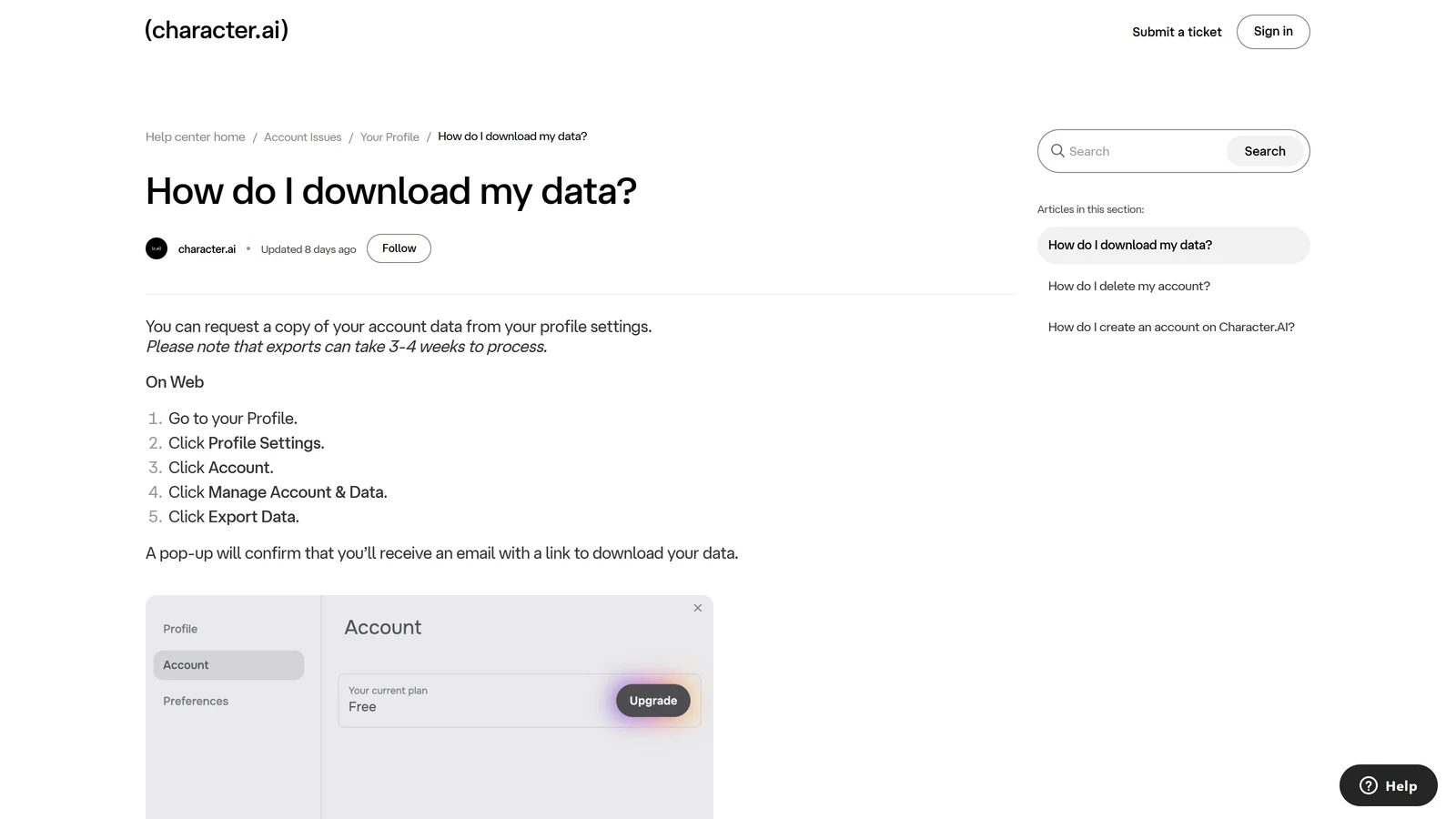
Character.AI has no button that saves one chat to a file. What it offers is a full data export of your account, sent by email.
On the web
- Go to your Profile.
- Click Profile Settings.
- Click Account.
- Click Manage Account & Data.
- Click Export Data. A pop-up confirms you will get an email.
On the mobile app
- Open your Profile.
- Tap the Settings icon.
- Tap Legal & Privacy.
- Tap Export Data. A “Success” banner confirms the request.
What happens next. Character.AI says: “Your export may take 3-4 weeks to complete.” When it is ready, it emails a download link to the address on your account, and “the link will be valid for 7 days from the time the email is sent.” Check your spam folder, and download the file the day it arrives.
Why today and not next month. Character.AI filed for Chapter 11 on 12 October 2026. The proposed date for the court to decide the sale is 24 November 2026, and Character.AI says the platform will be wound down if no buyer takes it. An export requested today should arrive before that date. One requested in late November may not. Character.AI’s own announcement reminds users that they “can delete your account or export your data through the app or the Character.ai website.” Our bankruptcy explainer has the full timeline.
Make sure you can read the email. Character.AI’s help centre says it “does not support the ability to change, update, or remove the email address associated with your account,” and that “data, characters, and chat histories cannot be transferred between accounts.” If you no longer use the email on your account, you will not receive the link.
Copying a chat by hand
For one or two chats you care about most, do not rely only on the export. Copy the parts you would need to carry the story somewhere else:
- the Character’s definition and greeting, if you made the Character (how Character creation works);
- your persona (Character.AI personas);
- your Story Memory notes and pinned messages, which are the facts the story depends on;
- a short summary of where the story stands.
That is enough to restart the same story with the same Character on another platform. A full message log is a record; a good summary is what actually lets you continue.
What Chat History Is Not
- It is not memory. A Character can forget something that is still in your history. See Character.AI memory.
- It is not a live audience. Character.AI’s help centre answers the question “Are people spectating these chats?” with “No!” Group chats are separate and are covered in our group chat guide.
- It is not portable. Chats stay with the account that made them.
- It is not guaranteed forever. No online service promises that. In Character.AI’s case, the Chapter 11 sale makes that a live question this autumn rather than a theoretical one.
Our Recommendation
- Request a data export today. It takes 3 to 4 weeks, and the sale is decided in late November.
- Look one level down before you panic. Older conversations with a Character are in that Character’s own history.
- Sign in the way you signed up. A different login method can mean a different, empty account.
- Archive, do not delete, when you only want a tidier list.
- Duplicate a chat before Rewind to Here or any experiment you might regret.
- Copy your best Characters and personas by hand, so you could rebuild them anywhere.
Frequently Asked Questions
Where is my chat history on Character.AI?
Your chats are listed under Recent Chats, and each Character keeps its own list of past conversations with you. Open a Character you have talked to and look at its chat history to see older conversations with it, not just the latest one. You can pin a favourite chat to the top of Recent Chats, and archived chats are kept out of the main list rather than deleted.
Did Character.AI remove chat history?
No. Chat history is still there in October 2026. Character.AI actually raised the limit in December 2025, from 100 to 1,000 conversations per Character. Most reports of history being gone come from a loading bug, the old site’s retirement in 2024, a different account, or a chat that was archived or hidden.
Is there a limit to Character.AI chat history?
Yes. Character.AI says chat history per Character was raised from 100 to 1,000 in December 2025. Before that, conversations past the hundredth fell off the list. It does not publish a limit on how many messages one chat can hold, and memory is a separate limit: a long chat is saved in full, but the Character does not remember all of it.
How do I download my Character.AI chat history?
Request a data export. On the web: Profile, Profile Settings, Account, Manage Account and Data, Export Data. On the app: Profile, the Settings icon, Legal and Privacy, Export Data. Character.AI emails a download link when it is ready, which can take 3 to 4 weeks, and the link works for 7 days.
How do I delete my Character.AI chat history?
Inside a chat you can remove single messages by holding a message and choosing remove, or use Rewind to Here to remove every message after a chosen point. To tidy the list without deleting, archive the chat. The only way Character.AI documents to delete everything is to delete your account, which is permanent and cannot be reversed.
Why did my Character.AI chat history disappear?
The common causes are: you are signed in with a different account or login method, the chat list has not loaded and needs a refresh, the chat was archived, the Character was restricted or you hid it, or the chat dates from the old beta site, retired on 24 September 2024, where chats older than six months had to be migrated by hand. A Character being deleted or restricted can also stop you from opening chats with it.
Can I move my Character.AI chats to a new account?
No. Character.AI’s help centre says data, Characters and chat histories cannot be transferred between accounts. It also says you cannot change the email address on an account. If you lose access to your email, you have to start a new account, and your history stays with the old one.
Will my Character.AI chats be deleted if Character.AI shuts down?
Nobody has said yet. Character.AI filed for Chapter 11 on 12 October 2026 to sell the company, and says the platform will be wound down if no buyer takes it. Its announcement says data practices are unchanged and points users to export and account deletion. If you want to keep your chats, request an export now.
Sources, read on 16 October 2026: Character.AI’s help-centre articles “How do I download my data?”, “How do I export all my data?”, “How do I delete my account?”, “How can I change my email address?”, “How do I block another user?”, “About (c.ai) lite”, “Important Changes for Teens on Character.ai”, “The old/beta has been fully retired” and the creator guide “Refining and Testing your Character”; its community updates of September 2024, January, February, April, August and September 2025 and December 2025; and its blog post “An Update on Character.ai” (12 October 2026). We did not test the menus first-hand, so menu names follow the help centre and may differ slightly in your app.
Character.AI is a trademark of Character Technologies, Inc. Arcanum is independent and not affiliated with it. Nominative use only.