oobabooga Is Now TextGen: What Changed, and How to Connect It to SillyTavern (2026)
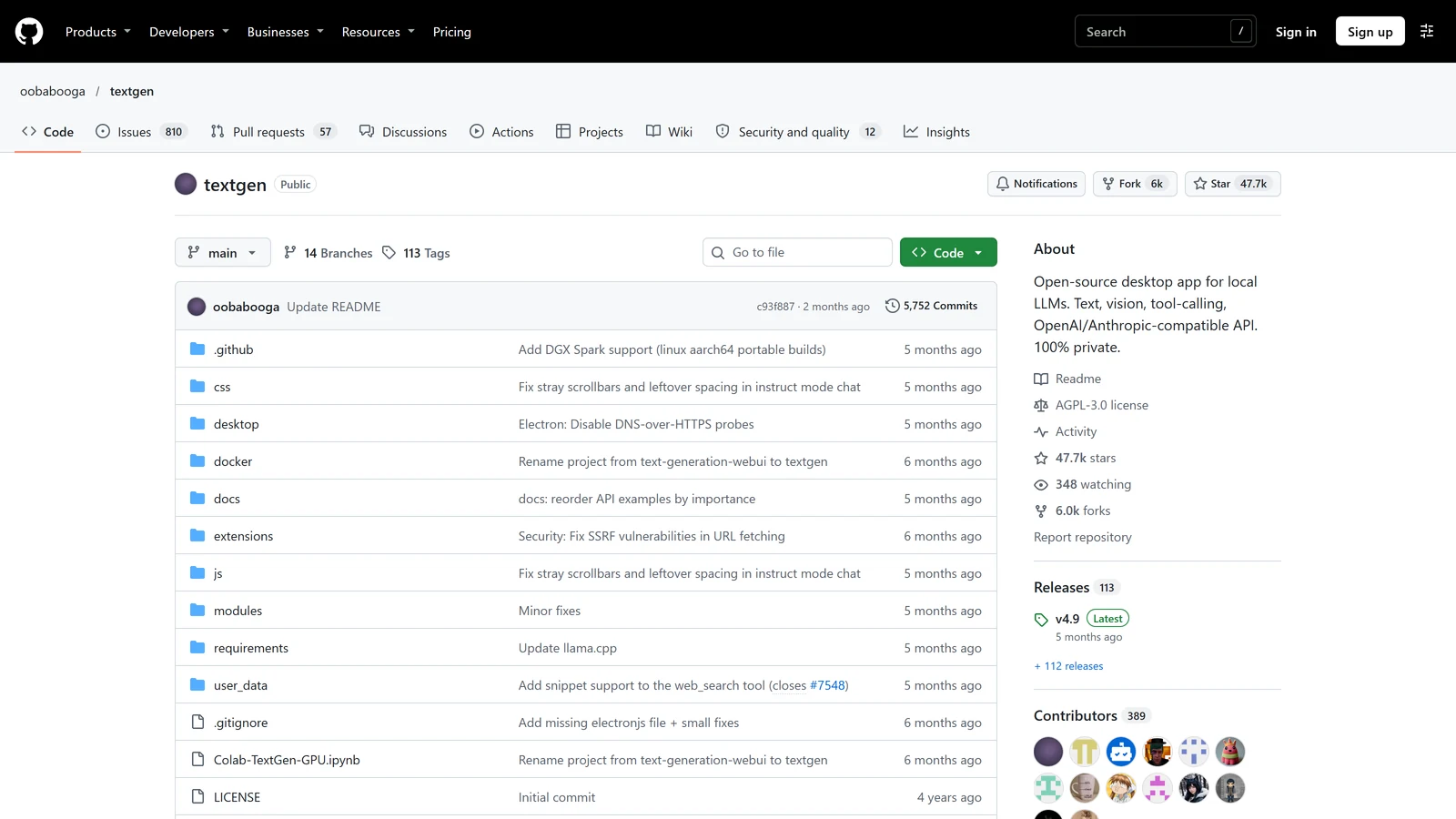
TextGen is the new name of the project that SillyTavern guides have called oobabooga or text-generation-webui for years, and since May 2026 it ships as a desktop app you unzip and double-click. It is still a program that loads an AI model on your own computer and offers it to other software, including SillyTavern, over a local API. If an older guide tells you to “clone text-generation-webui and run start_windows.bat”, the project has moved on, but the connection steps for SillyTavern have barely changed.
We read the project’s README, its API wiki, its release notes and its GitHub records, and SillyTavern’s connection documentation, all on 31 October 2026. We did not install TextGen, we did not load a model, we did not run SillyTavern against it and we did not benchmark anything. Everything below is what the documents say, with the places where they disagree marked.
oobabooga’s TextGen and SillyTavern are independent projects. Arcanum is not affiliated with either.
The Short Answer
| You want to… | What to do |
|---|---|
| Know if oobabooga and TextGen are the same thing | They are. TextGen is the current name of the same repository |
| Run a GGUF model for SillyTavern with the least setup | Download a portable build from the project’s Releases page and put a GGUF file in user_data/models |
| Let SillyTavern talk to it | Turn on the API with --api, load a model, then connect SillyTavern as a Text Completion source of type Default (Oobabooga) at http://127.0.0.1:5000/ |
| Run EXL3 or full-size Transformers models | Use the full installation, not the portable build |
| Avoid exposing it to other people | Do not use --listen or --public-api unless you mean to, and set --api-key if you do |
What Changed: A New Name and a Desktop App
Three records from the project itself show the change.
| Record | What it says |
|---|---|
| GitHub repository | oobabooga/textgen, described as an “open-source desktop app for local LLMs”, created 21 December 2022, licensed AGPL-3.0, about 47,700 stars on 31 October 2026 |
| Repository file list | Commits titled “Rename project from text-generation-webui to textgen” and “Electron: Disable DNS-over-HTTPS probes” are visible on the repository page, both about six months before our visit |
| README title | ”TextGen”, with the line “A desktop app for local LLMs. Open source, no telemetry” and a one-line start: “Download, unzip, double-click textgen. A window opens.” |
| Release v4.7.3, 3 May 2026 | ”Portable builds now bundle Electron and open as a native window. Run textgen / textgen.bat instead of the previous start scripts.” It adds that passing --listen or --nowebui skips the window and runs the server directly |
| Release v4.8, 7 May 2026 | A redesigned chat composer, with the input area and the attach and message-action buttons rearranged |
| Release v4.9, 20 May 2026 | Support for a speculative decoding mode named draft-mtp, and web search improvements |
The most recent release we found is v4.9 from 20 May 2026. The repository’s last code push, according to GitHub, was on 17 August 2026. We do not know what that means for future releases and we are not guessing.
Two things in the README are worth noting for roleplay players. The first is that the old “run a start script, then open a browser tab” flow is no longer the main route. The desktop app opens its own window, and the browser interface at http://127.0.0.1:7860 is described as an alternative for the other install methods. The second is that the project lists a much wider set of features than it did when most SillyTavern guides were written: several backends, tool calling, training, image generation. None of that matters for connecting SillyTavern. All SillyTavern needs is the API.
What TextGen Does, and What It Does Not Do For You
TextGen’s README lists llama.cpp, ik_llama.cpp, Transformers, ExLlamaV3 and TensorRT-LLM as backends, and says you can switch between backends and models without restarting. For the portable build it says “Compatible with GGUF (llama.cpp) models”. Files that are split into many parts, such as 16-bit Transformers models and EXL3 models, go in a subfolder of user_data/models and, the README says, “require the full installation (not the portable build)”.
It also has its own chat screen with three modes: instruct, chat-instruct and chat, the last two for talking to custom characters. You do not need any of that when you use SillyTavern. SillyTavern builds the prompt itself, with your character card, lorebook, persona and presets, and sends it to TextGen as a request. TextGen’s job is only to load the model and return text. This is the same split we describe in our guide to the three layers of a local setup: the model, the runner, and the front end.
Install: Pick the Route That Matches Your Model
The README offers five routes.
| Route | What the README says | Good for |
|---|---|---|
| Portable build | Download from Releases, unzip and run. CUDA, Vulkan, ROCm and CPU-only options, “All dependencies included” | GGUF models, the simplest start |
| One-click installer | Run start_windows.bat, start_linux.sh or start_macos.sh and pick your GPU vendor when asked | The full set of backends |
| Manual venv | Install from requirements/portable/requirements.txt and run python server.py --portable --api --auto-launch | People who prefer to manage Python themselves |
| Conda | Create a Python 3.13 environment and install the file for your hardware | Same, with conda |
| Docker | docker compose up --build after setting up the provided files | Servers, containers |
For the one-click installer the README gives three routine steps: restart by running the same start script, pass flags directly or persist them in user_data/CMD_FLAGS.txt, and update by running the update wizard for your operating system. It says that “--api to enable the API” is the example of a flag you would put in that file.
An unanswered question. The README does not say where the double-click desktop app reads its flags. The v4.7.3 notes say you can pass --listen or --nowebui to the launcher. We could not confirm from the documents whether a flag file works the same way with the desktop app, so if the API does not come up, run the launcher from a terminal with the flag, or use the manual route in the table above, which shows --api in the command itself.
Get a Model In
The README’s model instructions are two lines long. Download a GGUF file from Hugging Face and place it in user_data/models. “That’s it. The UI will detect it automatically.” It points to a memory calculator on Hugging Face for estimating how much memory a model will need, and we did not use it.
SillyTavern’s own documentation walks through the same job with an example model and adds one step that matters: before you connect, the model has to be loaded. It says to open the interface on port 7860, click the Model tab, pick the model in the dropdown and click Load. It also says that if you plan to use your graphics card, you set the number of layers to offload to it before loading. SillyTavern’s page gives a rough reference for that setting for smaller models, and says it varies with model architecture and size. A model that is on disk but not loaded is the most common reason for a connection that looks fine and then returns nothing.
Turn On the API
TextGen’s API wiki says the main API is meant to be a drop-in replacement for the OpenAI and Anthropic APIs, with Chat, Completions and Messages endpoints. To start it, “add --api to your command-line flags”. The wiki then lists the options you are most likely to need.
| Flag | What the wiki says it does |
|---|---|
--api | Starts the API |
--api-port 1234 | Changes the port. The wiki says it is 5000 by default |
--listen | Listens on your local network, not only on your own computer |
--public-api | Creates a public Cloudflare URL |
--api-key yourkey | Requires a key for requests |
The wiki says to check that it works by opening http://127.0.0.1:5000/docs, which shows the API’s endpoints. SillyTavern’s documentation uses the same check and puts it bluntly: “Does it load a FastAPI page? If not, you messed up somewhere.” That one test separates “TextGen is not serving an API” from “SillyTavern is set up wrong”.
A small disagreement between the documents. The new README never states the API’s default port, and when we asked a summary tool to extract it, the README did not support the number 5000. The API wiki does state it, and so does SillyTavern’s documentation. We therefore treat 5000 as documented in two places and absent from the README, and we suggest you confirm it by opening the /docs address above rather than assuming.
Connect SillyTavern
SillyTavern’s documentation gives the steps in its guide to self-hosted models, in a section titled “Configuring SillyTavern to talk to Oobabooga”:
- Click API Connections, the second button in the top bar.
- Set API to Text Completion.
- Set API Type to Default (Oobabooga).
- Set the server URL to
http://127.0.0.1:5000/. - Click Connect. The documentation says it “should connect successfully and detect” the loaded model.
- Chat with a character to test it.
A second SillyTavern page, which it dates to November 2023, adds that you should connect to http://localhost:5000/ without checking the “Legacy API” box, and that you may remove the /v1 ending shown in TextGen’s console. SillyTavern’s own list of API types, in the version we read last (1.19.0, released 14 September 2026), still names the Oobabooga text generation interface as one of its local connections.
Two situations change the address.
SillyTavern in Docker. The documentation warns that if you host SillyTavern in Docker you must use http://host.docker.internal:<port> instead of http://127.0.0.1:<port>, because the container’s network is separate from your computer’s and the loopback address is not shared.
TextGen on another computer. You need --listen on the TextGen side, and the machine’s address in SillyTavern. Treat that as exposing the API to your network, which is what --api-key is for.
A second route, untested. TextGen’s wiki shows its API working with OpenAI-style clients at http://127.0.0.1:5000/v1. SillyTavern also has a Chat Completion connection for OpenAI-compatible servers, so in principle you can use that instead of the Text Completion type. We did not try it, and the Text Completion route is the one SillyTavern documents for this tool. Our guide to KoboldCpp against Ollama explains the difference between the two connection styles.
Ports at a Glance
| Program | Address you will meet | Source |
|---|---|---|
| TextGen web interface | http://127.0.0.1:7860 | TextGen README |
| TextGen API | http://127.0.0.1:5000/ | TextGen API wiki, SillyTavern documentation |
| KoboldCpp | http://127.0.0.1:5001/ | SillyTavern documentation |
| Ollama | http://127.0.0.1:11434 | Ollama’s documentation, as read for our comparison |
| LM Studio | http://localhost:1234/v1 | LM Studio’s documentation, as read for our three-tool guide |
If two of these run on the same computer they use different ports, so a connection that reaches the wrong program is almost always a wrong number in the URL.
Keep It Private
TextGen says of itself that it is “100% offline and private, with zero telemetry, external resources, or remote update requests”, and its API wiki says the API “doesn’t create any logs”. Those are the project’s statements. What changes your privacy in practice is how you start it.
--listenmakes the web interface reachable from other devices on your network.--public-apicreates a public URL through Cloudflare. If you turn it on, anyone who has that address can try to use your model, and the wiki’s note that SSL does not work with it, because Cloudflare already uses HTTPS, is about encryption, not about who can connect.--api-keyrequires a key. It is the sensible companion to either of the two flags above.
For a normal single-computer setup you need none of them.
TextGen, KoboldCpp or Ollama?
All three are on SillyTavern’s list of local connections, and none of them is a front end. The choice is about what you want from the runner.
| TextGen | KoboldCpp | Ollama | |
|---|---|---|---|
| What the documents say it is | A desktop app for local models with several backends | A single program SillyTavern’s guide says “does not need to be installed” | A model server, covered in our earlier comparison |
| Model formats named | GGUF in the portable build; Transformers and EXL3 in the full install | GGUF | Its own model library plus GGUF import |
| SillyTavern API type | Default (Oobabooga) | KoboldCpp | Ollama |
| Default API port | 5000 | 5001 | 11434 |
| Licence | AGPL-3.0 | Not checked on this page | Not checked on this page |
| What we did not do | Install it or measure speed | Same | Same |
If you only run GGUF files and want the quickest route, our KoboldCpp setup guide and Ollama setup guide are shorter paths. If you want to try EXL3 models, change backends without restarting, or experiment with tool calling, TextGen lists those features and the other two, on the pages we read, do not. We make no claim about which is faster or uses less memory, because we did not test it.
If SillyTavern Will Not Connect
Work through these in order. They come from the documents above, and our SillyTavern troubleshooting guide covers the general case.
- Is the API on? Open
http://127.0.0.1:5000/docs. If it does not load, TextGen is not serving an API. Check that--apiis set where your install reads flags. - Is a model loaded? Open the Model tab on port 7860 and look. A downloaded file is not a loaded model.
- Is the type right? SillyTavern must be on Text Completion with the type Default (Oobabooga), not on a Chat Completion type.
- Is the address right? Use the port that
/docsanswered on, and use the Docker address if SillyTavern is in a container. - Did you change the port? If you used
--api-port, SillyTavern’s URL has to use the new number.
What We Did Not Check
| Not checked | Why it matters |
|---|---|
| A live connection between SillyTavern and TextGen | We did not install either. Every step is from the documents |
| Where the double-click desktop app reads flags | The README does not say, and we did not run it |
| Speed, memory use and model quality against KoboldCpp or Ollama | We ran no benchmarks |
| TextGen’s source code and its privacy claims | We read the claims, not the code |
| Whether SillyTavern’s documentation is current for the new name | It still uses the old repository name, and its dated page is from 2023 |
Frequently Asked Questions
Is oobabooga the same as TextGen?
Yes. The project people call oobabooga or text-generation-webui now lives at github.com/oobabooga/textgen and its README is titled TextGen. GitHub’s records show the repository was created in December 2022 under the same author. SillyTavern’s documentation still uses the older name and the older repository address.
How do I connect SillyTavern to TextGen?
SillyTavern’s documentation gives these steps: turn on the API with the —api flag, load a model in TextGen’s Model tab, then in SillyTavern open API Connections, set API to Text Completion, set API Type to Default (Oobabooga), enter http://127.0.0.1:5000/ as the server URL and click Connect. We did not run this connection for this page.
What port does TextGen use?
TextGen’s API wiki says the API listens on port 5000 by default and that you change it with the —api-port flag. Its web interface is at http://127.0.0.1:7860 according to the README. The README itself does not state the API port, which is why we cite the wiki for it.
Do I need the portable build or the full install?
The README says the portable builds are compatible with GGUF models. Models made of several files, such as 16-bit Transformers and EXL3 models, need the full installation instead. For most local roleplay setups people use GGUF files, so the portable build is the simplest start.
Is TextGen free, and does it send my chats anywhere?
The repository is licensed AGPL-3.0, which is an open-source licence. Its README says it is 100 percent offline and private, with zero telemetry, external resources or remote update requests, and its API wiki says the API does not create logs. Those are the project’s own statements and we did not audit the code.
Should I use TextGen, KoboldCpp or Ollama with SillyTavern?
All three appear on SillyTavern’s list of local connections, so any of them can work. TextGen supports more model formats and backends. KoboldCpp, according to SillyTavern’s guide, needs no installation. Ollama is covered in our earlier comparison. We did not benchmark them, so we cannot say which is faster on your computer.
TextGen’s README, API wiki, release notes and GitHub records and SillyTavern’s connection documentation were read on 31 October 2026. We did not install or run TextGen or SillyTavern for this page. The Ollama and LM Studio ports are from our earlier reading of their documentation on 10 and 30 October 2026. oobabooga’s TextGen, SillyTavern, KoboldCpp, Ollama, LM Studio, llama.cpp and Cloudflare are separate projects and companies. Arcanum is not affiliated with any of them.