How to Make a Janitor AI Bot That Holds Up (2026)
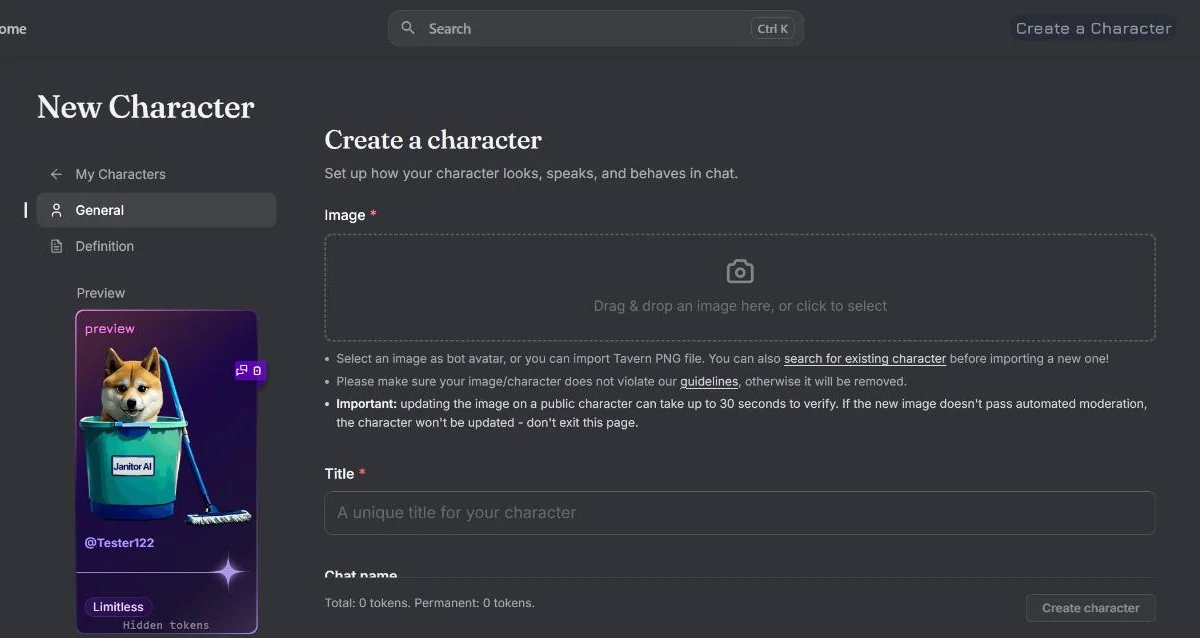
Janitor stores a bot as a small record of named fields, and counts exactly four of them into the prompt the model sees on every turn: personality, scenario, example dialogue and first message. Its own data keeps a separate token count against each one, plus a total.
That is the whole machine. Everything else in the editor — the description, the tags, the avatar — is for the human deciding whether to click, not for the model deciding what to say.
Knowing which is which fixes most of what goes wrong. The three complaints people search for constantly — the bot talks for me, the bot won’t shut up, the bot forgets — are not usually writing failures. They are mechanical ones, caused by putting the right words in the wrong box, or by demonstrating a behaviour while asking for the opposite.
This guide covers the platform side: what each field does, the settings that decide who can see your bot, and the specific fixes for those three failures. For the craft of writing a character well — the prose itself — we have a platform-agnostic guide to character cards that applies here and everywhere else the same format is read. And if what you are building is a game rather than a person, that is a different structure again, covered in how to run a real RPG on Janitor AI. Building the same character on the other big platform is a different form with different limits — see how to make a Character.AI bot.
The Two Kinds of Field
Sort every field into one of two piles before you write a word. This single habit prevents the most common beginner mistake, which is pouring beautiful characterisation into a box the model never reads.
| Field | Who reads it | What it is for |
|---|---|---|
| Personality | The model, every turn | Who the character is and how they behave |
| Scenario | The model, every turn | The situation the conversation starts inside |
| Example dialogue | The model, every turn | A demonstration of format, length and voice |
| First message | The model, every turn | The opening, and the tone-setter |
| Name | Both | Identification |
| Description | Humans browsing | The pitch that earns the click |
| Tags | Humans browsing, and search | Discovery |
| Avatar | Humans browsing | The thumbnail |
Janitor’s records also carry an alternate-greetings list, so one bot can ship several different openings, and a set of publishing and visibility flags we come to further down.
The important consequence of that first block is cost. Those four fields are re-sent on every single message, forever. A long card is not a one-time investment that pays off later; it is a standing charge, deducted from the same context window that is supposed to be holding the last thirty messages of your conversation. This is why a tight 400-token card frequently beats a lavish 2,000-token one over a real session — and why the single most useful editing pass is deleting.
Personality: Behaviour, Not Biography
The personality field is where most effort goes and where most of it is wasted, because people write a biography when the model needs a behaviour specification.
A biography says what is true about a character. A behaviour specification says what the character does in the situations that will actually come up. The model cannot act on “she had a difficult childhood”. It can act on “she deflects direct questions with a joke, and only answers them on the second ask”.
Three things belong here, in roughly this order of value:
How they speak. Register, rhythm, verbal habits. One concrete tic beats three adjectives — “never uses contractions” or “calls everyone by their surname” does more work than “formal and reserved”, because it is checkable on every line.
What they want, and what they will not do. A character with no wants is furniture; they just respond to you forever. A character with a want pushes the conversation somewhere. A character with a refusal creates friction, and friction is most of what makes a chat feel alive rather than compliant.
The rules for the bot’s own output. This is the part that belongs in personality rather than anywhere else, because it is a rule about behaviour. The line that matters most is the one that stops the single biggest complaint on the platform:
Never write the user’s dialogue, actions, thoughts or decisions. End each reply and wait.
Put it in plainly. We come back below to why the instruction alone is not enough.
Scenario: The Situation, Not the Setting
Scenario is a small field with a specific job: establish the situation the first exchange happens inside.
It is not a worldbuilding slot — that job belongs to a lorebook, which lives outside the character entirely and only spends tokens when something triggers it. “A vast empire that fell three centuries ago” is setting, and it will sit in your prompt costing tokens while contributing nothing the conversation can touch. “You have been waiting in his office for twenty minutes and he has just walked in” is a situation, and it generates the next five turns by itself.
Two or three sentences is usually right: where we are, what just happened, and what the relationship between the two parties currently is.
Example Dialogue: The Field That Teaches Format
This is the most underused field on the platform and the most powerful, because it is the only one that shows rather than tells.
Instructions are weak at format. Examples are strong at it. If you want two-paragraph replies, third-person narration, asterisks for actions, or dialogue attributed by name, the reliable way to get them is to write a sample that does exactly that. The model is a pattern-continuer; hand it the pattern.
Three rules make this field earn its tokens:
- Write examples at the length you actually want. This is the real answer to “how do I make my bot’s responses shorter”. The model has no fixed idea of what “short” means, but it can match a demonstrated shape precisely.
- Never write the user’s side doing anything interesting. Keep user lines in your examples minimal — a short action or question. The moment your example shows the user taking a paragraph of initiative, you have taught the bot that composing the user’s turn is part of the job.
- Demonstrate the normal case, not the dramatic one. Most of a real session is ordinary exchanges. If every example is a confrontation, every reply will reach for one.
First Message: The Opening and the Contract
The first message does two things at once. It opens the scene, and it silently sets the terms — length, tense, person, formatting — for everything that follows.
So write it at the length you want an average reply to be. A 600-word opening teaches the bot that 600 words is normal, and then people complain the bot talks too much. It is the most common self-inflicted cause of that exact problem.
End it somewhere that hands the turn over cleanly: a question, an arrival, an offer. An opening that resolves everything leaves the other person with nothing to do.
Janitor supports alternate greetings on a card, and they are worth using. The same character can open in three different situations — a first meeting, a reunion, a crisis — and the person chatting picks. It costs you nothing in prompt size, since only the chosen one is used, and it makes a single bot feel like three.
The Three Failures People Actually Search For
Almost every complaint reduces to one of these, and each has a mechanical cause.
”The bot is talking for me”
By far the most searched problem on this platform, and the fix is in two places, not one.
The instruction goes in personality, as above. But the instruction on its own routinely loses, because it is competing with a demonstration. If your example dialogue or your first message ever writes the user doing or saying something substantial, you have shown the model that composing the user’s turn is normal — and shown beats told, every time.
So audit your own examples. Every user line in example dialogue should be short and inert. Your first message should end before the user does anything. When the two agree, the problem mostly disappears. The player has a share in this too: a persona that describes behaviour invites the same thing, as we explain in Janitor AI personas.
If it still creeps in mid-session, say so in the chat as a plain out-of-character note. That puts a correction in recent context, which is the part of the conversation the model weighs most heavily.
”The bot’s replies are too long”
Three causes, in order of how often they are the real one: your first message was long, your example dialogue is long, and only then, the response length setting on your side of the chat.
Fix the demonstrations first. Rewriting the first message to the target length is frequently the entire fix, and it takes two minutes.
”The bot forgets”
This one is not a card problem, and no amount of card writing solves it. The context window is finite, and the oldest part of a conversation falls out of it and stops existing — we explain the mechanism in why LLMs forget.
What the card can do is make the important things cheap to re-anchor: keep the personality tight so it never gets crowded out, and put durable facts in the fields rather than hoping they will be remembered from turn four. What the player can do is restate what matters and keep a summary, which our guide to summarising a campaign covers.
Multiple Characters in One Bot
A well-defined sub-genre, and the usual mistake is thinking of it as a group chat.
One card produces one reply. So a multi-character bot is really one narrator that voices several characters, and it has to fit everyone who speaks into a single turn. Build it that way:
- Define the cast in personality, with one distinguishing line each — a voice tic, a want, a stance toward the user. Resist full biographies; you are paying for all of them on every turn.
- Use example dialogue to show two or three of them speaking within one reply, with names attached, exactly as you want it rendered.
- Keep the cast small. Voices blur as the count rises, and a model juggling six distinct personalities in one paragraph tends to average them into one.
Who Can See Your Bot
Janitor’s character records carry a set of visibility and publishing flags, and they are worth understanding before you press publish rather than after.
Public or private. A bot is either listed in the library or it is not. Private is the correct default while you are still testing — a half-finished bot that gets found is how most bad first impressions are made, and the review it earns does not un-happen when you fix it later.
Published chats. Records carry a flag for whether chats can be published, which is a separate decision from whether the bot itself is listed.
Proxy use. There is a per-bot flag governing proxy access, so this is a creator-side choice rather than purely a platform-wide one.
Scheduled and quiet publishing. The records carry fields for a scheduled publish time and for publishing without the usual announcement, which is useful if you would rather a bot appear without being pushed at everyone at once.
The Definition Setting
Janitor’s records carry a setting for whether a bot’s definition is displayed. It is a real control and you should set it deliberately.
But be clear-eyed about what it is. It is a courtesy setting, not a security control. Everything in those four prompt fields has to be sent to a model in order for the bot to work at all, and that fact does not change based on a display toggle. There is a visible market in tools and techniques that advertise recovering hidden definitions, and we are not going to publish a method for it — taking work that a creator deliberately hid is not something this site is going to teach.
The practical advice for a creator is simply this: hide the definition if you would prefer people not copy-paste it, and expect that to stop casual copying and nothing more. If a piece of writing would genuinely hurt you to lose, a public bot on any platform is the wrong place to keep the only copy.
Why Bots Get Moderated
There is a steady stream of searches about bots being moderated, removed, or quietly made private, and most of the answers circulating are guesswork.
Here is what can actually be established. Janitor’s character records carry an obscenity score and a separate text obscenity score — two distinct fields. That is consistent with automated screening, and with the image and the text being assessed as separate things.
What is not published, and what we cannot see, is the thresholds or how a score becomes an action. So nobody outside the platform can tell you precisely what tripped a given removal, and anyone who claims to is guessing.
Two things follow that are useful anyway. First, a removal is much more likely to be a scoring outcome than a personal judgement about you, which is worth knowing before you write an appeal. Second, because the avatar and the text are scored separately, a bot can be caught by its image while its writing is unremarkable, or the reverse — so when something goes wrong, check both rather than assuming it was the text.
Getting Your Bot Found
Discovery is a real part of making a bot people use, and it runs on the two fields the model never reads.
Tags are the search surface. Janitor publishes a fixed set of official tags — 53 of them as of 20 September 2026 — and they are how most browsing happens. Tag accurately rather than broadly: a bot tagged into a category it does not really belong to gets opened by people who wanted something else and closed immediately, which helps nobody.
The description is the pitch. This is the one piece of writing aimed squarely at a human deciding whether to click, and it should not be a synopsis of the personality field. Say what the experience is: the situation, the tone, and what makes this one different from the several hundred thousand others. The library is enormous — Janitor’s own browse endpoint reported around 639,000 public characters on 20 September 2026 — and the description is most of what distinguishes yours in a list.
Test It Before You Publish
The fastest quality check on any bot is a short session with a specific thing you are watching for.
Run twenty messages and check three things: does it write your lines, are replies the length you designed, and does the voice at message twenty match the voice at message two. Those three cover the overwhelming majority of what makes a bot feel bad to use.
Then do the pass nobody enjoys: cut. Every token you remove from the four prompt fields is a token available to hold the conversation instead. Most cards get better when they lose a third of their length, because what gets cut is almost always biography the model was never going to act on.
Which model you connect matters as much as the card by the time you are testing seriously — a good card on a weak model reads like a weak card. Our guides to connecting an API key, running DeepSeek and using a proxy cover that side, and how to use Janitor AI covers the setup end to end.
The Short Version
- Four fields reach the model — personality, scenario, example dialogue, first message — and you pay for all four on every turn. Everything else is for humans.
- Personality is behaviour, not biography. How they speak, what they want, what they refuse.
- Scenario is a situation, not a setting.
- Example dialogue teaches format — length, person, formatting — better than any instruction.
- The first message sets the contract. Write it at the length you want replies to be.
- “Talking for me” is fixed in two places: the rule in personality, and never demonstrating it in your examples.
- Multi-character bots are one narrator voicing a small cast, not a group chat.
- Set visibility deliberately, keep it private while testing, and treat the definition setting as courtesy rather than security.
- Tag accurately, pitch in the description, and cut a third of the card before you publish.
Frequently Asked Questions
How do you make a bot on Janitor AI? You fill in a small set of named fields and publish. Janitor stores a bot as a record with a name, a description, a personality, a scenario, example dialogue and a first message, plus tags and an avatar. Only four of those are counted into the prompt the model sees on every turn: personality, scenario, example dialogue and first message. The description and tags are for humans browsing the library. Write the four prompt fields for the model and the other two for the person deciding whether to click.
How do you make a Janitor AI bot private? Janitor’s character records carry a public flag, so a bot is either listed in the library or it is not, and you set that when you publish or by editing the bot afterwards. A private bot still works normally for you — it simply does not appear in the library for anyone else. Making a bot private is the right default while you are still testing it, because a half-finished bot that gets found and chatted with is how most bad first impressions happen.
Why does my Janitor AI bot talk for me? Because nothing stops it by default. The model continues the text it is given, and if your example dialogue or first message ever writes the user’s actions, you have shown it that writing your lines is part of the format. Fix it in two places: state plainly in the personality field that the bot never writes the user’s dialogue, actions or thoughts, and then make sure your own example dialogue never does it either. The demonstration matters more than the instruction, because format is learned from examples.
How do I make my Janitor AI bot’s responses shorter? Set the length in the example dialogue rather than asking for it in words. Instructions like keep replies short are weak, because the model has no reliable sense of how long short is; a worked example that is two paragraphs long is a target it can match. Write every example reply at the length you actually want, keep the first message the same length, and cut any long monologues from example dialogue. If it still runs long, the response length setting on your side of the chat is the other lever.
Can you make a Janitor AI bot with multiple characters? Yes, and the usual mistake is making it a group chat. A multi-character bot works best as one narrator that voices several characters, because a single card produces a single reply and that reply has to contain everyone who speaks. Define the cast in the personality field with one distinguishing line each, then use example dialogue to show two or three of them speaking in a single turn with names attached. Keep the cast small; voices blur as the count rises.
Why was my Janitor AI bot moderated or removed? Janitor’s character records carry an obscenity score and a separate text obscenity score, which is consistent with automated screening of what a bot contains. The thresholds are not published and we cannot see them, so nobody outside the platform can tell you exactly what tripped it. Practically, that means a removal is usually a scoring outcome rather than a personal judgement, and the avatar and the text are scored as separate things, so either one can be the cause.
Can people see my Janitor AI bot’s definition? Janitor’s records carry a setting for whether a bot’s definition is shown, so you control whether the library displays it. Treat it as a courtesy setting rather than a security control, though. Everything in those four prompt fields is sent to a model in order to work at all, so a determined person has routes to infer it, and tools that advertise this exist. If a piece of writing would genuinely hurt you to lose, a public bot is the wrong place to keep it.
Field structure, tag list and library size checked against Janitor AI’s own public browse and character endpoints on 20 September 2026; the platform’s character records count personality, scenario, example dialogue and first message separately toward a card’s token total, and carry separate obscenity scores for image and text. Moderation thresholds are not published and are not claimed here. Janitor AI is a third-party platform and Arcanum is an independent publication with no affiliation to it or to any model provider named here; all names are used nominatively.