NovelAI Text Adventure Mode (2026): Caret Commands, Do and Say, and What the AI Sees
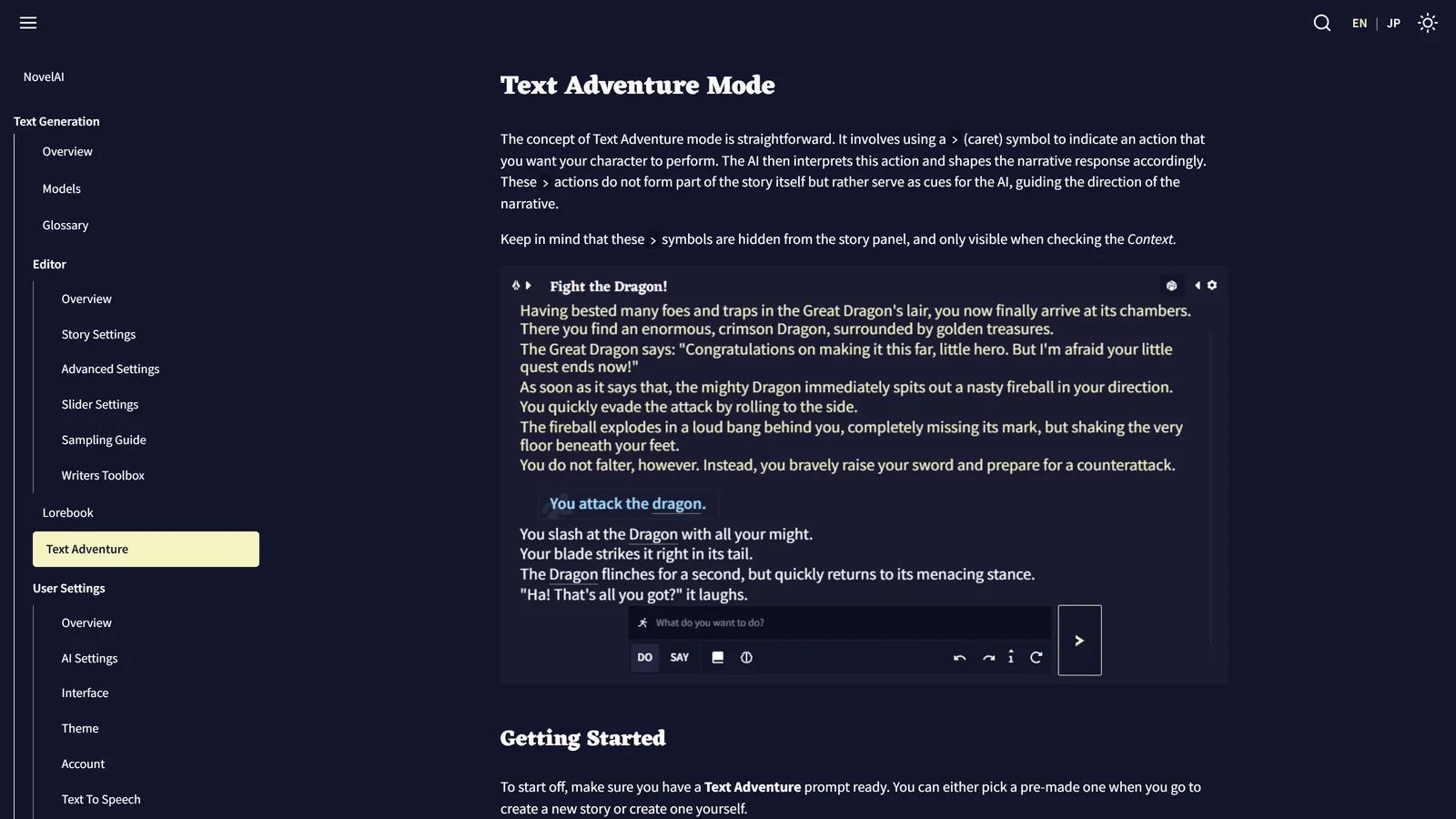
NovelAI’s Text Adventure mode is a way to play a story by typing what your character does, with the AI writing the result, and its trick is a hidden caret: every action you type is marked with > so the model reads it as a player’s intention and not as part of the story. That one design choice explains most of how the mode behaves. It is why the AI sometimes does not repeat your words, why a vague action gets a free interpretation and a detailed one gets followed closely, and why the mode has its own small command language.
We read NovelAI’s documentation for Text Adventure mode, its model page, its module page and its Story Settings page on 8 November 2026. We did not subscribe, start a story or test any command for this page, so nothing here is a play report. Where we are interpreting the documentation and not quoting it, we say so.
NovelAI is a trademark of Anlatan, used here only to identify the service. Arcanum is independent and not affiliated with NovelAI or Anlatan.
The Short Answer
| Question | Answer from the documentation |
|---|---|
| What do I type? | A command such as charge the dragon. NovelAI formats it for you |
| What does the AI see? | > You charge the dragon, with the caret hidden in the story panel and visible in the Context |
| What are the two input modes? | Do (an action) and Say (speech) |
| Are there shortcuts? | Yes: l, i, x thing, z, and the compass directions |
| Can the AI continue my action for me? | Yes, end the input with * or a comma |
| Does the AI obey exactly? | No. It treats the action as an intention and interprets it |
| Is it the same on every model? | No. On Xialong, inputs go to the model as instructions |
If you have played a classic parser game, the shortcuts will feel familiar. If you have played a modern AI text adventure, the difference is that NovelAI here is a writing studio with a game mode, not a game. Our review of NovelAI explains what that means for how it is built, and our comparison with AI Dungeon shows the practical gap.
Starting a Text Adventure
The documentation gives two ways in, both from the New Story button in the bottom left:
- From a blank prompt. After you create the story, click the Text Adventure button. The page says “It’s that simple”, and then adds the catch: a story that starts from an empty prompt “may not be as coherent” as one that starts from a longer, properly written prompt.
- From a scenario. At the bottom right, click View All Scenarios and find one with the Text Adventure tag. The search bar helps. Click Start, or fill in the placeholders the scenario asks for. The page notes that some ready-made scenarios come with placeholders already filled.
Our reading: the quality of a text adventure on NovelAI depends heavily on the opening. A scenario with a written setting, a role for you and a first scene gives the model something to work from, and a blank start asks it to invent all of it. The documentation says the second is possible and the first is better.
The Mode and the Module Are Two Things
This is a common point of confusion, so it is worth separating.
- Text Adventure mode is the interface: the Do and Say input box and the command formatting.
- The Text Adventure module is an AI module “made specifically to assist the AI at writing in a Text Adventure style”. The module page explains that its training data is written in second person (“You” in every sentence) and has distinct player actions marked with
>.
Picking the module from the dropdown in the options sidebar also switches on the Text Adventure interface if your story did not start as one. So the two travel together on the models that use modules.
The documentation calls modules a legacy tool for older models. Custom modules work only with Sigurd and Euterpe, and training new ones is no longer supported. The Text Adventure module sits in the Specials section of the module gallery, the one for modules “with extra functionality”. The modules you can see change with the model you picked, so if you cannot find it, check the model first.
The Two Input Modes: Do and Say
Text Adventure mode does not take plain prose. It takes commands, which NovelAI formats to fit the style, with some capitalisation and punctuation corrections added where they are appropriate. There are two formats.
Do
Do adds > You to the front of what you type. The documentation calls it “the bread and butter” of the mode. Its example: you type charge the dragon, and that becomes a > You action about charging the dragon.
Say
Say changes what it adds based on the last character of your input:
| You end with | NovelAI adds | Example input |
|---|---|---|
| A full stop, or nothing | > You say | you've had enough |
| A question mark | > You ask | you've had enough? |
| An exclamation mark | > You yell | you've had enough! |
The pages we read do not show where the switch between the two sits in the interface. The prefixes in a later section let you change mode for one line without touching it.
Shortcuts: A Small Command Language
The documentation lists three groups of shortcuts. They are what makes the mode quick once you know them.
Special actions (in Do mode)
| Type | What happens |
|---|---|
l | You look around |
i | You check your inventory |
x book | You examine the book (x plus the thing) |
z | You wait |
n, s, e, w | You go north, south, east or west |
nw, ne, sw, se | You go diagonally |
u, d | You go up or down |
These are the verbs of the old parser games, and the page does not say it is copying them. Our observation: they save typing but they do not give the AI a map. n becomes “you go north”, and the model decides what is north. NovelAI is not tracking rooms or an inventory list for you in these shortcuts. Whether it does so inside the story is up to the story’s text and your own notes. Our AI RPG mechanics page explains why that difference matters.
Wildcards: leaving part of the input to the AI
Wildcards “leave a part of the input up to the AI”, and they work differently in Do and Say.
- End with
*or,and the AI continues your action as its output, along with the result. The*is removed from the final text, and the comma stays. The documentation’s example:grab the dragon's tail*can become “You grab the dragon’s tail and spin it around.” - Just
!in Do mode makes you perform a random action. In Say mode it makes you shout something. - Just
?in Do mode makes you inquire about something. In Say mode it makes you ask something.
The wildcard is useful when you know the direction but not the detail. It is also a way to let the model be the author for a moment, so use it when you want surprise and avoid it when you want control.
Prefixes: switching mode for one line
These let you do what the current mode would not, without changing modes:
- Start with
"and you say something, even in Do mode. - Start with
>and you do something, even in Say mode. - Start with
!and NovelAI takes your input exactly as written, with no changes except the hidden>at the front. The result is a command that is not an action by your character. The page’s example:!The dragon suddenly has a heart attack.It adds that this used to be called a story-mode input in older versions, and warns you to use proper capitalisation and punctuation, because the corrections are off.
The ! prefix is the one a game-master type will use: it is how you push an event into the story that your character did not cause. Compare it with the ! wildcard above. A single ! on its own is a random action. A ! in front of a sentence is a verbatim command. The documentation lists both, and we would expect people to mix them up.
What > Really Does
The documentation answers the question directly: the AI sees a > line as a player action, not an in-character action. You are only stating what your character intends to do, not what is happening in the narrative. That is why the AI has to interpret it, and why it sometimes does not repeat your words exactly.
It gives practical advice on how to use that:
- For a closer follow, write a more detailed action.
- For more freedom for the AI, leave details out.
Our reading, and not a documented rule: this is the same dial every AI game has, set by you. A line such as > You pick the lock with the pin from your hair, quietly, in under a minute gives the model very little room. A line such as > You deal with the lock gives it a lot. If the story keeps going somewhere you did not want, the answer is usually in how much you handed the model.
The carets also explain a point that confuses newcomers: they are hidden from the story panel and only visible when you check the Context. If your story reads like plain prose but the AI keeps behaving as if you issued commands, that is how it is built. See our page on what the AI sees in NovelAI’s context for how to open the Context Viewer.
The Xialong Change
NovelAI’s model page carries a note that matters if you play on its newest model. For Xialong, the page says:
when using Text Adventure mode with Xialong, user inputs are sent as instructions. If you are running text adventures outside of the dedicated text adventure mode, please use the { instruct syntax instead of > .
In plain words: on older models, your > action is a line in the story the model continues. On Xialong, the dedicated mode sends your input as an instruction to the model, and if you build a text adventure by hand in the normal editor, you start the instruction with { and not with >.
We do not know, and the page does not say, how large the difference in play is. Our inference is that Xialong, which is a finetune of a general instruction model, is built to follow orders, and NovelAI has wired the mode to that. The same page gives the model’s details: Xialong is a 355-billion-parameter finetune of ZhipuAI’s GLM-4.6, released on 31 March, with a context of 28,672 tokens plus an 8,192-token rollover window. Our pricing page covers which plan gets Xialong.
Edit the Story Directly
Two Goose Tips in the documentation say you are not locked into the input box:
- You can edit any part of the story by clicking into the text, including changing your actions into something that is not an action by your character.
- The model reads what is in the story. So a line you rewrote by hand is a line the AI will treat as history.
Our practical reading is that when the AI misreads a scene, correcting the text beats arguing with it in the next command. That is a feature of the writing-studio design and it is one place where NovelAI gives you more control than most game-first tools. It is also more work.
Where It Fits, and Where It Does Not
NovelAI’s Text Adventure mode is a good fit if:
- You like a parser-style feel: short commands, a second-person narrator, a shortcut for looking around.
- You want control over the text, including editing, undoing and exporting.
- You are already a NovelAI subscriber for writing and want a game mode in the same place.
It is a weaker fit if:
- You want the game to keep score. Nothing in the pages we read describes hit points, dice or an inventory the system enforces. Our mechanics page and review make the same point at more length.
- You want a free way to try it. NovelAI has no free plan, only a trial, which our pricing page covers.
- You want many people in one game. We found nothing about multiplayer in the documentation we read.
If you want the same genre in a tool built around it, our page on what an AI text adventure is and the AI Dungeon comparison are the places to start.
Making a Text Adventure Better: Memory, Lorebook and Notes
The mode gives you the input format. The rest of the quality comes from the same story tools NovelAI offers for any story:
- The Memory box holds broad details about the setting, your character and what has happened. By default it sits at the top of the story context.
- The Author’s Note sits much closer to the newest text and the documentation says it has a “very strong effect”.
- The Lorebook inserts an entry when its keyword appears.
Those three are the difference between an adventure that remembers the key and one that forgets it. Each has its own page: Memory, Author’s Note and Context and the Lorebook. If you are new to the idea, our explainer on why models forget is the reason all three exist.
What We Did Not Check
| Not checked | Why it matters |
|---|---|
| Playing a Text Adventure | We read the documentation and ran nothing |
| How the shortcuts behave on Xialong | The page says inputs are sent as instructions and says nothing else |
Whether l, i and x work the same on every model | The page lists them once, for the mode |
What the { instruct syntax looks like in full | The model page names it and does not give examples |
| Whether older models still have the mode | The module page describes it for the older Kayra and Clio generation |
| How well any of it plays | That is a verdict, and we have not made one |
Frequently Asked Questions
What is Text Adventure mode in NovelAI?
It is a way of writing a story in which you type actions for your character and the AI writes what happens. Your input is marked with a hidden caret symbol so the AI reads it as a player action and not as story text. NovelAI’s documentation says the carets are hidden in the story panel and visible only in the Context.
How do I start a Text Adventure in NovelAI?
Create a new story and click the Text Adventure button to start from a blank prompt, or open View All Scenarios and pick a scenario tagged Text Adventure. The documentation says a blank start works but the AI writes more coherently when it has more material to work with.
What is the difference between Do and Say?
Do adds the words “You” in front of your input, so charge the dragon becomes an action. Say turns your input into speech, and the end of your sentence changes the verb: a full stop or nothing gives “You say”, a question mark gives “You ask” and an exclamation mark gives “You yell”.
What do the l, i, x and z shortcuts do?
In Do mode, typing just l makes you look around, i checks your inventory, x followed by a thing examines it, z makes you wait, and n, s, e, w, nw, ne, sw, se, u or d moves you in that direction. These come from NovelAI’s documentation of special actions.
Does the AI have to do exactly what I type?
No. NovelAI’s documentation says the AI sees your action as an intention, not as something that already happened, so it interprets it and sometimes does not repeat your words. A more detailed action makes it follow you more closely, and a vaguer one gives it more freedom.
Does Text Adventure mode work differently on Xialong?
Yes. NovelAI’s model page says that with Xialong, Text Adventure mode sends your inputs to the model as instructions. If you run a text adventure outside the dedicated mode on Xialong, the documentation says to use the { instruct syntax instead of the > caret.
NovelAI’s documentation for Text Adventure mode, models, modules and story settings was read on 8 November 2026. We did not subscribe to NovelAI or run any command for this page. NovelAI is independent of Arcanum, and we have no commercial relationship with it.