AI Dungeon Story Cards (2026): How They Actually Work, and the Three Reasons Yours Don't
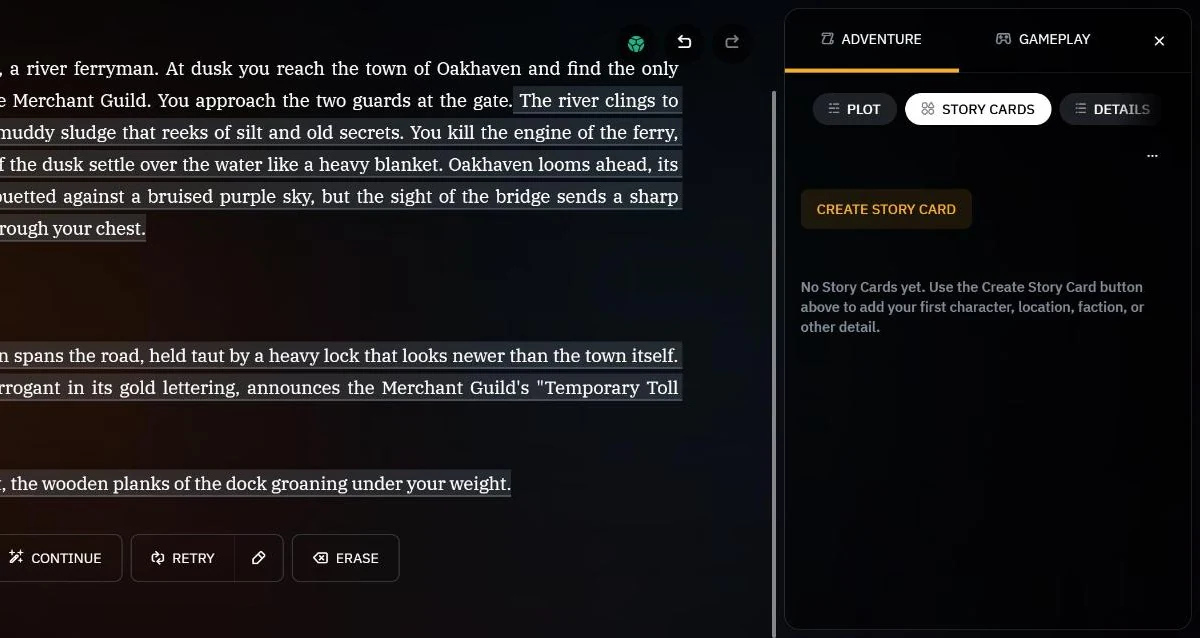
A Story Card is a note you write for the AI that it only reads when a trigger word appears. That single sentence explains both why they are the most powerful tool in AI Dungeon and why so many of them appear to do nothing: a card that is never triggered is a card the AI has never seen, and it will not tell you that.
There are three entirely separate reasons a Story Card fails, and they have nothing to do with each other. The card can be written in a way the AI cannot use. Its triggers can be written in a way that never matches. Or it can be perfectly good and simply have no room left in the context window. Most guidance addresses the first and ignores the other two.
This is the full picture, checked against Latitude’s own documentation on 16 September 2026. If your immediate problem is that nothing works at all, start with AI Dungeon not working instead, which sorts the symptoms.
What a Story Card Is (and What It Used to Be Called)
Story Cards are notes about characters, locations, factions, concepts — anything in your story that needs to stay true after it scrolls out of the conversation. They are optional, and Latitude says so plainly. You can play without ever making one.
They were previously called World Info, which is the name the rest of the genre still uses: this is the same mechanism SillyTavern calls a lorebook, and our glossary entry covers the general concept. AI Dungeon’s implementation has its own specific rules, and those rules are where people come unstuck.
The crucial property is conditional injection. Latitude’s description is exact: “The AI only consults Story Cards when they become relevant. Their relevance is determined by keywords called Triggers.” A card sits inert until something fires it, and then its text joins the prompt for a while. This is what makes them cheap compared with Plot Essentials, which is sent on every single turn — and it is also what makes them unreliable in a way Plot Essentials never is.
One more line from the documentation is worth reading twice, because it explains a whole category of confusion: the AI does not know Story Cards exist. It cannot look one up, cannot be asked to check one, and cannot tell you it is missing information. It only ever sees text that has already been inserted, labelled World Lore: in the prompt.
The Anatomy: Two Fields the AI Sees, Three It Doesn’t
This is the part that catches nearly everyone. A Story Card has five fields, and the AI sees exactly two of them.
| Field | Does the AI see it? | What it is actually for |
|---|---|---|
| Entry | Yes | The text injected into context when the card fires |
| Triggers | Indirectly | The keywords that fire the card; never shown as text |
| Name | No | Your reference only |
| Type | No | Character Creator scenarios; a hint for the generator |
| Notes | No | Your reference, or generation logs |
Read that table against a card you have written. If your card is named “Amanda” and the Entry begins “She is a retired smuggler who distrusts the guild,” the AI receives a paragraph about an unnamed “she” with no way to connect it to Amanda. Latitude’s own best-practice list says it directly: mention the name of the thing you are describing, “Remember: the AI does not see the Name, so it needs to be able to tie the description to the name in some way.”
This is the single most common way a well-written card produces nothing useful. The card fires, the text arrives, and the model cannot attach it to anything.
Type and Notes matter only in Character Creator scenarios, where Type controls whether a card is offered as a selectable option and Notes becomes the description the player reads. Outside that, they are private scratch space — which makes Notes genuinely useful for keeping your own version history next to the card.
Writing an Entry That Survives
Latitude’s guidance here is unusually candid, including about its own community’s folklore. On formatting wars — the years of argument about whether to use bracketed lists, key-value pairs or prose — the documentation says there is “no evidence that there is any downside to using plain English, as long as you are concise to save context space.”
So: plain English, short sentences, unambiguous.
Four rules do carry real weight:
- Put the most important information at the beginning and the end. The documentation attributes this to a positional bias in the model — the middle of a block is where detail goes to die. This is the same lost-in-the-middle effect that governs how much your system prompt and world file actually cost.
- Be brief, because Story Cards are first against the wall. Latitude’s phrasing: they “are among the first elements to be removed from the context when it is full.” Length is not a neutral choice here; it is a bet against your own budget.
- Name the subject inside the Entry, for the reason above.
- Avoid piling on physical description. The documented failure mode is specific and recognisable: the AI “will either not use it at all, or may repeatedly mention it, over and over again.” If a character’s scar or hair colour turns up in every second paragraph, the card is why — and that is one of the quieter causes of repetition loops.
The practical target is a card that reads like a competent index entry rather than a character sheet. Whatever you cut, keep the name and the two or three facts that change how a scene plays.
Triggers: Where Most Cards Quietly Die
Triggers are the half of a Story Card that people write last and think about least, and the rules are pickier than they look.
Triggers are case-insensitive but space-sensitive. This is the whole game. Latitude’s example is worth reproducing exactly, because it is not intuitive: cat will fire inside the word catalog, whereas cat — with a trailing space — will not. But cat will also fail to fire on cat. at the end of a sentence, because a full stop is not a space.
That is a genuine trap in both directions. A short trigger fires constantly on words you never meant; a trigger padded with a space stops firing exactly when the word ends a sentence.
The rest of the documented rules:
- Separate triggers with commas and no spaces —
Amanda,your daughter. A stray space becomes part of the trigger. - Use truncated stems to catch plurals.
boatcatchesboatsfor free. - Prefer proper nouns. Latitude calls them “the safest trigger types,” precisely because they occur only when the thing is genuinely relevant.
- Triggers are not instant. If the AI mentions Amanda in the middle of an output, the card does not apply to that output — it applies from the next one. A card can therefore look one turn late, and it is.
- Both sides fire triggers. Your input counts as well as the AI’s output, which gives you a direct lever: if you need a card in play, use its trigger word in what you type.
If you want a card that is always in play, do not solve it with an aggressive trigger. Move the content to Plot Essentials, which is sent every turn by design. Our guide to AI Instructions, Plot Essentials and Author’s Note covers what belongs there and what it costs.
The Networked Cards Technique
The most useful advanced idea in Latitude’s documentation is buried at the end of a section, and it addresses the structural weakness of the whole system: a card nobody mentions never fires, and the AI cannot go looking for it.
The fix is to have cards refer to each other in their Entry text, so that firing one drags the next into range. Their example: “Amanda’s best friend is Jeremy, and they often visit Fossil Garden together.” Mention Amanda, and Jeremy and Fossil Garden are now words in the context — which means the AI is far more likely to use them, which fires their cards in turn.
Done deliberately, this gives you a branching structure: a region card that names its towns, a faction card that names its officers, a character card that names their haunts. It is the closest thing AI Dungeon has to a world that surfaces itself, and it costs nothing but a sentence per card.
How Many Cards, and How Much Room
Two separate limits, and the one that matters is not the one people search for.
The hard cap is 5,000 Story Cards per adventure or scenario. Essentially nobody reaches it, and it is not your constraint.
The real constraint is context. Story Cards are a Dynamic context element, which means they get roughly 25% of whatever is left after the Required elements — AI Instructions, Plot Essentials, Story Summary, Author’s Note and your last action — have taken their share, and that share can run to 70% of the window. Since context on AI Dungeon is granted per model rather than per plan, the space available to your cards varies enormously:
| Your model’s context | Story Cards get (~25% of what’s left) | Trigger window |
|---|---|---|
| 2k | ~150 tokens | 4 actions |
| 4k | ~300 tokens | 4 actions |
| 8k | ~600 tokens | 6 actions |
| 16k | ~1,200 tokens | 12 actions |
| 32k | ~2,400 tokens | 24 actions |
Our arithmetic on Latitude’s published allocation rules, assuming a Required block heavy enough to hit the 70% ceiling. The full derivation, including what happens when your Plot tab is nearly empty, is in AI Dungeon not working.
The second column is the one that surprises people. How far back AI Dungeon looks for trigger matches is itself a function of budget: a minimum of four recent actions, widening only once more than 500 tokens are available for cards, at a rate of one action per 100 tokens. On a free model you are permanently at the floor. A card whose keyword last appeared five turns ago cannot fire at all — and the same card on a 32k model is checked against a window six times longer.
This is why identical cards behave differently on two accounts, and why “story cards stopped working” often coincides with nothing more than a model change.
Update (29 September 2026). AI Dungeon’s “Alchemy” release lets Premium players pin a Story Card so it always stays in context. A pinned card is not dropped when the window fills and does not wait for a trigger, so the budget above now describes your unpinned cards. A pinned card still takes up room in the context, though, so pin the few cards the story cannot do without, not all of them. This week’s news covers the rest of the release.
If you are building a Scenario rather than fixing an Adventure, the same budget decides where your opening text should live — see how to create an AI Dungeon scenario, where every Character Creator option is a Story Card in disguise.
The Generator, and What to Tell It
AI Dungeon can write cards for you, and the generator is better than its reputation — mostly because two of its fields are doing more work than their labels suggest.
Under Generator Settings, before you create anything:
- AI Instructions is style and remit: what kind of card, in what voice. Latitude’s examples run from “Write in a noir style with short, punchy sentences” to “Ensure all location descriptions include a hidden secret or mystery.”
- Story Information is the world the card has to fit into — setting, lore, companions, magic system.
- Include Story Summary lets the generator read your actual story rather than working from the brief alone.
- Log Generation in Notes keeps every generated attempt in the card’s Notes so you can harvest the good sentences from three drafts instead of picking one whole output.
- Speed Create Mode turns Finish into Next, for building a set of the same type in one sitting.
Both AI Instructions and Story Information are per-adventure, so they need resetting for each new story. Two behaviours are worth knowing before you lean on the buttons: generating from the Name field always regenerates Name, Entry and Triggers together, so it will overwrite work you meant to keep; and if you generate only an Entry, nothing fills in your Triggers — you have to add them yourself, matching the name.
Generated triggers are also where the generator is weakest. It produces reasonable proper nouns and rarely produces the stems and alternate forms that make a card fire reliably in play. Treat them as a first draft.
Import and Export: Powerful, and a Genuine Way to Lose Everything
Story Cards export as JSON, and the schema is documented. Only two fields are required:
[
  {
    "keys": "Fairy, Larry",
    "value": "You are Larry, a fairy living in the kingdom of Larion...",
    "type": "character",
    "title": "Fairy",
    "description": "Notes for yourself; the AI never sees this.",
    "useForCharacterCreation": false
  }
]
keys is the trigger list and value is the Entry — those two are mandatory. title is the Name, description is the Notes, and the Character Creator flag is optional. One small inconsistency to be aware of if you are generating files programmatically: Latitude’s prose calls that last field useForCharacterCreator while its own sample file uses useForCharacterCreation. It is optional either way, so neither spelling will break an import.
Now the part that costs people their worldbuilding, in Latitude’s own capitals: “WARNING: When a valid file is imported, the new set of Story Cards will fully overwrite the previous set of Story Cards. Be sure to save backups!”
Import replaces. It does not merge. If you import a file of twelve new cards into an adventure holding sixty, you now have twelve. This is the documented cause behind “my story cards disappeared,” and there is no undo.
The safe workflow is always the same: export first, combine the old file and the new one outside AI Dungeon, then import the combined file. Latitude even suggests handing both files to any LLM and asking it to merge them, which is the rare case of a vendor recommending a competitor’s product for a chore its own UI does not do.
Three more behaviours worth knowing:
- Exact duplicates are purged on import — but only when triggers and entry match exactly.
human,kingandking,humanare two different cards as far as the importer is concerned. - Importing an empty array deletes every card. That is intentional, and it is the documented way to clear a scenario.
- Import and export are web-only. The iOS and Android apps do not show the buttons; Latitude’s own workaround is to open
play.aidungeon.comin your phone’s browser instead.
The wider point of the feature is worth taking seriously. Because the format is plain JSON with two required fields, any model anywhere can generate a hundred cards for you in the right shape, and the prompt-builder approach to writing them transfers directly. Just export before you import.
The Three-Reason Checklist
When a card does not seem to work, check them in this order — they take about a minute together, and they are genuinely independent.
- Does the Entry name its own subject? If it opens with “she” or “it,” the AI has a paragraph it cannot attribute. This is the most common fault and the easiest fix.
- Would the trigger actually match what gets typed? Watch for trailing spaces, triggers that only exist in your head rather than in the prose, and words that only ever appear at the end of a sentence.
- Is there room? Check your model’s context, then the table above. If you are on a 2k or 4k model with a full Plot tab, your cards are fighting over roughly 150 to 300 tokens and a four-action memory. Open the Context Viewer and you will see exactly what made it in.
If all three pass and the card still does nothing, the problem is probably not the card. It is the architecture: AI Dungeon holds your world in the prompt rather than in a database, which is what our full review marks it down for, and what platforms that store state properly are built to solve.
Used well, though, Story Cards are the difference between a story that forgets your world and one that keeps handing it back to you. They just need to be written for a reader who cannot see their own filing system.
If you would rather not write and maintain them by hand, that job can be automated: community scripts such as Auto-Cards create and update cards during play, and AI Dungeon scripting explains how to install one without writing any code — along with the API that lets a script add, update and remove cards itself.
Frequently Asked Questions
Why are my AI Dungeon story cards not working? There are three independent causes and they need checking separately. First, the AI never sees the Name field, so an Entry that never mentions its own subject arrives as an unattributable paragraph. Second, triggers are case-insensitive but sensitive to leading and trailing spaces, so a trailing space stops a trigger matching a word that ends a sentence, and a short trigger fires inside longer words. Third, Story Cards receive only about 25 percent of the context left after the Required elements take their share, which on a free 2k or 4k model is roughly 150 to 300 tokens. Check all three in that order.
What is the character limit for an AI Dungeon story card? There is no published character limit on an individual card, but there is a hard cap of 5,000 Story Cards per adventure or scenario, which almost nobody reaches. The real limit is context rather than character count. Story Cards are among the first elements removed when context fills, so a long card is a bet against your own budget. Keep entries short, put the most important information at the beginning and the end, and use the Context Viewer to see what each one actually costs.
How do story card triggers work in AI Dungeon? A trigger is a word or phrase that causes the card’s Entry to be added to the context when it appears in either your input or the AI’s output. Triggers are case-insensitive but sensitive to spaces, are separated by commas without spaces, and catch plurals if you use a truncated stem such as boat for boats. Proper nouns are the safest choice because they only occur when the subject is genuinely relevant. Triggers are also not instant, so a card fired mid-output only applies from the next output onward.
Does the AI see the name of a story card? No. Of the five fields on a card, the AI only ever receives the Entry, inserted into context under the label World Lore, and it is the Triggers that decide when that happens. Name, Type and Notes are never shown to it. This is why Latitude’s own guidance tells you to mention the subject by name inside the Entry itself, and why a card that refers only to she or it produces so little.
How do I import and export AI Dungeon story cards? The buttons are at the bottom of the Details tab in the Scenario or Adventure Editor, and the format is JSON, where keys holds the triggers and value holds the entry. Only those two fields are required. Import and export are web only, so on a phone you need to open play.aidungeon.com in a browser rather than use the app. Importing fully overwrites your existing set rather than merging with it, so always export first, combine the old and new files outside AI Dungeon, and import the combined result.
Where did my AI Dungeon story cards go? The most likely explanation is an import. A valid import file completely replaces the previous set of Story Cards rather than adding to them, and there is no undo, which is why Latitude’s documentation carries an explicit warning to keep backups. Importing an empty array removes every card by design. If no import happened, check that you are looking at the right adventure, since cards belong to the specific adventure or scenario they were created in.
Checked against Latitude’s published documentation on 16 September 2026. Features and limits are theirs to change. AI Dungeon is a product of Latitude; Arcanum is an independent publication and is not affiliated with, endorsed by, or sponsored by Latitude, and references to its products are nominative.