Backyard AI in 2026: The Desktop App Is Deprecated and Paid Plans Are Closed. What Still Works?
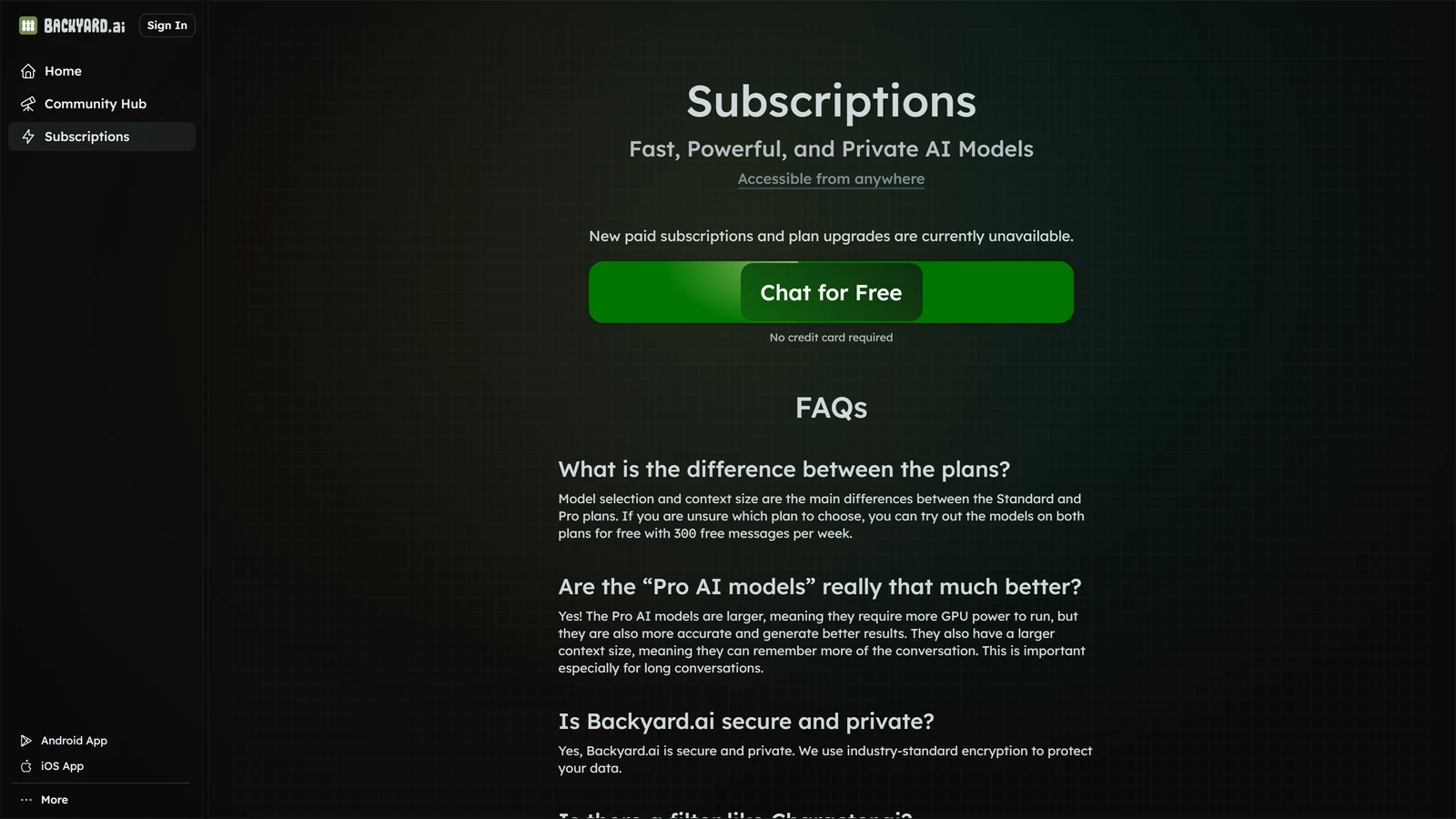
Backyard AI is the new name of Faraday.dev, an app that let you chat with AI characters using models running on your own computer. As of 20 October 2026, its desktop app is marked deprecated and no longer supported, new paid subscriptions are unavailable, and what is left is a free web and phone service that gives you 300 free messages a week.
We have not played Backyard AI, and this page is not a review. Everything below comes from Backyard AI’s own pages, read on 20 October 2026, and from what our own guides already cover. Where we could not confirm something, we say so.
The Short Version
| Question | Answer on 20 October 2026 |
|---|---|
| Is the desktop app still supported? | No. Its download page says it is deprecated and no longer supported |
| Can I still download it? | Yes, installers for Windows and Mac are still listed |
| Can I buy a paid plan? | No. The plans page says new paid subscriptions and plan upgrades are unavailable |
| Is there a free way to use it? | Yes, 300 free messages a week, no credit card, on the web and phone apps |
| Is it shutting down? | We found no shutdown notice on any page we read |
| Does it filter what the AI writes? | Its FAQ says it does not filter text generations |
If you only read one line: if you depended on running your own models in Backyard AI’s desktop app, plan to move; if you only want to chat for free, the hosted service still works, for now.
What Backyard AI Was
Backyard AI began as Faraday.dev. Its blog announced the rebrand on 13 May 2024. For a long time it was the easy way to run local models behind a friendly character-chat app. You downloaded a program, picked a model file, and chatted with characters, with no server to set up and no per-message cost. In February 2024 it added what it called mobile tethering, which let a phone use the models running on your computer, and its post presented local models on mobile as free.
By March 2024 it was selling Backyard Cloud plans, with bigger models running on its own servers for a monthly fee. In October 2024 it added voice calls. That is the date of its newest blog post.
So the product was two things in one. A free local app, and a paid cloud service. What has changed is what happened to each of them.
What Changed
The desktop app was deprecated. The desktop download page carries a notice that reads: “The desktop app is deprecated and no longer supported.” It tells you to visit backyard.ai “for the best and most up-to-date experience”. The Windows installer is listed at 865.1 MB, and the Mac installers at 288.8 MB for Intel and 282.3 MB for Apple Silicon. The page says it was last updated “last year” and gives no exact date, and we could not find a post from Backyard AI that explains the change.
Paid plans closed to new customers. The plans page now opens with the line: “New paid subscriptions and plan upgrades are currently unavailable.” The table of tiers and prices that this page showed earlier is no longer on the page. Our SillyTavern alternatives guide quoted those tiers when we read them, and we have added a note there. If you are already paying, the FAQ says you can cancel in the Manage Subscription page or by emailing [email protected].
The blog went quiet. The newest post, about voice calls, is dated 24 October 2024. The footer of the plans page says 2025. Nothing on the home page, the plans page or the desktop page announces a shutdown, and nothing explains what comes next.
The documents are unfinished. Backyard’s documentation lists guides for the Character Hub, Voices and Speech, and Import and Export. When we opened the Import and Export guide it said: “Docs on imports and exports coming soon.” The Character Hub guide said the same.
None of this says the service is ending. It says that it is not being actively grown, and that is worth knowing before you build anything on it.
What Still Works
On 20 October 2026 the home page and the plans page showed:
- Free sign-up. The plans page says “No credit card required”, with a Chat for Free button.
- 300 free messages a week. The FAQ says you can try the models on both plans “for free with 300 free messages per week”.
- A web app, plus links to Android and iOS apps. The side menu lists both. Earlier, our alternatives guide recorded Android as “coming soon”. It is now linked.
- The Community Hub, a library of characters other people have shared.
- The character tools. The home page lists dynamic voices and audio, lorebooks, an author’s note, grammars, and model parameters, including token samplers, a custom context length and prompt templates.
The FAQ still draws a line between a Standard and a Pro plan: “Model selection and context size are the main differences”. With paid upgrades unavailable, how that line works for a new player is unclear, and we could not test it.
Filters. Backyard’s FAQ says it has no filter like Character.AI: “We do not censor or filter text model generations.” It applies community guidelines to what people share on the public Community Hub. That is the studio’s own statement, and we have not tested it.
What We Could Not Confirm
- When, and why, the desktop app was deprecated. The page does not give a date.
- Whether the cloud service will keep running, or whether paid plans will return.
- How to export your characters from the app. The Import and Export guide is empty.
- Whether a desktop install still works on a current version of Windows or macOS. We did not download or run it, and it is a large file from a product that says it is no longer supported.
- Which models the free messages use. The plans page does not name them.
If any of these matters to you, ask Backyard’s support at [email protected], whose address is on the plans page.
If You Used the Desktop App: Save Your Characters First
Before the desktop app stops working on your machine, get your characters out. Do it now, while it opens.
- Look in the app for an export or share option on each character, and for a way to save a backup of your chats. We could not confirm the steps, because the guide for it says it is coming soon.
- Keep the installer you used, and your model files. A model file such as a GGUF is just a file, and it will work with other programs, so do not delete it.
- Do not rely on the app’s own folder as your only copy.
Where your characters can go next is better known. SillyTavern’s character import accepts a .byaf file, which it describes as Backyard AI’s archive format, along with .png and .json cards. We know this from reading SillyTavern’s import code, not from using Backyard, so test it with one character before you move them all. Our character card guide shows how a card is imported and what survives the move.
Where to Go Next
It depends on what you liked about it.
| You liked | Use | Our guide |
|---|---|---|
| Running models on your own computer | KoboldCpp: one file for Windows, macOS or Linux that loads a GGUF model and opens its own chat interface | KoboldCpp settings and KoboldCpp vs Ollama |
| The characters, lorebooks and author’s note, with local models | SillyTavern connected to KoboldCpp | SillyTavern and KoboldCpp setup |
| A browser app that can connect to a local model | RisuAI | RisuAI guide |
| No setup at all, and free | A hosted site such as Janitor AI or Chub AI | Janitor AI and how to use Chub AI |
| The free tier of a hosted app | Backyard AI’s own web app, 300 free messages a week | This page |
| A game, not a chat | A platform with rules and a story | Best AI roleplay platforms |
If you want to keep running models yourself, the question is your graphics card. Video memory is the limit that matters. In our local models guide, roughly 8 GB of video memory runs a comfortable 7B or 8B model, 12 GB or more moves you to larger models with room to spare, and below about 8 GB a free hosted tier is usually the better experience. That guide also explains the trade: nothing you type leaves your computer, there is no subscription, and the model keeps working if the company that made the app disappears. That last point is the one this page is about.
If you would rather not set anything up, the hosted sites are the closest thing to Backyard’s free tier, and the best-known ones have their own guides above. Our guide to the best free AI roleplay platforms compares them. The cost of a hosted service is that someone else decides what happens to it, and Backyard AI is a reminder of that.
If you want a different kind of experience, with dice, a world that persists and a story that has stakes, that is a different kind of product. Our ranking of AI RPG platforms scores them on seven axes.
A Short Checklist
- Using the desktop app? Export or back up your characters now, and keep your model files.
- Want to keep local models? KoboldCpp, with SillyTavern if you want its character tools.
- Want to chat for free? Backyard’s web app gives 300 free messages a week, but plan for it to change.
- Paying for a plan? Cancel through Manage Subscription or [email protected] if you no longer want it, and do not rely on being able to upgrade.
- Do not download an old installer from anywhere but Backyard’s own page, and do not trust a third-party “APK” or “mod” of any app.
- Not sure about something on this page? Ask Backyard’s support, and tell us if the answer changes it.
Frequently Asked Questions
What happened to the Backyard AI desktop app?
Backyard AI’s desktop download page now labels the app deprecated and no longer supported, and sends users to backyard.ai. Installers for Windows and Mac are still listed. We could not find a date for the change or a post that explains it, and we did not test the installers.
Is Backyard AI shutting down?
We found no shutdown notice on its home page, plans page or desktop page on 20 October 2026. But new paid subscriptions and plan upgrades are unavailable, the newest blog post is from 24 October 2024, and its documentation for import and export says it is coming soon. That adds up to a service that is not growing. We cannot say whether it will end.
Is Backyard AI free?
Yes, to start. Signing up needs no credit card, and its plans page says you can try the models for free with 300 free messages per week. Paid plans cannot be bought by new customers at the moment, and the page does not list prices.
Is Backyard AI the same as Faraday?
Yes. Faraday.dev changed its name to Backyard AI, and its blog announced the change on 13 May 2024.
Does Backyard AI have a filter?
Its FAQ says: “We do not censor or filter text model generations.” It also says its Community Guidelines apply to what people share on the Community Hub. This is the studio’s own statement and we have not tested it.
Can I move my Backyard AI characters to SillyTavern?
Probably. SillyTavern’s importer accepts a .byaf file, which it describes as Backyard AI’s archive format, and it also accepts .png and .json cards. We know this from SillyTavern’s code and have not tested a Backyard export, and Backyard’s own guide to exporting is not written yet. Try one character before moving them all.
What can I use instead of the Backyard AI desktop app?
For local models, KoboldCpp is the simplest: one file that loads a GGUF model and opens its own chat interface. SillyTavern connected to KoboldCpp adds character cards, lorebooks and an author’s note. If you do not want to run anything yourself, hosted sites such as Janitor AI and Chub AI are free to start.
Can I play Backyard AI on my phone?
Its side menu links an Android app and an iOS app, and the service also runs in a browser. We did not test the apps. Our earlier guide recorded the Android app as coming soon, and it is now linked.
Backyard AI is a third-party service. We have no relationship with it and it has not seen this page. Facts about it come from backyard.ai, its desktop download page and its documentation, read on 20 October 2026, and may have changed since. Backyard AI, Faraday and the other names here are used nominatively. Arcanum is not affiliated with Backyard AI.