Agnai (Agnaistic) Guide (2026): What It Is, How to Start, and How Memory Books Work
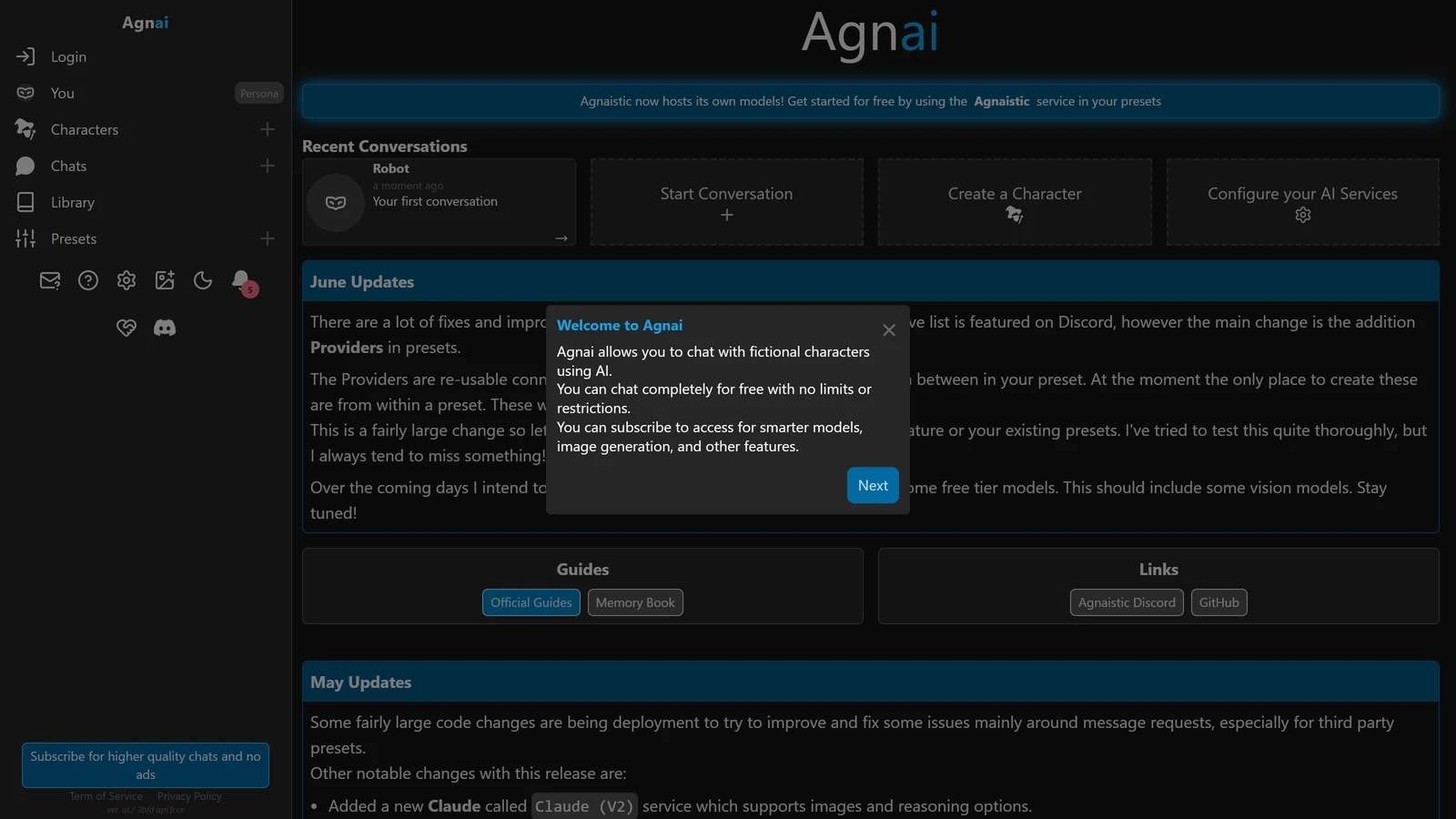
Agnai, officially Agnaistic, is a free, open-source site for chatting with AI characters, with one feature none of its closest alternatives have: several real people can share a chat with several bots. You can use it in a browser with no account, bring your own AI service, or host it yourself.
This is a how-to-start guide built from Agnai’s own site and documentation, read on 27 October 2026, and from its public code repository. We did not play it. Where its own guide is unfinished or unclear, we say so instead of filling the gap. For how it compares with the other front ends, see SillyTavern alternatives.
Agnai is an independent project. Arcanum is not affiliated with it.
The Short Answer
- What it is: a character chat site and open-source program. The website is agnai.chat, and the guides are at agnai.guide.
- What it costs: you can start free. We did not find prices for the paid tier on the pages we read.
- What makes it different: group conversations with more than one human user and more than one bot.
- What to check first: the code’s last commit was on 13 June 2026. The site is up, but ask whether it is still being worked on before you move a large collection into it.
- Your characters can leave: SillyTavern’s documentation says it converts Agnai memory books on import. See SillyTavern lorebooks.
What Agnai Is
The repository describes it as “AI Roleplay Chat with Personalized Characters using your favorite AI services”, and says it is based on early work from Galatea-UI by PygmalionAI. The official guide uses the words: “Agnaistic, or Agnai for short, is both an open-source project and a website.”
From the readme, its headline features are:
| Feature | What the readme says |
|---|---|
| Group conversations | Multiple users with multiple bots |
| Services | Kobold, Novel, AI Horde, Goose, OpenAI, Claude, Replicate, OpenRouter and Mancer |
| Character formats | W++, square bracket format, Boostyle and plain text |
| Accounts | Multi-user with per-user service settings and generation presets |
| Subscriptions | Listed as a feature |
| Characters | AI-assisted character generation |
| Images | Image generation through third-party services |
| Memory | Memory and lore books |
| Optional extras | Long-term memory, and embedding of Wikipedia articles and PDFs |
The site’s own home page adds that “Agnaistic now hosts its own models”, and invites you to “get started for free by using the Agnaistic service in your presets”. Its first-visit welcome box says you can “chat completely for free with no limits or restrictions”, and that you can subscribe “to access smarter models, image generation, and other features”. A button at the bottom of the menu says to subscribe “for higher quality chats and no ads”. We did not find a price for that subscription. The home page also lists a library for sharing characters and memory books, an official guide, a Discord server and the GitHub page.
The licence is AGPL-3.0. That is the same licence family as KoboldCpp, and it means the code is open and anyone can run their own copy.
Starting in Five Minutes
The official quick start, in its own order:
- Open agnai.chat. Logging in or creating an account is optional. The guide says an account lets your chats persist across devices and gives access to higher context and more powerful models.
- Talk to the Robot. Click the “Robot” chat on the home page, type in the “Send a message” box and wait. New chats use the Agnai model by default.
- Create a character. Click the ”+” by “Character” and enter a name. A description, tags, a scenario, persona information and an example chat are optional. Click “Create” at the bottom right.
- Create a chat. Use “New” at the top right or the ”+” by “Chats”, choose your character, name the conversation and click “create”.
- Add a memory. Covered in the next section.
- Add an instruction. Covered in the section after that.
If the character’s picture matters to you, the guide adds that image generation “uses the Kobold Horde by default and is slow”. You can upload an image instead.
Guest mode, and what it means for your characters
The readme says that without a database, the self-hosted program runs in “guest only” mode, with data saved in browser local storage. The guide for the hosted site is less specific: it says only that an account makes chats persist across devices.
So, until you have an account, treat your characters and chats as living in one browser on one device. If you clear that browser’s site data, they can go with it. That is our reading of the local-storage statement, not something the guide spells out.
Memory Books
A memory book is Agnai’s version of a lorebook. The guide says it adds context to a character dynamically, “so you don’t have to spend your whole context budget” on the scenario, persona and sample chat.
To make one: open the gear at the top right of the chat page, choose Memory, then “Create a new memory book”, then ”+ Entry”.
Each entry has:
| Field | What it does |
|---|---|
| Keywords | Comma-separated words that trigger the entry, for example “drink, thirst, hydrate, water” |
| Entry | The text that gets inserted when a keyword is found |
| Priority | Higher is more important. Entries are sorted by priority and added one at a time until the budget is full |
| Weight | After the budget is applied, entries are sorted by weight. A higher weight sits closer to the bottom of the memory prompt, which the guide says makes it more important to the reply |
Three more details from the guide are worth knowing.
- Wildcards.
*matches zero or more characters, sobook*matches “book”, “books” and “booking” but not “ebook”.?matches one character, so?bookmatches “ebook” but not “book”. A lone*keyword matches anything, if the memory settings allow it. - Memory depth. This is how many recent messages are scanned for keywords. The guide warns that values above 100 may not behave as expected, because the server sends at most 100 messages at first and more only load as you scroll up.
- Context limit. This is the share of your “Max Context Length” the memory prompt may use. Make it too large and the chat history shrinks.
The guide adds that there are no recommended settings yet, and asks users to share what works. That is honest, and it means the starting values are yours to find. A good rule is to keep entries short and put one idea in each, as in our lorebook guide for SillyTavern, which explains the same trade-off in more detail.
Embeds: Memory That Searches
Agnai has a second kind of memory, based on embeddings. The guide splits it in two.
User embeds let you attach a website or a file. The text is split by line breaks and each line becomes its own embedding, so the guide’s advice for a custom lorebook is to put each fact on its own line.
Chat embeds are built from your own chat. Messages loaded in the browser, including older ones you scroll up to load, are added, and relevant past messages are inserted as you talk. Chat embeds are kept in a local in-memory database, and the guide says that once the embed context limit is reached, they are no longer included.
Two catches the guide states plainly:
- Messages you have not loaded are not embedded. Scroll up to load them.
- User embeds need a placeholder. The guide says the default prompt template does not include
{{user_embed}}, so you must add it to your template or the embeds are not used. Its example is written for one model format, and it says another format needs changes.
If you are not sure what an embedding is, our memory guide for SillyTavern explains the idea.
The Prompt: Templates and the Jailbreak Slot
The quick start introduces what it calls a jailbreak, also written UJB for “user jailbreak”. Despite the name, the guide describes it as “a strong instruction for the bot”. In the default prompt template it is one of the last pieces of context, and the guide says context placed lower has more influence on the response.
That matches how other front ends work, and it is the reason people put their strongest style instruction near the end. A typical use is a short style line, such as “Write in third person, past tense, and never speak for the player”.
The chat settings page lists four tabs: General, Prompt, Memory and Advanced. Only the General tab is described in detail. The Prompt tab reads “Prompt definition and options” and nothing more. The “Max New Tokens” setting is explained: it reserves part of your context for the reply, and setting it higher “reduces the amount of context available for chat history, memory, etc.” Our token budget guide explains that trade.
The Guide’s Settings for Repetition
The official troubleshooting page on repetition gives a set of values:
| Setting | Value it suggests |
|---|---|
| Repetition penalty | 1.1 |
| Repetition range | 2048 |
| Repetition slope | 0.05 |
| Frequency penalty | 0.05 |
| Presence penalty | 0.1 |
| Top K | 50 |
| Temperature | 1.2 |
| Min P | 0.1 |
It then adds its own warnings. A temperature above 1 can cause problems, and if “sentence structure starts to fall apart or strange gibberish is produced”, the temperature is too high. It also says to be “gentle” with the repetition penalty, since it can hit too hard.
Treat this as a starting point written for the models of its time. The page is undated, and the right values depend on the model you connect. It also suggests non-numeric fixes: varying the prompt, using a randomized instruction in the jailbreak slot, or switching to another model for a few replies and then back. Our repetition loop guide explains why those work.
Running It Yourself
The readme gives three routes.
| Route | Steps |
|---|---|
| npm | npm install agnai -g, then agnai. Use agnai --pipeline for the pipeline features. Files are stored in a .agnai folder in your home directory |
| Docker | Run it with MongoDB using the included compose file, or run a single container without MongoDB and open it on port 3001 |
| Manual | Install Node.js, clone the repository, run npm run deps and npm run build:all, then npm run start |
MongoDB is optional. Without it you get guest-only mode. Pipeline features are the optional long-term memory and the embedding of Wikipedia articles and PDFs.
An optional settings.json at the root can change application-wide behavior, such as extra response end tokens. The readme says a restart is needed.
The guide’s page on running Agnai locally exists, but we did not read it in detail for this page. The configuration page for AI services, which is where you would learn to connect a service, said on 27 October 2026 that the project “haven’t yet provided detailed information about this topic”. It points to the Discord server. So connecting your own key is the part you will have to work out from the services’ own pages or by asking.
Is It Still Alive?
Two things are true at once.
- The site is up. agnai.chat loaded on 27 October 2026, with a home page that describes hosted models, a library and a guide.
- The code has been quiet. The public repository is not archived. The latest commit we could see was dated 13 June 2026, with a push two days later, and none since.
The home page announcements are not dated. They mention “June Updates” and “May Updates” without a year, and an earlier note about “Nov 9th”, so we cannot tell you when they were written. Do not read them as proof of recent activity.
What that means for a player:
- To try it, go ahead. It is free to start, and nothing here needs an account.
- To keep a large collection in it, export first. Check that you can take your characters and memory books out. SillyTavern’s documentation says it converts Agnai memory books on import, which is one exit.
- To rely on it for group play with friends, ask in its Discord whether the hosted site is being looked after. That is the only feature nothing else in our alternatives guide offers.
Agnai Compared With the Others
| Agnai | SillyTavern | |
|---|---|---|
| Where it runs | Website, or self-hosted | Your own computer or server |
| Several humans in one chat | A headline feature in its readme | Not what it is built for |
| Account needed | Optional | No |
| Extensions | None that we found in its guide | A large ecosystem, see extensions |
We compared these on what each project’s own pages say. We did not test them side by side. For the full comparison with its sources, read SillyTavern alternatives, and RisuAI vs SillyTavern for the other browser-based option.
For group play with several AI characters and one human, SillyTavern has its own feature: see SillyTavern group chats.
What We Could Not Check
- The price of the paid tier. We did not find it on the pages we read.
- Whether guest chats survive a browser clean-up. The readme implies they do not.
- How well it plays. We did not use it for a session.
- Why a given error appears. Search suggestions include “agnai not working” and “agnai network request failed”, but we found nothing in the official guide about them, so we do not guess.
Frequently Asked Questions
What is Agnai?
Agnai, short for Agnaistic, is an open-source website and program for chatting with AI characters. Its own guide calls it both an open-source project and a website. You can use it at agnai.chat in a browser, connect your own AI service, or install it on your own computer.
Is Agnai free?
Yes to start. The site’s welcome box says you can chat completely for free with no limits or restrictions, and that you can subscribe for smarter models, image generation and other features. Its guide says that logging in is optional. We did not find a price list on the pages we read, so we cannot state what the paid tier costs.
Do I need an account to use Agnai?
No. The quick start guide says that logging in or creating an account is optional. An account lets your chats persist across devices. Without one, the project’s readme says data is saved in your browser’s local storage and is not shared across devices or browsers.
What is the difference between Agnai and SillyTavern?
Agnai runs on a website and takes a few minutes to start, and it is built for several human users and several bots in one chat. SillyTavern is a program you install and run yourself, with far more settings and a large extension ecosystem. Agnai’s readme also lists a different, smaller set of connected services.
How do memory books work in Agnai?
A memory book is a list of entries. Each entry has keywords and some text. When a keyword appears in the recent chat, the entry’s text is added to the prompt. Priority decides which entries are kept when the budget is full, and weight decides where the kept entries sit.
Is Agnai still being developed?
The code is on GitHub under the AGPL-3.0 licence and is not archived. The most recent commit we could see on 27 October 2026 was dated 13 June 2026. The website was still online and its home page showed updates, but those notes carry no year.
The description, features, services, self-hosting steps and guest-only mode are from Agnai’s readme on GitHub. The licence, the date of the latest commit and the archived status are from the public GitHub repository. The home page notes, the library and the guide links are from agnai.chat. The quick start, memory books, embeds, chat settings, repetition advice and the unfinished AI-service page are from the official guide at agnai.guide. All were read on 27 October 2026. The statement that SillyTavern converts Agnai memory books is from our own SillyTavern lorebook guide. We did not play Agnai, did not run it ourselves, and did not test any of the settings above.
Agnai, Agnaistic, SillyTavern and RisuAI are separate projects. Arcanum is not affiliated with any of them. Product names and trademarks are the property of their respective owners.